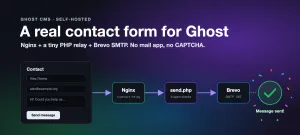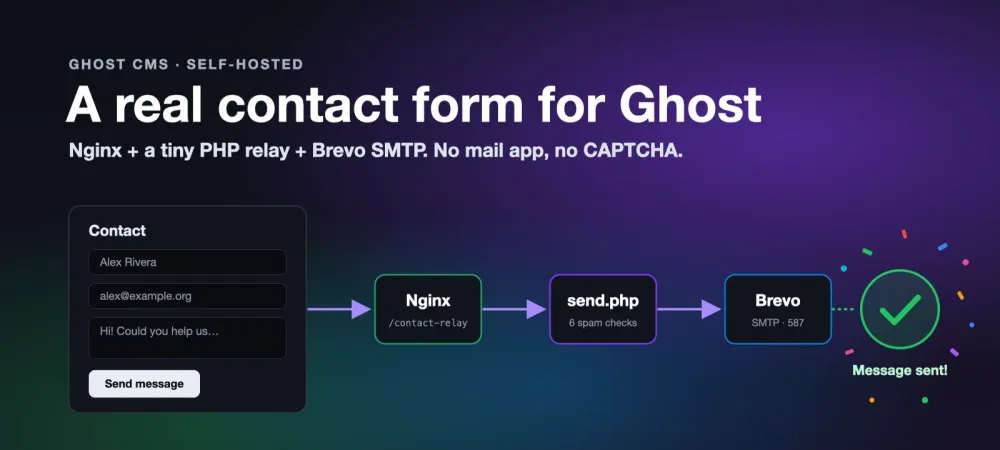
Ghost is a great publishing platform, but it has no contact form. There's no form handler, and a Ghost theme can't run server-side code, so a theme can't send an email on its own. Most guides stop at "use a third-party form service" or "link to your email address". We wanted neither, so for ty1er.com's contact page we built a small relay that sends the form through Brevo, keeps our address out of the page, and shrugs off spam bots.
This post is the full, step-by-step version of that build, so you can add the same thing to your own self-hosted Ghost site. The code is what runs this site's contact form on Ghost 6, generalised so it drops into any server: our details are swapped for example.com, and the paths use a standard Ubuntu layout.
Why Ghost has no contact form
Ghost only sends two kinds of email: newsletters, and member sign-in links. Neither can be triggered by a visitor filling in a form. Themes are Handlebars templates that Ghost renders, with no hook for running your own code when someone submits something. So your options are:
- A
mailto:link. Simple, but it opens the visitor's mail app (many people don't have one set up), you can lose the message, and your address sits in the page for scrapers to harvest. We started here and quickly moved on. - A hosted form service (Formspree, Tally, Google Forms and the like). This is the only option on Ghost(Pro), and it works fine. The costs are another account, message limits on free plans, and your visitors' data passing through a third party.
- Your own tiny endpoint on the server that already runs Ghost. That's this guide. It's about 250 lines of PHP, and you control everything: where mail goes, how spam is handled, and what gets logged.
How the pieces fit together
/contact-relay, to PHP. Everything else still goes to Ghost.- Nginx already sits in front of Ghost. We add one exact-match route,
location = /contact-relay, that goes to PHP-FPM instead of Ghost. send.phpis the relay.GEThands out a signed start token.POSTruns the spam checks, builds the email, and sends it through Brevo over SMTP with STARTTLS./etc/contact-relay.envholds the secrets: the Brevo SMTP key, your inbox address, and a signing secret. It lives outside the theme and outside the web root, so nothing secret ships with your theme.- A custom Ghost template (
custom-contact.hbs) renders the form and a few lines of JavaScript that talk to the relay.
Before you start
- Self-hosted Ghost behind Nginx, with root or sudo SSH access. (On Ghost(Pro) you can't add server code, so use a hosted form service instead.)
- PHP-FPM 8.x on the same server. Check with
ls /run/php/orls /tmp/*.sock. Control panels like aaPanel often have it installed already. On plain Ubuntu, runapt install php8.3-fpm. - A free Brevo account. Its free plan covers far more contact-form mail than a personal site sends.
- DNS access for your domain, so Brevo can authenticate it.
Read and verify the files before you use them
These files end up running on your server, and contact-report is installed as a root command. Don't take any script from the internet on trust, ours included. Download them into one folder, check they match what we published, and read them before installing anything. They're short, and nothing in them should surprise you.
mkdir -p ~/ghost-contact-form && cd ~/ghost-contact-form
for f in send.php custom-contact.hbs contact-relay.env.example contact-report SHA256SUMS; do
  curl -fsSLO https://www.ty1er.com/content/files/2026/09/ghost-contact-form/$f
done
sha256sum -c SHA256SUMS      # every line should end in: OK
less send.php contact-report # read them before installing
If any line says FAILED, the file isn't the one we published, so don't use it. These are the expected SHA-256 hashes:
| File | SHA-256 |
|---|---|
send.php | 78828e7c5f5f071499955376ecbecb50861371ae8823c4ac164b8c7162a5fc66 |
custom-contact.hbs | 3cd8d595670e77e4bece2b493fae13abdc59636a52e8150a2de82fecc205a336 |
contact-relay.env.example | 220d4950733354850adf670e85054000a65275f646ae3a786fd635c9c5d2a369 |
contact-report | de57fa13e597c5f1303d7d9e32f1cbc08ffd520e7a73d0af2688da76bd880203 |
The steps below install from this verified folder. If you later edit a file, for example to change its paths, its hash will change. That's expected.
Step 1: Set up Brevo
- In Brevo, go to Senders, Domains & Dedicated IPs → Domains and add your domain. Brevo shows you a few DNS records (a Brevo code, DKIM and DMARC). Add them at your DNS host and wait for Brevo to show the domain as authenticated.
- Pick the address the form will send from, on that domain, for example
contactform@example.com. It doesn't need a real mailbox. It only has to be on the authenticated domain. - Go to SMTP & API → SMTP and generate an SMTP key. Copy the key and the login shown on that page.
The gotcha that cost us an evening: the SMTP login is the generated address that looks like 8a1b2c001@smtp-brevo.com, not the email you signed up to Brevo with. Using your account email gets you 535 Authentication failed. The key must also be an SMTP key, not a v3 API key.
If your Ghost install already sends newsletters or sign-in emails through Brevo, you can reuse that same SMTP login and key. A separate key just lets you revoke the contact form on its own later.
Step 2: Install the relay script
Put send.php in its own folder, owned by root and readable by the PHP-FPM user. That's www-data on Ubuntu and www on aaPanel. Check yours with ps -eo user,args | grep "php-fpm: pool".
mkdir -p /var/www/contact-relay
install -o root -g www-data -m 644 ~/ghost-contact-form/send.php /var/www/contact-relay/send.php
php -l /var/www/contact-relay/send.php
What it does, top to bottom:
- Loads
/etc/contact-relay.env. It refuses to run (503 not_configured) while any required value is missing or still saysCHANGE_ME. GETreturns{"t": <unix time>, "sig": <HMAC-SHA256 of t>}. The form fetches this when the page loads.POSTruns six checks in order, then sends. See step 6.- Sends with a minimal built-in SMTP client (EHLO, STARTTLS, AUTH LOGIN, DATA), so there's no Composer or PHPMailer to install. Every header value is stripped of line breaks, which blocks header injection.
Reply-Tois the visitor, so hitting Reply answers them. - Never loses a message. If Brevo rejects a send, the whole email is saved as an
.emlfile in a spool folder, and the visitor still sees success. - Logs every POST, real or bot, as one JSON line per submission, for the report in step 7.
View the full send.php
<?php
/**
 * contact-relay — sends a Ghost contact form through Brevo SMTP.
 * From "How to Add a Real Contact Form to Ghost CMS" on ty1er.com.
 *
 * Served by PHP-FPM at the exact path /contact-relay (an nginx location).
 *   GET  → {"t": <unix time>, "sig": <hmac>}   start token, fetched on page load
 *   POST → {"ok": true} | {"ok": false, "error": "<code>"}
 *
 * Credentials, sender and the destination inbox live only in
 * /etc/contact-relay.env on the server (never in your theme, never in page HTML).
 */

declare(strict_types=1);

const ENV_FILE      = '/etc/contact-relay.env';
const MIN_FILL_SECS = 5;        // faster than this is a bot
const MAX_TOKEN_AGE = 7200;     // start token valid for 2 hours
const RATE_MAX      = 5;        // messages per IP…
const RATE_WINDOW   = 3600;     // …per hour
const LOG_FILE      = '/var/log/contact-relay.log';
const SPOOL_DIR     = '/var/log/contact-relay-spool';   // unsent messages, php-user-only 700
const SUBMIT_DIR    = '/var/log/contact-relay-submissions'; // every POST, one JSONL file per month, php-user-only 700

header('Content-Type: application/json; charset=utf-8');
header('Cache-Control: no-store');
header('X-Content-Type-Options: nosniff');

function reply(int $code, array $body): void {
    http_response_code($code);
    echo json_encode($body);
    exit;
}

/**
 * Record every POST (real or bot) as one JSON line in SUBMIT_DIR/YYYY-MM.jsonl,
 * with the outcome and what was submitted, then reply. Read it with
 * `contact-report` (see README). Contains visitor data: server-only, 600.
 */
function finish(string $outcome, int $code, array $body, array $extra = []): void {
    $f   = fn(string $k, int $max): string => is_string($_POST[$k] ?? null) ? mb_substr(trim($_POST[$k]), 0, $max) : '';
    $row = [
        'time'     => gmdate('c'),
        'outcome'  => $outcome,
        'ip'       => $_SERVER['REMOTE_ADDR'] ?? '',
        'ua'       => mb_substr($_SERVER['HTTP_USER_AGENT'] ?? '', 0, 300),
        'origin'   => $_SERVER['HTTP_ORIGIN'] ?? '',
        'name'     => $f('name', 200),
        'email'    => $f('email', 200),
        'reason'   => $f('reason', 80),
        'company'  => $f('company', 200),
        'message'  => $f('message', 5000),
        'honeypot' => $f('website', 200),
    ] + $extra;
    if (is_dir(SUBMIT_DIR) || @mkdir(SUBMIT_DIR, 0700, true)) {
        $file = SUBMIT_DIR . '/' . gmdate('Y-m') . '.jsonl';
        $new  = !file_exists($file);
        @file_put_contents($file, json_encode($row, JSON_UNESCAPED_UNICODE | JSON_UNESCAPED_SLASHES) . "\n", FILE_APPEND | LOCK_EX);
        if ($new) @chmod($file, 0600);
    }
    reply($code, $body);
}

function logline(string $msg): void {
    @file_put_contents(LOG_FILE, gmdate('c') . ' ' . $msg . "\n", FILE_APPEND | LOCK_EX);
}

function load_config(): ?array {
    // KEY=VALUE lines; blank lines and # comments ignored (parse_ini_file
    // would choke on # comments in PHP 7+).
    $lines = @file(ENV_FILE, FILE_IGNORE_NEW_LINES | FILE_SKIP_EMPTY_LINES);
    if ($lines === false) return null;
    $cfg = [];
    foreach ($lines as $line) {
        $line = trim($line);
        if ($line === '' || $line[0] === '#' || !str_contains($line, '=')) continue;
        [$k, $v] = explode('=', $line, 2);
        $cfg[trim($k)] = trim($v);
    }
    foreach (['SITE_URL', 'SITE_ORIGINS', 'SMTP_HOST', 'SMTP_PORT', 'SMTP_USER', 'SMTP_PASS', 'MAIL_FROM', 'MAIL_TO', 'FORM_SECRET'] as $k) {
        if (empty($cfg[$k]) || str_starts_with((string) $cfg[$k], 'CHANGE_ME')) return null;
    }
    return $cfg;
}

// Strip CR/LF and control chars from anything that lands in a mail header.
function hdr(string $s, int $max = 200): string {
    return mb_substr(trim(preg_replace('/[\x00-\x1F\x7F]+/u', ' ', $s) ?? ''), 0, $max);
}

// RFC 2047 encode a header value if it isn't plain ASCII.
function enc(string $s): string {
    return preg_match('/[^\x20-\x7E]/', $s) ? '=?UTF-8?B?' . base64_encode($s) . '?=' : $s;
}

function rate_limited(string $ip): bool {
    $file = sys_get_temp_dir() . '/contact-relay-' . hash('sha256', $ip);
    $now  = time();
    $hits = array_filter(
        array_map('intval', @file($file, FILE_IGNORE_NEW_LINES) ?: []),
        fn($t) => $t > $now - RATE_WINDOW
    );
    if (count($hits) >= RATE_MAX) return true;
    $hits[] = $now;
    @file_put_contents($file, implode("\n", $hits), LOCK_EX);
    return false;
}

/** Minimal SMTP client: EHLO → STARTTLS → AUTH LOGIN → one message. */
function smtp_send(array $cfg, string $to, string $data): void {
    $sock = @stream_socket_client('tcp://' . $cfg['SMTP_HOST'] . ':' . (int) $cfg['SMTP_PORT'], $errno, $errstr, 15);
    if (!$sock) throw new RuntimeException("connect failed: $errstr");
    stream_set_timeout($sock, 15);

    $read = function () use ($sock): string {
        $resp = '';
        while (($line = fgets($sock, 1024)) !== false) {
            $resp .= $line;
            if (strlen($line) < 4 || $line[3] === ' ') break;
        }
        return $resp;
    };
    $cmd = function (string $line, int $expect) use ($sock, $read): void {
        if ($line !== '') fwrite($sock, $line . "\r\n");
        $resp = $read();
        if ((int) substr($resp, 0, 3) !== $expect) {
            // Never log AUTH payloads.
            $shown = str_starts_with($line, 'AUTH') || $line === '' || !ctype_print($line) ? '[redacted]' : $line;
            throw new RuntimeException("SMTP $shown → " . trim($resp));
        }
    };

    $host = parse_url($cfg['SITE_URL'] ?? 'https://localhost', PHP_URL_HOST) ?: 'localhost';
    $cmd('', 220);
    $cmd("EHLO $host", 250);
    $cmd('STARTTLS', 220);
    if (!stream_socket_enable_crypto($sock, true, STREAM_CRYPTO_METHOD_TLSv1_2_CLIENT | STREAM_CRYPTO_METHOD_TLSv1_3_CLIENT)) {
        throw new RuntimeException('STARTTLS negotiation failed');
    }
    $cmd("EHLO $host", 250);
    $cmd('AUTH LOGIN', 334);
    fwrite($sock, base64_encode($cfg['SMTP_USER']) . "\r\n"); $r = $read();
    if ((int) substr($r, 0, 3) !== 334) throw new RuntimeException('SMTP AUTH user rejected → ' . trim($r));
    fwrite($sock, base64_encode($cfg['SMTP_PASS']) . "\r\n"); $r = $read();
    if ((int) substr($r, 0, 3) !== 235) throw new RuntimeException('SMTP AUTH rejected → ' . trim($r));
    $cmd('MAIL FROM:<' . $cfg['MAIL_FROM'] . '>', 250);
    $cmd("RCPT TO:<$to>", 250);
    $cmd('DATA', 354);
    // Dot-stuff lines that start with "." and terminate.
    fwrite($sock, preg_replace('/^\./m', '..', $data) . "\r\n.\r\n");
    $cmd('', 250);
    fwrite($sock, "QUIT\r\n");
    fclose($sock);
}

// ── Request handling ─────────────────────────────────────────────────────

$cfg = load_config();
if ($cfg === null) reply(503, ['ok' => false, 'error' => 'not_configured']);

$method = $_SERVER['REQUEST_METHOD'] ?? 'GET';

if ($method === 'GET') {
    $t = time();
    reply(200, ['t' => $t, 'sig' => hash_hmac('sha256', (string) $t, $cfg['FORM_SECRET'])]);
}

if ($method !== 'POST') {
    header('Allow: GET, POST');
    reply(405, ['ok' => false, 'error' => 'method']);
}

// Same-site only: browsers always send Origin on a cross-site POST.
$origin = $_SERVER['HTTP_ORIGIN'] ?? '';
$allowed = array_map('trim', explode(',', $cfg['SITE_ORIGINS'] ?? ''));
if ($origin !== '' && !in_array($origin, $allowed, true)) {
    logline('bad-origin ip=' . ($_SERVER['REMOTE_ADDR'] ?? '') . ' origin=' . hdr($origin));
    finish('bad-origin', 403, ['ok' => false, 'error' => 'origin']);
}

$ip = $_SERVER['REMOTE_ADDR'] ?? 'unknown';
$in = fn(string $k): string => is_string($_POST[$k] ?? null) ? trim($_POST[$k]) : '';

// Honeypot: pretend success so bots don't learn anything.
if ($in('website') !== '') { logline("honeypot ip=$ip"); finish('honeypot', 200, ['ok' => true]); }

// Signed start token: proves the form was loaded here, and not too fast.
$t   = (int) $in('started_at');
$sig = $in('started_sig');
$age = time() - $t;
if (!hash_equals(hash_hmac('sha256', (string) $t, $cfg['FORM_SECRET']), $sig) || $age > MAX_TOKEN_AGE) {
    $bad = hash_equals(hash_hmac('sha256', (string) $t, $cfg['FORM_SECRET']), $sig) ? 'expired-token' : 'bad-token';
    logline("$bad ip=$ip");
    finish($bad, 400, ['ok' => false, 'error' => 'expired']);
}
if ($age < MIN_FILL_SECS) { logline("too-fast ip=$ip age=$age"); finish('too-fast', 200, ['ok' => true], ['fill_secs' => $age]); }

$name    = hdr($in('name'), 120);
$email   = hdr($in('email'), 200);
$reason  = hdr($in('reason'), 60) ?: 'General inquiry';
$company = hdr($in('company'), 200);
$message = mb_substr(str_replace("\r\n", "\n", $in('message')), 0, 5000);

if ($name === '' || $message === '' || !filter_var($email, FILTER_VALIDATE_EMAIL)) {
    finish('invalid', 400, ['ok' => false, 'error' => 'invalid'], ['fill_secs' => $age]);
}
$reasons = ['General inquiry', 'Project or consulting inquiry', 'Partnership', 'Something else'];
if (!in_array($reason, $reasons, true)) $reason = 'Something else';

if (rate_limited($ip)) { logline("rate-limited ip=$ip"); finish('rate-limited', 429, ['ok' => false, 'error' => 'rate'], ['fill_secs' => $age]); }

$site     = parse_url($cfg['SITE_URL'] ?? '', PHP_URL_HOST) ?: 'website';
$fromName = hdr($cfg['MAIL_FROM_NAME'] ?? "$site contact form", 80);
$subject  = "[$site] $reason — $name";
$body = "Name: $name\nEmail: $email\nReason: $reason\n"
      . ($company !== '' ? "Company/Website: $company\n" : '')
      . "\nMessage:\n$message\n\n--\nSent from " . ($cfg['SITE_URL'] ?? '') . "/contact/ (IP $ip)\n";

$data = implode("\r\n", [
    'Date: ' . date(DATE_RFC2822),
    'From: ' . enc($fromName) . ' <' . $cfg['MAIL_FROM'] . '>',
    'To: <' . $cfg['MAIL_TO'] . '>',
    'Reply-To: ' . enc($name) . " <$email>",
    'Subject: ' . enc($subject),
    'Message-ID: <' . bin2hex(random_bytes(12)) . '@' . $site . '>',
    'MIME-Version: 1.0',
    'Content-Type: text/plain; charset=UTF-8',
    'Content-Transfer-Encoding: base64',
    '',
    rtrim(chunk_split(base64_encode($body), 76, "\r\n")),
]);

try {
    smtp_send($cfg, $cfg['MAIL_TO'], $data);
    logline("sent ip=$ip reason=\"$reason\"");
    finish('sent', 200, ['ok' => true], ['fill_secs' => $age]);
} catch (Throwable $e) {
    logline('error ip=' . $ip . ' ' . $e->getMessage());
    // Don't lose the message: keep the full .eml so it can be read or re-sent.
    $file = SPOOL_DIR . '/' . gmdate('Ymd-His') . '-' . bin2hex(random_bytes(4)) . '.eml';
    if ((is_dir(SPOOL_DIR) || @mkdir(SPOOL_DIR, 0700, true)) && @file_put_contents($file, $data, LOCK_EX) !== false) {
        @chmod($file, 0600);
        logline('spooled ' . basename($file));
        finish('spooled', 200, ['ok' => true, 'queued' => true], ['fill_secs' => $age, 'error' => $e->getMessage()]);
    }
    finish('send-failed', 502, ['ok' => false, 'error' => 'send_failed'], ['fill_secs' => $age, 'error' => $e->getMessage()]);
}
Step 3: Create the config file
The config lives in /etc, readable only by root and the PHP user. It never goes in your theme or a git repo.
install -o root -g www-data -m 640 ~/ghost-contact-form/contact-relay.env.example /etc/contact-relay.env
sed -i "s/^FORM_SECRET=.*/FORM_SECRET=$(openssl rand -hex 32)/" /etc/contact-relay.env
nano /etc/contact-relay.env
Fill in each CHANGE_ME:
SITE_URL=https://www.example.com
SITE_ORIGINS=https://www.example.com,https://example.com
SMTP_HOST=smtp-relay.brevo.com
SMTP_PORT=587
SMTP_USER=8a1b2c001@smtp-brevo.com      # the generated login, not your account email
SMTP_PASS=xsmtpsib-…                     # the SMTP key
MAIL_FROM=contactform@example.com       # on your Brevo-authenticated domain
MAIL_FROM_NAME=Example.com contact form
MAIL_TO=you@example.com                 # where messages arrive; only ever lives here
FORM_SECRET=…                           # already generated by the sed line above
Don't paste the key into a chat, a ticket, or a shell history you share. If the SMTP values are already in Ghost's config.production.json, you can copy them over on the server without ever displaying them. We did exactly that with a short Python one-liner that reads the mail block and rewrites only the matching lines of the env file.
Step 4: Add the Nginx route
Open the Nginx server block for your Ghost site, the one that has listen 443 ssl and proxy_pass http://127.0.0.1:2368. Add this above the location / block:
# Contact form relay: this one path goes to PHP, everything else to Ghost.
location = /contact-relay {
    client_max_body_size 32k;
    include fastcgi_params;
    fastcgi_param SCRIPT_FILENAME /var/www/contact-relay/send.php;
    fastcgi_pass unix:/run/php/php8.3-fpm.sock;   # your PHP-FPM socket
}
Test and reload, and read the output. A failed test means the reload never happened:
nginx -t && systemctl reload nginxThen check from anywhere:
curl -s https://www.example.com/contact-relayYou want JSON: {"t":1790445890,"sig":"…"}. If you get {"ok":false,"error":"not_configured"}, the route works but the env file still has a CHANGE_ME in it.
If you get a redirect or an HTML page instead, Ghost is still answering that path, so Nginx isn't using your route. Look for x-powered-by: Express in curl -sI, which means Ghost answered. It happened to us several times: the edit went into a backup copy of the config, into the port-80 block, or into a file the control panel later regenerated. This command shows the config Nginx actually loaded:
nginx -T 2>/dev/null | grep -n "listen 443\|contact-relay"Step 5: Add the contact page template
Copy custom-contact.hbs from ~/ghost-contact-form into the root of your theme folder, next to page.hbs. Then zip and upload the theme in Settings → Design → Change theme, or copy the file over if you deploy themes by SSH (restart Ghost afterwards). In Ghost Admin, create a page called “Contact”. In its settings panel, pick Contact under Template, and publish it.
The template is intentionally plain, so it drops into any theme. Its short inline <style> block is easy to replace with your theme's own styles. The parts that matter:
- The honeypot: a text field named
website, positioned off-screen and hidden from screen readers. People never fill it. Bots fill every field they find. - The token fetch: on page load,
fetch('/contact-relay')gets the signed start time. The form sends it back with the message. - The success panel: after
{"ok": true}, the form hides and a “Message sent!” panel takes its place, with the visitor's first name. - The reason dropdown must match the
$reasonslist insend.php. Anything else is recorded as “Something else”.
// The heart of the form script: token on load, token back on submit.
function fetchToken() {
    return fetch('/contact-relay', { credentials: 'same-origin', cache: 'no-store' })
        .then(function (r) { return r.ok ? r.json() : null; })
        .then(function (j) { token = (j && j.sig) ? j : null; return token; });
}

function send(tok) {
    var data = new URLSearchParams(new FormData(form));
    data.set('started_at', tok.t);
    data.set('started_sig', tok.sig);
    return fetch('/contact-relay', { method: 'POST', credentials: 'same-origin', body: data })
        .then(function (r) { return r.json(); });
}
View the full custom-contact.hbs
{{!< default}}
{{!--
  custom-contact.hbs — a contact page for any Ghost theme.
  From "How to Add a Real Contact Form to Ghost CMS" on ty1er.com.

  1. Save this file in your theme's root folder, upload the theme.
  2. In Ghost Admin, create a page and pick "Contact" under Template.
  3. The form posts to /contact-relay (send.php behind nginx).

  The <option> values below must match the $reasons list in send.php.
--}}

{{#post}}
<article class="contact-page">
    <header class="contact-header">
        <h1>{{title}}</h1>
        {{#if custom_excerpt}}<p>{{custom_excerpt}}</p>{{/if}}
    </header>

    {{content}}

    <div class="contact-card">
        <div class="contact-success" id="contact-success" role="status" aria-live="polite" tabindex="-1" hidden>
            <svg class="contact-success-check" viewBox="0 0 52 52" aria-hidden="true">
                <circle cx="26" cy="26" r="24" fill="none" stroke="currentColor" stroke-width="2.5"/>
                <path d="M15 27.5l7.5 7.5L38 19" fill="none" stroke="currentColor" stroke-width="4" stroke-linecap="round" stroke-linejoin="round"/>
            </svg>
            <h2>Message sent!</h2>
            <p>Thanks<span id="contact-success-name"></span>. Your message is on its way, and I'll get back to you soon.</p>
            <button type="button" id="contact-again">Send another message</button>
        </div>

        <form class="contact-form" id="contact-form" novalidate>
            <label for="cf-name">Name *</label>
            <input id="cf-name" name="name" type="text" autocomplete="name" required>

            <label for="cf-email">Email *</label>
            <input id="cf-email" name="email" type="email" autocomplete="email" required>

            <label for="cf-reason">Reason</label>
            <select id="cf-reason" name="reason">
                <option>General inquiry</option>
                <option>Project or consulting inquiry</option>
                <option>Partnership</option>
                <option>Something else</option>
            </select>

            <label for="cf-company">Company or website (optional)</label>
            <input id="cf-company" name="company" type="text">

            <label for="cf-message">Message *</label>
            <textarea id="cf-message" name="message" rows="6" required></textarea>

            {{!-- Honeypot: people never see or fill this; bots fill everything. --}}
            <div class="contact-hp" aria-hidden="true">
                <label for="cf-website">Leave this field empty</label>
                <input id="cf-website" name="website" type="text" tabindex="-1" autocomplete="off">
            </div>

            <button class="contact-submit" type="submit">Send message</button>
            <p class="contact-status" id="contact-status" role="status" aria-live="polite" hidden></p>
        </form>
    </div>
</article>
{{/post}}

<style>
    .contact-page { max-width: 680px; margin: 0 auto; padding: 48px 20px 80px; }
    .contact-form { display: grid; gap: 8px; }
    .contact-form input, .contact-form select, .contact-form textarea { width: 100%; box-sizing: border-box; padding: 11px 13px; font: inherit; border: 1px solid #ccd; border-radius: 8px; margin-bottom: 10px; }
    .contact-hp { position: absolute; left: -9999px; width: 1px; height: 1px; overflow: hidden; }
    .contact-submit { justify-self: start; padding: 12px 24px; font: inherit; font-weight: 600; border: 0; border-radius: 8px; background: #111; color: #fff; cursor: pointer; }
    .contact-submit[disabled] { opacity: .6; cursor: wait; }
    .contact-status { margin: 8px 0 0; }
    .contact-status.is-err { color: #c62828; }
    .contact-success { text-align: center; padding: 32px 20px; border: 1.5px solid #16a34a; border-radius: 14px; background: #f0fdf4; color: #14532d; }
    .contact-success[hidden] { display: none; }
    .contact-success-check { width: 72px; height: 72px; color: #16a34a; }
    .contact-success button { padding: 10px 18px; font: inherit; border: 1px solid #16a34a; border-radius: 8px; background: transparent; cursor: pointer; }
</style>

<script>
(function () {
    var RELAY   = '/contact-relay';
    var form    = document.getElementById('contact-form');
    if (!form) return;
    var status  = document.getElementById('contact-status');
    var button  = form.querySelector('.contact-submit');
    var success = document.getElementById('contact-success');
    var token   = null;   // { t, sig }: the relay's signed "page loaded at" time

    function show(msg, ok) {
        status.hidden = false;
        status.textContent = msg;
        status.className = 'contact-status ' + (ok ? 'is-ok' : 'is-err');
    }

    // Ask the relay for a signed start time as soon as the page loads.
    function fetchToken() {
        return fetch(RELAY, { credentials: 'same-origin', cache: 'no-store' })
            .then(function (r) { return r.ok ? r.json() : null; })
            .then(function (j) { token = (j && j.sig) ? j : null; return token; })
            .catch(function () { token = null; return null; });
    }
    fetchToken();

    var ERRORS = {
        invalid:     'Please check your name, email, and message and try again.',
        expired:     'This form has been open a while. Please send it again.',
        rate:        'Too many messages from this connection. Please try again later.',
        unavailable: 'The form can’t be reached right now. Your message is still here, so please try again in a few minutes.'
    };

    function showSuccess(name) {
        document.getElementById('contact-success-name').textContent = name ? ', ' + name.split(/\s+/)[0] : '';
        status.hidden = true;
        form.hidden = true;
        success.hidden = false;
        success.scrollIntoView({ behavior: 'smooth', block: 'center' });
        success.focus({ preventScroll: true });
    }
    document.getElementById('contact-again').addEventListener('click', function () {
        success.hidden = true;
        form.hidden = false;
        form.reset();
        document.getElementById('cf-name').focus();
    });

    function send(tok) {
        var data = new URLSearchParams(new FormData(form));
        data.set('started_at', tok.t);
        data.set('started_sig', tok.sig);
        return fetch(RELAY, { method: 'POST', credentials: 'same-origin', body: data })
            .then(function (r) { return r.json().catch(function () { return {}; }); });
    }

    function handle(res, retried, name) {
        if (res.ok) { showSuccess(name); return; }
        if (res.error === 'expired' && !retried) {        // stale tab: new token, one retry
            return fetchToken().then(function (t) {
                return t ? send(t).then(function (r2) { return handle(r2, true, name); }) : show(ERRORS.unavailable, false);
            });
        }
        show(ERRORS[res.error] || ERRORS.unavailable, false);
    }

    form.addEventListener('submit', function (e) {
        e.preventDefault();
        if (form.website.value) { showSuccess(''); return; }   // honeypot: act normal, send nothing

        var name    = form.name.value.trim();
        var email   = form.email.value.trim();
        var message = form.message.value.trim();
        if (!name || !email || !message) { show('Please fill in your name, email, and a message.', false); return; }
        if (!/^[^@\s]+@[^@\s]+\.[^@\s]+$/.test(email)) { show('That email address doesn’t look right. Please check it.', false); return; }

        button.disabled = true;
        show('Sending…', true);
        (token ? Promise.resolve(token) : fetchToken())
            .then(function (tok) { return tok ? send(tok).then(function (res) { return handle(res, false, name); }) : show(ERRORS.unavailable, false); })
            .catch(function () { show(ERRORS.unavailable, false); })
            .then(function () { button.disabled = false; fetchToken(); });
    });
})();
</script>
On ty1er.com we added one extra flourish: a short confetti burst on success, drawn on a temporary <canvas> that removes itself after three seconds. It's about 40 lines with no library. Skip it for anyone whose system has prefers-reduced-motion turned on.
Step 6: Understand the spam defences
- Origin. Browsers always send an
Originheader on a cross-site POST, so the relay refuses any that isn't inSITE_ORIGINS. This stops other websites from using your form as a mail cannon. - Honeypot. If the hidden
websitefield has anything in it, the relay replies “ok” and sends nothing. - Signed token.
started_sigmust be the HMAC ofstarted_atunder yourFORM_SECRET. Bots that POST straight to the endpoint without loading the page can't produce one, and they're logged asbad-token. Genuine tokens expire after two hours, and the page quietly fetches a fresh one and retries once. - Five-second timer. The signed start time also proves how long the form was open. Anything submitted within five seconds of page load is a bot. It gets a fake success and is logged as
too-fast. A person can't fill in a name, an email and a message that quickly, and five seconds is still short enough that nobody real waits on it. - Fields. A name, a message and a valid email are required. Every value is length-capped and stripped of control characters before it touches an email header.
- Rate limit. Five messages per IP per hour, tracked in a tiny file per (hashed) IP.
There's no CAPTCHA, because none of this ever asks a real visitor to do anything.
Step 7: See what's coming in
Every POST is appended to /var/log/contact-relay-submissions/YYYY-MM.jsonl (the path is a constant at the top of send.php). Each line records the outcome, time, IP, user agent, how many seconds the form took, and what was typed. It's a record of real messages, a backup if an email ever goes missing, and a clear view of what the bots are up to. Create the folders once:
install -d -o www-data -g www-data -m 700 /var/log/contact-relay-submissions /var/log/contact-relay-spool
touch /var/log/contact-relay.log && chown www-data:www-data /var/log/contact-relay.log
Change the LOG_FILE, SPOOL_DIR and SUBMIT_DIR constants in send.php (and SUBMIT_DIR in contact-report) if you use different paths. The log holds visitors' names and emails, so keep it at 700/600 and never inside a web root.
Then install the report command:
install -o root -g root -m 700 ~/ghost-contact-form/contact-report /usr/local/bin/contact-report

contact-report                  # last 7 days
contact-report 30 --all         # 30 days, including every blocked bot post
contact-report --csv 30 > contact.csv
Here's what it printed after we sent three fake bots at our own form (IP shortened):
Contact form: last 1 day(s)  (2026-09-25 → 2026-09-26 UTC)
────────────────────────────────────────────────────────────────────────
Total posts: 3   Real messages: 0   Blocked as bots/invalid: 3

  too-fast           1
  bad-token          1
  honeypot           1

Per day (real / blocked):
  2026-09-26     0 / 3   ▇▇▇

All posts (newest first):
────────────────────────────────────────────────────────────────────────
2026-09-26 18:37:30Z  honeypot        -  [203.0.113.7]
  Honeypot Bot <bot@example.com>  · -
  "filled every field"
  honeypot: "http://spam.example"

2026-09-26 18:37:30Z  bad-token       -  [203.0.113.7]
  Forged Token <bot@example.com>  · -
  "no token here"

2026-09-26 18:37:30Z  too-fast        1s  [203.0.113.7]
  Instant Bot <bot@example.com>  · -
  "Buy cheap SEO now"
Step 8: Test it
- Endpoint:
curl -s https://www.example.com/contact-relayreturns a token. - A real send: open
/contact/, wait at least five seconds, fill it in, and send. The success panel appears andtail /var/log/contact-relay.logshowssent. Check the inbox, and the spam folder the first time. - Reply: hit Reply on the email. It should be addressed to whatever email you typed in the form.
- A bot: send a POST with no token and check that the log records
bad-token:curl -s -X POST -H "Origin: https://www.example.com" \ -d name=Bot -d email=bot@example.com -d message=spam \ https://www.example.com/contact-relay
Troubleshooting
| What you see | What it means | Fix |
|---|---|---|
curl gets a 301 or HTML, x-powered-by: Express | Ghost is answering. Nginx isn't using the route. | Check nginx -T | grep contact-relay. Put the block in the 443 server, above location /, then run nginx -t and reload. |
503 not_configured | The env file is missing, unreadable, or still has CHANGE_ME. | Run grep -c "=CHANGE_ME" /etc/contact-relay.env and expect 0. Check that the owner is root:<php user> and the mode is 640. |
502 Bad Gateway | Nginx can't reach PHP-FPM. | Fix the socket path in fastcgi_pass, and check that PHP-FPM is running. |
Log: SMTP AUTH rejected → 535 | Wrong SMTP login or key. | Use the …@smtp-brevo.com login and an SMTP key, not your account email or an API key. |
Log says sent, but nothing arrives | Brevo accepted it and then dropped or filtered it. | Check that MAIL_FROM is on an authenticated domain, look in Brevo's transactional logs, and check your spam folder. |
Success panel shows, log says too-fast | You submitted within 5 seconds (autofill makes this easy). | Wait a few seconds before sending. This is the timer working. |
| “Too many messages from this connection” | You hit 5 sends in an hour while testing. | Wait an hour. The limit resets on its own. |
Wrapping up
That's the whole thing: one PHP file, one config file, one Nginx route, and one Ghost template. Visitors get a form that just works, with no mail app and a clear success message. You get mail through a properly authenticated sender, spam stopped without a CAPTCHA, and a log of everything that came in. Nothing depends on a third-party form service, and your email address never appears on the page.
Want to see it working? Try the form on our contact page. It's the same code.