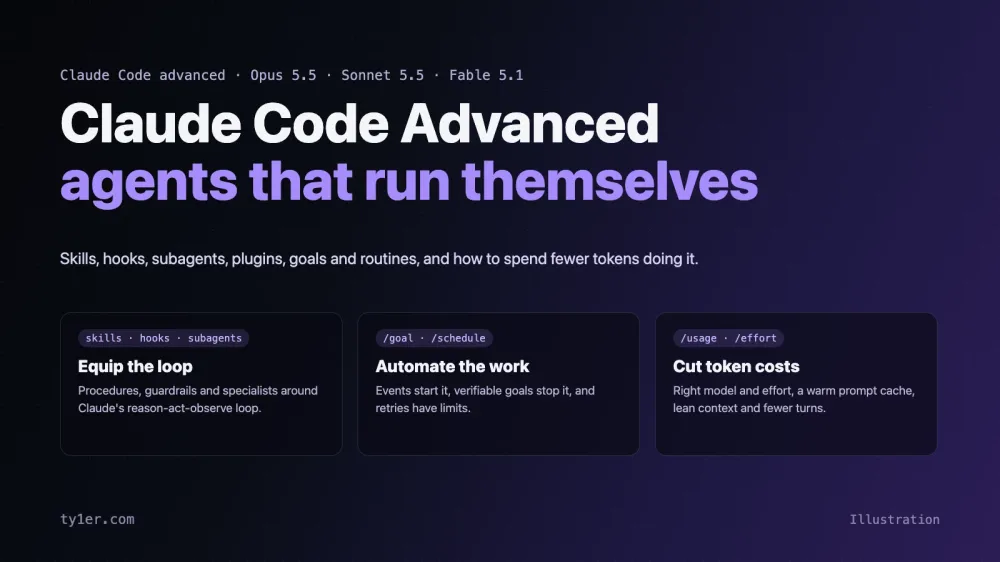
Our recent posts, including this one, are researched, written, illustrated, published and checked with Claude Code. Tyler picks the topic. Claude reads the primary sources, writes the post, designs the header banner and diagrams, publishes through Ghost's Admin API, and checks the live page on desktop and phone widths. Tyler reviews the result, and Claude fixes whatever he flags.
That workflow is a good way to explain advanced Claude Code, because it uses almost everything: skills for repeatable procedures, guardrails for what must never slip through, subagents for research and fact-checking, and token habits that keep long sessions affordable. This guide walks through those features using our own blog workflow as the running example, including how Claude designs the hero banner at the top of each post.
The structure follows the advanced section of an October 2026 Claude Code webinar. The webinar used a different example; the blog workflow here is our adaptation. Features were checked against Anthropic's docs on October 13, 2026, and newer tips from the docs are marked New tip. Where something is a proposal we haven't set up yet, such as the hooks and the routine, we say so. For quick reference, our Claude Code cheatsheet has a 5.5 Models & Agents tab with the highlights.
First, the 5.5 models
Agents are only as good as the model in the loop, and the lineup changed this year. All four current models have a 1M-token context window, 128K max output and always-on adaptive thinking:
| Model | API ID | Price per MTok (in / out) | Use it for |
|---|---|---|---|
| Fable 5.1 | claude-fable-5-1 | $10 / $50 | The hardest reasoning and long-horizon agent work |
| Opus 5.5 | claude-opus-5-5 | $4 / $20 | Long-running agentic coding; Anthropic's suggested default |
| Sonnet 5.5 | claude-sonnet-5-5 | $2 / $10 | Fast, capable work; subagents and teammates |
| Haiku 5.5 | claude-haiku-5-5 | from $0.10 / $0.50 | Routing, extraction and cheap fan-out |
In Claude Code, the opus, sonnet and haiku aliases resolve to the 5.5 models on the Anthropic API, and fable resolves to Fable 5.1. The default model on Pro, Max, Team and Enterprise plans is Opus 5.5. On Bedrock, Google Cloud and Microsoft Foundry, some aliases still point to older models, so check /model.
- Effort defaults to
mediumon Opus, Sonnet and Haiku 5.5 in Claude Code (highon Fable). Raise it with/effort highorxhighfor hard problems. - Changing effort no longer costs you the cache on the 5.5 models and Fable 5.1, with an API key or a subscription. Switching models still does.
- Cached reads are cheaper: 5% of base input on Opus 5.5 and Sonnet 5.5, and 2.5% on Fable 5.1, compared with the usual 10%.
- You can't turn thinking off on these models. Use effort to control how much they think.
The building blocks of a Claude Code agent
The webinar's core idea: an agent is a model in a loop, so equip the loop. Each Claude Code feature solves a different problem:
| Component | What it's for | Example |
|---|---|---|
CLAUDE.md | Instructions that always apply | House style: Ghost HTML, headings with ids, no invented facts |
| Skills | Reusable procedures, loaded when needed | The tech-blog-post procedure |
| Hooks | Deterministic checks and enforcement | Block secrets and private emails in drafts |
| Subagents | Specialists with their own context | Docs research, code review, fact-checking |
| MCP and CLIs | Access to tools and services | gh, web fetch, a browser, the Ghost Admin API |
| Plugins | Packaging and sharing all of the above | One blog workflow for every contributor |
/loop and /goal | Keeping a session working | Watch release notes; work until a draft passes checks |
| Routines | Starting work without you | Draft a post when a tracked tool ships a release |
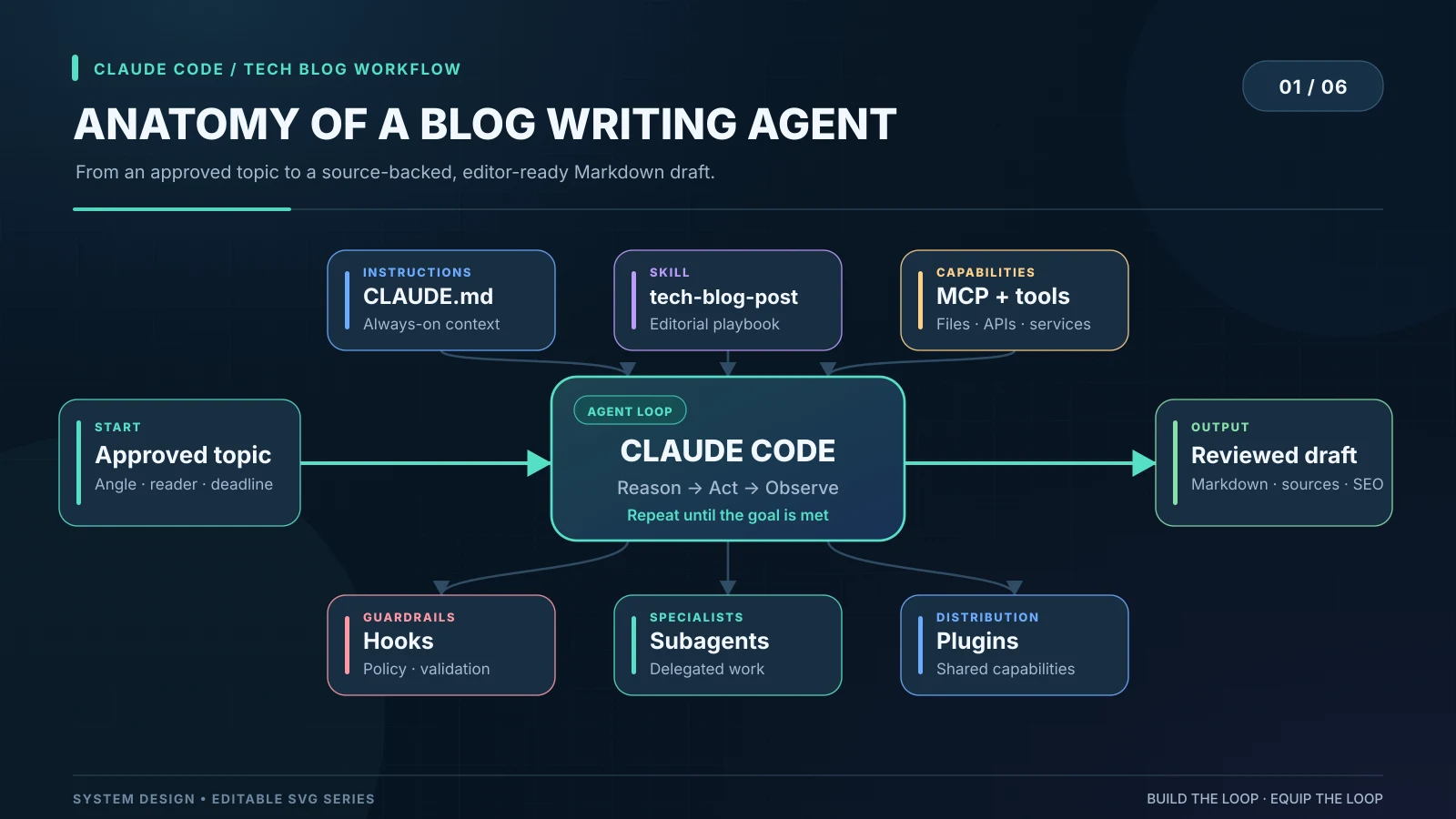
The modular approach separates what an agent knows (CLAUDE.md, skills), what it can access (MCP, tools), what it must prove (hooks) and what it is allowed to do (permissions). That separation makes each piece easier to test and change.
Skills: write the blog procedure down once
A skill is a reusable set of instructions for one job. Our posts follow the same steps every time: research from primary sources, write Ghost-ready HTML, build a 1600×900 header, publish, then verify. Instead of repeating that in every request, it belongs in a skill:
.claude/skills/tech-blog-post/SKILL.md---
name: tech-blog-post
description: Research, write, illustrate and publish a technical blog post for ty1er.com. Use when asked to write or update a blog post.
argument-hint: "[topic, reader, angle, source URLs]"
---
# Tech blog post
1. Treat $ARGUMENTS as the brief. Check the site for an existing post on the topic first.
2. Research primary sources only: vendor docs, release notes, the project's repo.
Record each important claim with its URL. Never invent flags, numbers or quotes.
3. Write Ghost HTML: h2 headings with id attributes (they feed the On This Page menu),
short paragraphs, code in pre/code blocks, captioned 1600x900 figures.
4. Build the header and diagrams (see the hero-banner steps), render, look, fix.
5. Mark anything unverified as [VERIFY: ...] and list it in the report.
6. Publish only when asked; then confirm the page returns 200 and doesn't
scroll sideways at 375px and 320px.Run it with /tech-blog-post Topic: Claude Code hooks. Reader: developers., or just ask for a post; Claude matches the request to the skill's description and loads the full instructions only then. That's the key difference from CLAUDE.md, which loads every session. CLAUDE.md is for rules that always apply, like "never show the site owner's email on a public page." A skill is for how to do one job.
Honest note: today, most of this procedure lives in Claude's project memory and our conversations rather than one SKILL.md. Writing it down as a skill is the next step, and the version above, adapted from the webinar kit, is what we're adopting.
New tip: skills can carry their own model and effort in frontmatter, so a mechanical skill can run on a cheaper setting. A skill that names a different model is a model switch for that turn, which rebuilds the prompt cache, so use it for skills that run on their own rather than mid-conversation. A context: fork skill runs in a subagent instead.
Hooks: guardrails Claude can't talk its way around
Skills give instructions; hooks enforce them. You can tell Claude never to paste an API key into a draft, but instructions can slip. A hook runs your own check at a fixed point in the workflow, every time.
Claude Code now has over 30 hook events. The ones agents use most:
| Event | Fires | Typical use |
|---|---|---|
SessionStart | When a session starts or resumes | Load extra context |
UserPromptSubmit | When you send a prompt | Validate or enrich the request |
PreToolUse | Before a tool runs | Block unsafe edits or commands |
PostToolUse | After a tool runs | Check results, report errors |
Stop | When Claude tries to finish | Require tests to pass first |
SubagentStop, PreCompact, SessionEnd | At those moments | Verify delegated work, save notes, clean up |
A hook can be a shell command, an http request, an mcp_tool call, a single-turn prompt to a model, or an agent that uses tools (experimental). The webinar's advice holds: start with a script, and use a model only when the decision needs judgment.
For a blog, two checks matter most. Before Claude writes a draft, a PreToolUse hook can run a secret scanner (say, scan_draft_secrets.py) that blocks the write if it finds an API key, a private key or an email address that shouldn't be public. After a write, a PostToolUse hook can run validate_article.py to check that every heading has an id, every image has alt text and a width, and no placeholder URLs or [VERIFY] markers are left.
{
  "hooks": {
    "PreToolUse": [
      { "matcher": "Write|Edit",
        "hooks": [{ "type": "command", "command": "python3 .claude/hooks/scan_draft_secrets.py" }] }
    ],
    "PostToolUse": [
      { "matcher": "Write|Edit",
        "hooks": [{ "type": "command", "command": "python3 .claude/hooks/validate_article.py" }] }
    ]
  }
}
These two hooks are a proposal; we haven't installed them yet. What we do today is close: before linking generated notes or publishing, Claude searches the output for email addresses, server IPs and API keys, and every post is checked for sideways scrolling on phone widths. Our repo also has a git pre-push hook that refuses a push without a CHANGELOG entry. That's a git hook rather than a Claude Code hook, but it shows the same idea: rules that run every time, not reminders.
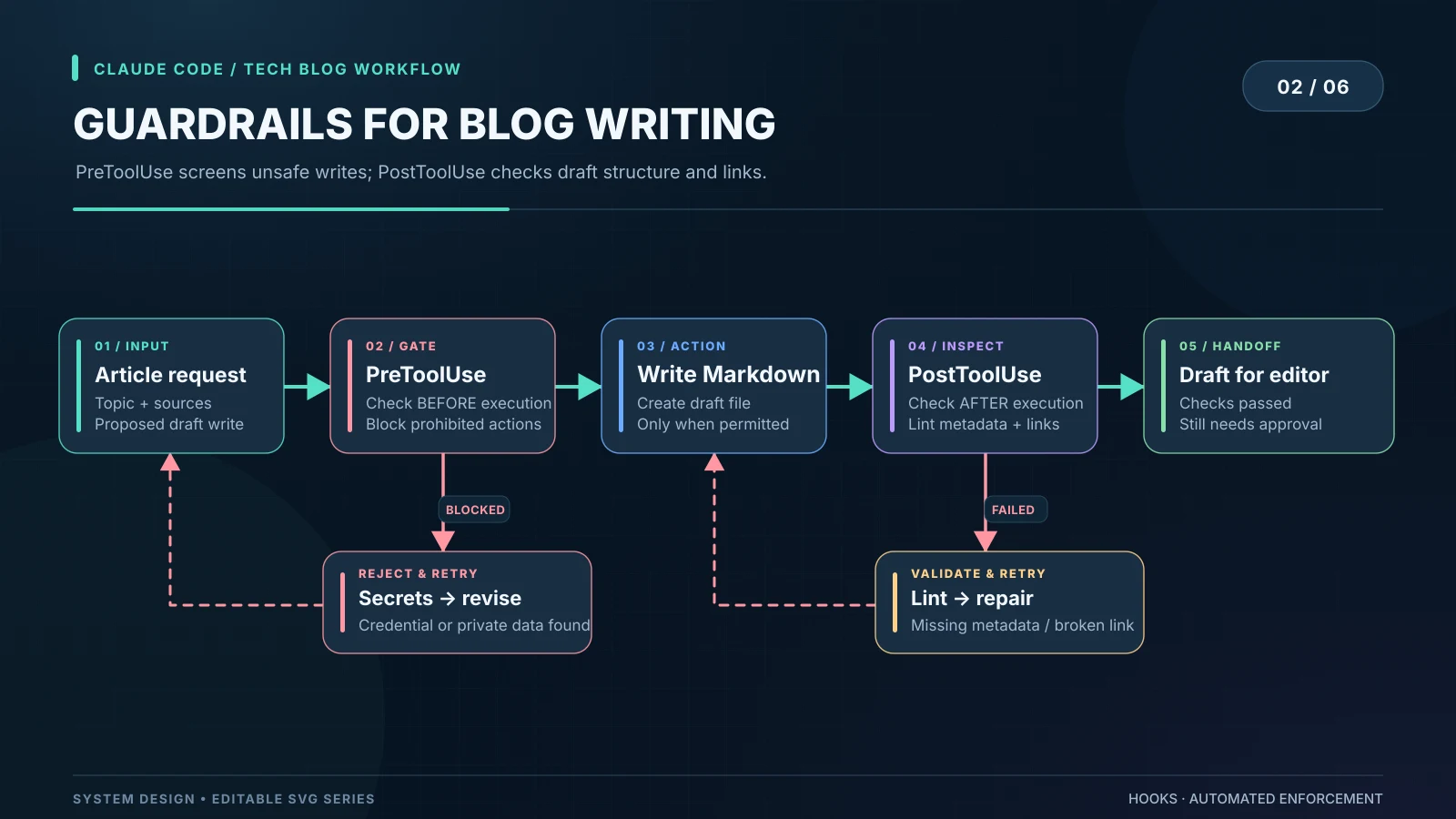
New tip: use exit code 2 to block. In a command hook, exit 2 blocks the action and sends your stderr to Claude as the reason. Exit 1 is only a non-blocking warning, which is a common reason a "guardrail" silently doesn't guard. PostToolUse can't undo an edit that already happened, but it can report the problem or replace the tool's output.
Hooks can live in user, project or local settings, organization-wide managed settings, plugins, skill frontmatter, or subagent frontmatter. Hooks from different levels run together, and admins can restrict an organization to managed hooks only. Test your hooks like code: a regex secret scanner is not a data-loss-prevention system, and a link checker cannot tell you whether a claim is true.
Subagents: a small editorial team
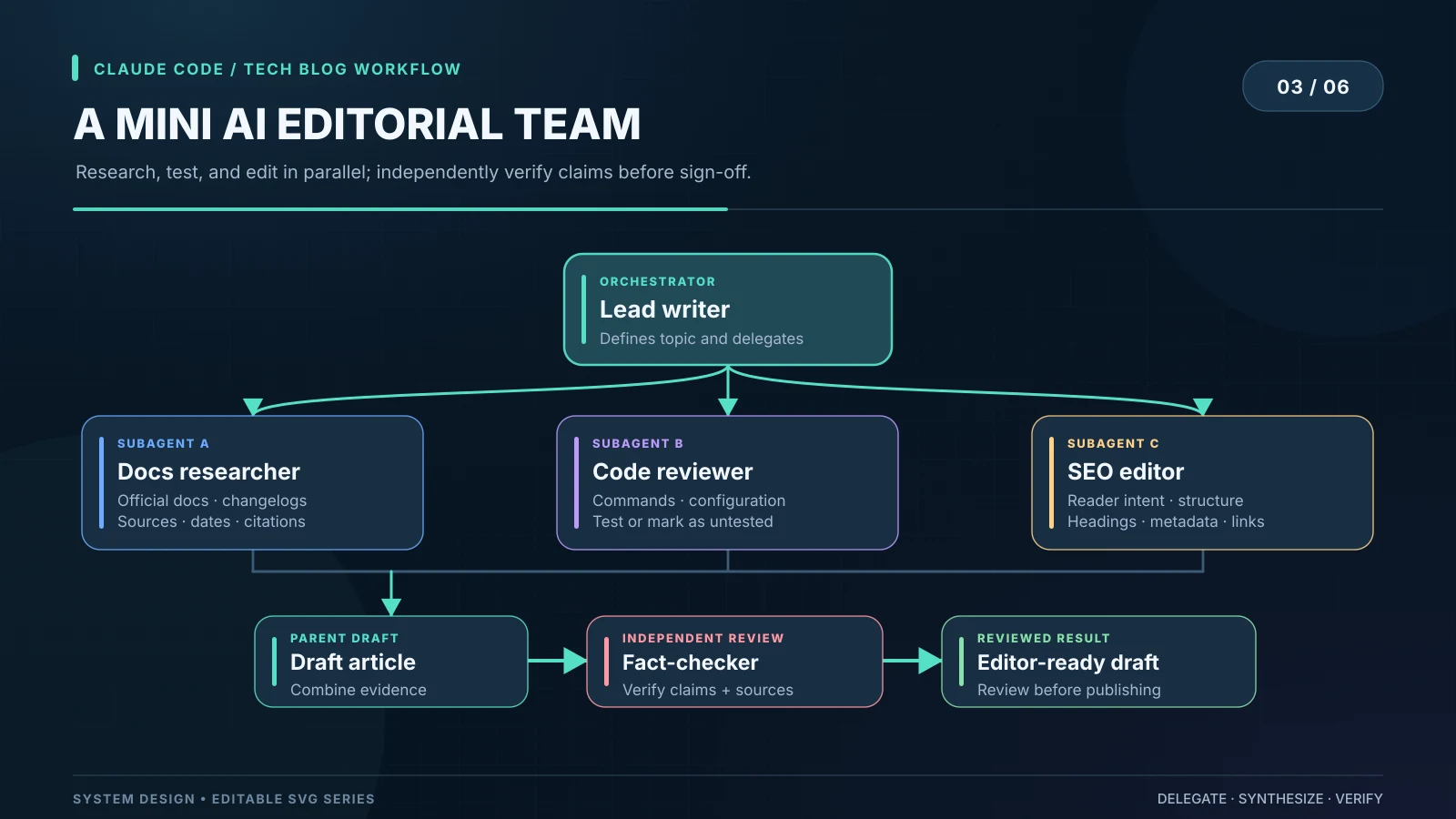
A subagent is a specialist with its own instructions, tools, model and context window. A post about a fast-moving tool can mean reading the docs, the changelog, the repository and several release notes. Instead of pouring all of that into one conversation, the lead writer can hand out focused jobs:
- Docs researcher: reads official docs and changelogs, and returns version-specific facts with URLs.
- Code reviewer: checks commands and config examples, testing them where possible and marking the rest as untested.
- SEO and structure editor: checks the title, excerpt, headings and internal links against what readers actually search for.
Subagents still cost tokens, so for a short post one agent is better. We used parallel subagents when we mapped this site's theme repo with graphify: five extracted 73 files at once. For most posts, Claude does the research itself.
The most valuable specialist is a fact-checker that doesn't trust the draft just because another agent wrote it:
---
name: fact-checker
description: Independently verify factual claims in a blog draft: versions, dates, commands, prices and feature support. Use before publishing.
tools: Read, Grep, Glob, WebFetch, Bash
model: sonnet
effort: high
maxTurns: 25
---

Review the draft as if someone else wrote it. For each material claim,
check the primary source and return a table:
Claim | verified / incorrect / unverified | source URL | required fix.
Never publish. Send findings back to the writer.
Fact-checking against primary sources has caught real errors on this site. While updating our cheatsheets, it found that the Claude Code page still said Fable couldn't act as an advisor (it now can), and that our Midjourney page described --preview as a low-resolution preview when it actually runs an unreleased model. Both were fixed before going live.
New tip: subagent frontmatter can set model, effort, tools, maxTurns, isolation: worktree (run in a throwaway git worktree) and background: true. To put every subagent on one cheap model, set CLAUDE_CODE_SUBAGENT_MODEL=haiku, and add CLAUDE_CODE_SUBAGENT_MODEL_FORCE=1 to override per-agent settings. Subagents get a 5-minute prompt cache by default, even on subscriptions.
Plugins: package a workflow once, reuse it everywhere
Once the blog workflow is reliable, other writers or other sites should get the same standard. Copied prompt files drift: one writer has an old checklist, another skipped the fact-checker. A plugin bundles skills, hooks, subagents, MCP servers and commands into one installable, versioned package, so everyone runs the same thing and updates go through review like any other code.
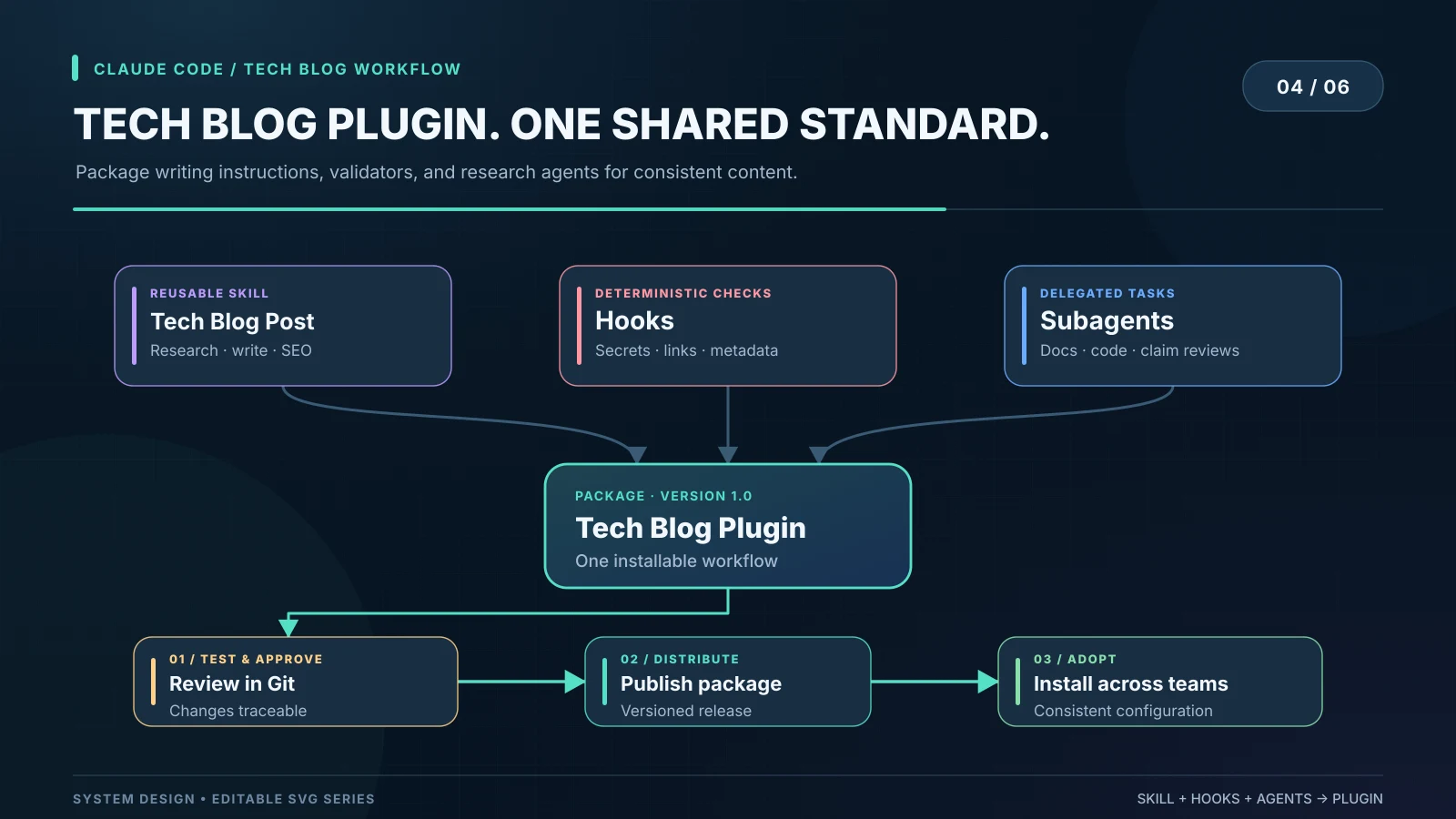
We run one site from one repo, so a project .claude/ folder is enough for us today. If we add contributors or a second site, the skill, fact-checker and hooks become a plugin.
New tip: turning on a plugin's skills, agents and hooks adds to the conversation and keeps the prompt cache. Plugins that add MCP servers follow MCP rules, which also usually keep the cache now that MCP tools load on demand. Turn plugins on at the start of a task rather than in the middle.
Autonomy: loops, goals and routines
The real step change is agents that don't wait for you to type. Claude Code has three levels.
/loop: repeat on an interval
/loop 30m check whether the linked release notes changed; summarize only real changesRuns a prompt repeatedly while the session stays open. We'd use it to watch a release page while writing about it. Leave out the interval to let Claude set its own pace.
/goal: keep going until it's done
/goal the draft has every h2 with an id, every image has alt text, the fact-checker reports no incorrect claims, or stop after 15 turnsAfter each turn, a separate small, fast model reads the transcript and decides whether the condition holds. If not, Claude keeps working. It stops when the condition is met, judged impossible, or cleared with /goal clear. It also runs headless: claude -p "/goal CHANGELOG.md has an entry for every PR merged this week".
New tip: the evaluator doesn't run commands or read files; it only sees what Claude surfaced in the conversation. So write conditions Claude's own output can prove ("npm test exits 0", not "the code is good"), add a turn limit, and run goals in auto mode so turns don't stop for permission prompts. For a check that runs every session, write a Stop hook instead.
Routines: agents that start on their own
Routines run Claude Code in Anthropic's cloud, so they keep working when your laptop is closed. A routine is a saved prompt plus repositories, an environment and connectors, with one or more triggers:
- Schedule: hourly, daily, weekdays, weekly or a custom cron expression (at most once an hour), or a single run at a set time.
- API: an HTTP POST to the routine's own endpoint from your monitoring tool or deploy pipeline.
- GitHub: pull request or release events, with filters for branch, label, author and more.
Create one at claude.ai/code/routines or from the CLI:
/schedule every Tuesday at 9:07am, check our tracked repos for new releases and draft a post for each
/schedule list
/schedule run
For a blog, a routine could start research when a tool we cover ships a release, and stop at a draft. Here's the specification we'd use. It's a plan, not something we run today:
TRIGGER:     A GitHub release on a repository we cover.
WORK:        Run /tech-blog-post for the release. Collect primary sources,
             draft the post, run the validators and the fact-checker.
COMPLETION:  The draft is saved as a Ghost draft, every claim has a source,
             and validation passes.
FAILURE:     After three failed attempts, stop and report why.
PUBLISHING:  Never publish automatically. Tyler approves every post.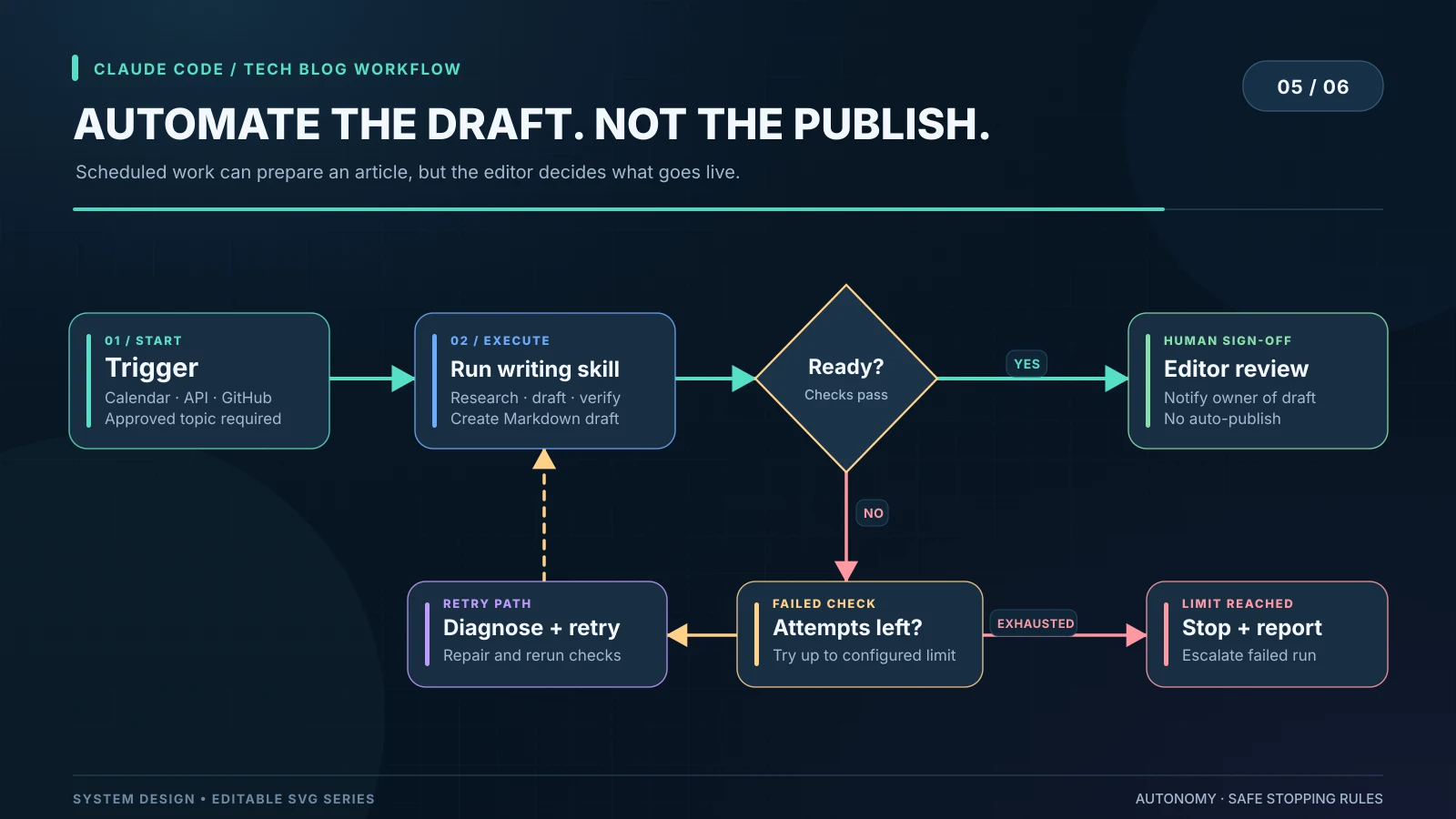
Routines are a research preview on Pro, Max, Team and Enterprise plans, and they draw on your subscription usage. They run without permission prompts and act as you, so commits carry your GitHub user. Give each routine only the repositories and connectors it needs.
New tip: a green run status only means the session ran without an infrastructure error, not that the task succeeded. Have the routine save a Ghost draft or open a pull request you will actually see, and read the run transcript. Two smaller gotchas: schedule a few minutes past the hour (9:07, not 9:00) to start on time, and text sent to the API endpoint arrives labeled as untrusted, so the routine's prompt must say to act on it.
How Claude Code designs our hero banners
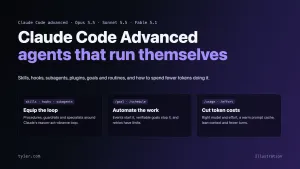
The header images on our recent posts, including the one above, are designed by Claude Code, and so are most of the diagrams. No design app is involved. The trick is to treat the banner as a small web page: Claude writes it in HTML and CSS, with inline SVG where it needs arrows or icons, renders it in a headless browser, looks at the result, and fixes what it sees.
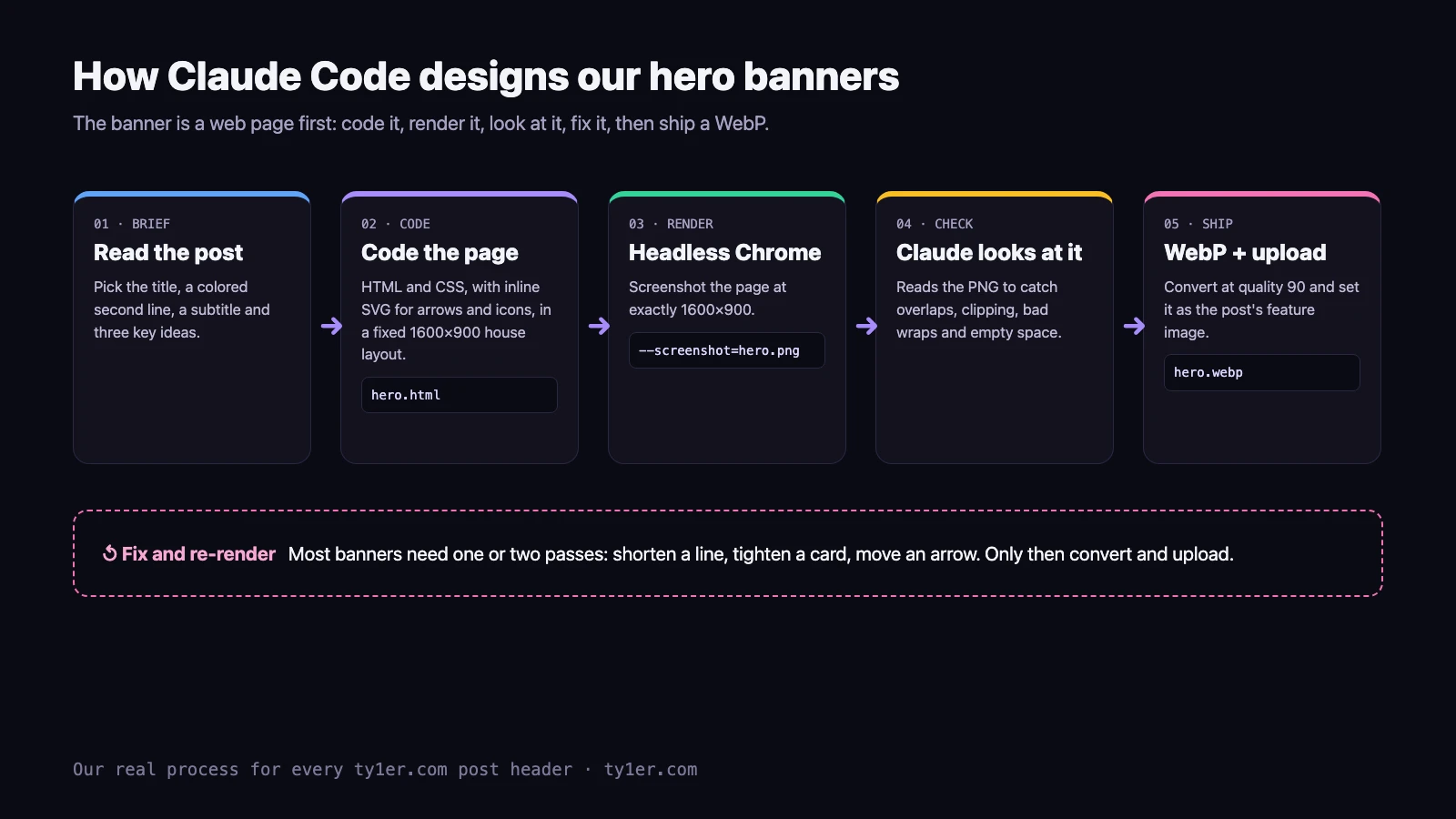
1. One house template
Every banner shares a layout: a dark gradient with a faint dot grid, a small monospace eyebrow line, a large two-line title with the second line in an accent color, a one-sentence subtitle, three idea cards, and ty1er.com in the corner. Keeping the layout fixed means Claude only writes words and picks an accent color, so each banner takes minutes and the site looks consistent. The core of the template is plain CSS:
.w { width:1600px; height:900px; position:relative; overflow:hidden;
     background: radial-gradient(circle at 4px 4px, rgba(255,255,255,.055) 1.4px, transparent 0) 0 0/28px 28px,
                 linear-gradient(115deg, #05070b 0%, #0a0d16 36%, #1c1840 70%, #2b1d55 100%); }
h1      { position:absolute; left:96px; top:150px; font-size:88px; font-weight:800; line-height:1.04; }
h1 span { color:#a78bfa; }   /* the accent-colored second line */
.cards  { position:absolute; left:96px; top:500px;
          display:grid; grid-template-columns:repeat(3,452px); gap:24px; }
2. Render it exactly
Claude serves the file locally and screenshots it with headless Chrome at the exact size, then converts it to WebP with Python's Pillow library:
python3 -m http.server 8803 &
"/Applications/Google Chrome.app/Contents/MacOS/Google Chrome" --headless --disable-gpu   --window-size=1600,900 --hide-scrollbars --screenshot=hero.png http://localhost:8803/hero.html
python3 -c "from PIL import Image; Image.open('hero.png').convert('RGB').save('hero.webp','WEBP',quality=90)"
3. Look before shipping
This is the step that makes it work. Claude can read images, so after every render it opens the PNG and checks it the way a designer would: text running into a card, a title wrapping at an awkward word, a code snippet splitting across lines, a card with a big empty bottom half. Then it edits the HTML and renders again. On this post, the pipeline diagram above needed one fix: a card title wrapped onto two lines, so it was shortened.
4. Lessons from dozens of banners
- Write fewer words. At 88px, a title over about 30 characters per line wraps. Short titles and three short cards beat dense layouts.
- Watch SVG whitespace. SVG collapses repeated spaces in text, so indented code inside an SVG needs non-breaking spaces (
 ). - Label illustrations. Mockups that look like a product screenshot get an "Illustration" note so readers aren't misled. Real screenshots are used only when they're real, like the graph in our graphify post.
- Check screenshots for private data. We once dropped a real screenshot because it showed a server IP and location.
- Use the right model for review. The visual check is where a capable model earns its cost. A cheaper model writing the HTML is fine; the look-and-fix step is where mistakes get caught.
Treat agents like infrastructure
Once an agent can publish to a live site, the questions become operational:
- Ownership: one person approves what goes live. Here, that's Tyler.
- Version control: the theme, skills and agents live in Git; the repo's CHANGELOG records every session.
- Verification: checks scale with risk. Facts are checked against primary sources, pages against phone widths, and cheatsheet changes against a backup taken first.
- Observability: every publish returns the live URL, and Claude confirms it loads and that the images return 200. To watch the agents themselves, we built a local Claude Dashboard that shows every open session, its tokens and subagents, stale worktrees and open pull requests on one page.
Six habits that cut token costs
The webinar's rule of thumb: cost ≈ price per token × tokens per turn × number of turns. It's not a billing formula, but it shows you can save on all three factors, not just by picking the cheapest model.
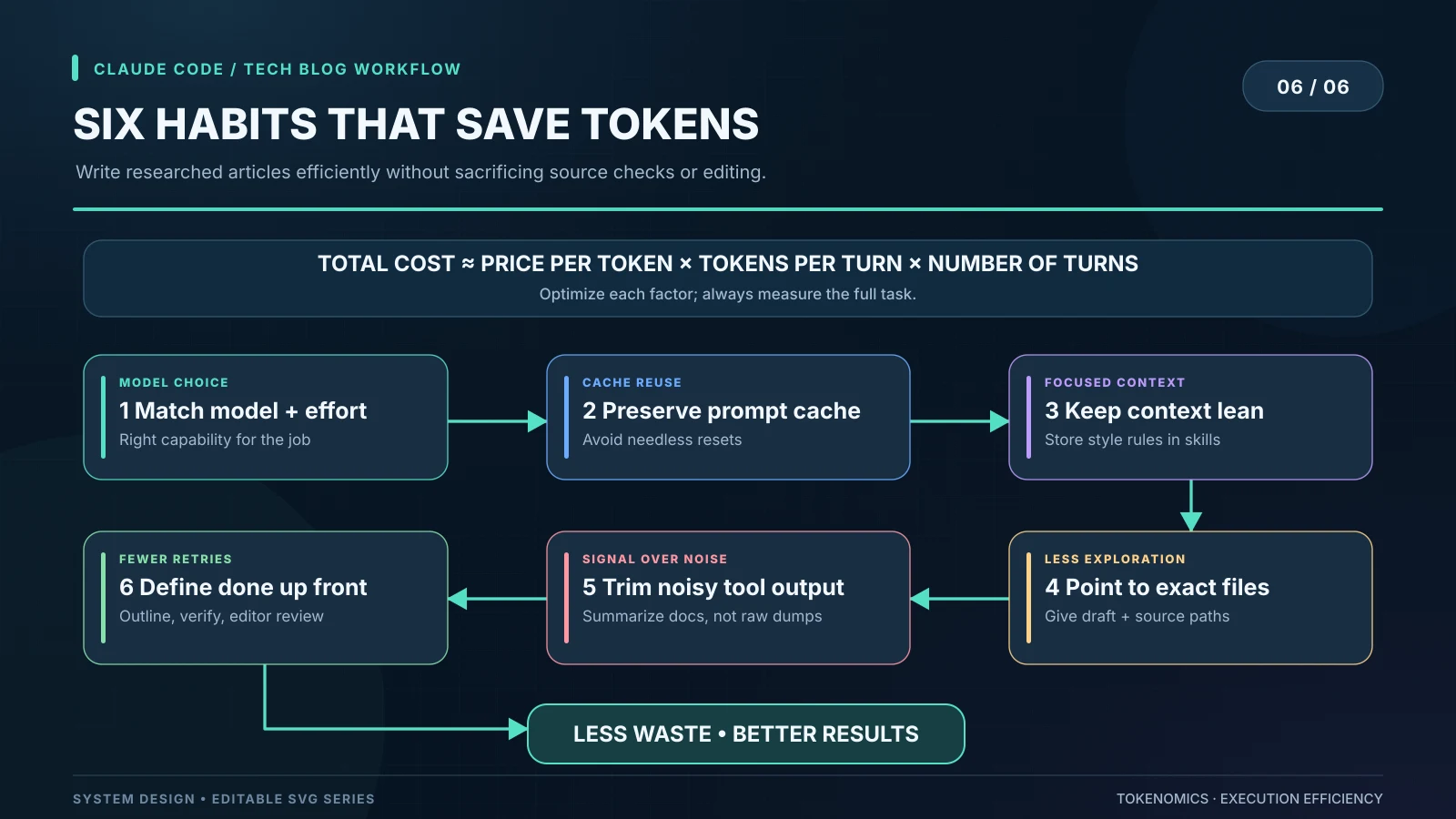
1. Match the model and effort to the task
Cheaper per token isn't always cheaper per task. In the webinar's illustration, a weaker model spent about 180,000 tokens over nine turns on a hard bug that a stronger one solved in about 35,000 over four (an example, not a benchmark). Measure the whole task. Use Haiku or Sonnet for mechanical work and Opus or Fable for hard reasoning, and use /effort as a second dial.
New tip: pair a cheap main model with a strong advisor, as in claude --model sonnet --advisor opus. Claude consults the advisor only at decision points, which usually costs less than running Opus throughout. Or use opusplan, which plans on Opus and executes on Sonnet. Note that each plan-mode toggle then switches models.
2. Protect the prompt cache
Claude Code resends your whole conversation every turn, and the prompt cache makes the unchanged part cheap. On a subscription, the main conversation's cache lasts an hour. With an API key, a cloud provider or usage credits, it lasts five minutes. Things that rebuild the cache: switching models, turning on fast mode, adding MCP servers whose tools load up front, compacting, and upgrading Claude Code.
New tip: run /usage. Since v2.1.251 it shows a Prompt cache (main) line with your hit rate, misses and whether the cache is warm, and newer versions name the likely cause of a miss. On an API key, set "promptCacheTtl": "1h" if you often step away mid-task. Pick your model at the start of a session, and save /compact for natural breaks.
3. Start with a lean context
Run /context to see what's using the window. Keep CLAUDE.md under about 200 lines and move specialized workflows into skills, which load only when needed. Disable MCP servers you aren't using in /mcp. CLI tools like gh and aws add nothing to context until you run them.
New tip: edits to CLAUDE.md don't reach a running session; they load on the next /clear, /compact or restart. If Claude is ignoring a rule you just added, that's probably why.
4. Point Claude at the exact file
"Make the blog post accurate" invites a site-wide search. "Check the model IDs in the API table of @drafts/claude-code-advanced.html against platform.claude.com/docs/en/about-claude/models/overview" starts at the answer. Give file paths, URLs, error messages and the exact claim to check whenever you have them. For typed languages, a code-intelligence plugin replaces grep-and-read with a single go-to-definition.
5. Keep tool noise out of the conversation
A docs page can be 100,000 characters when three lines matter, and a test run can print 2,000 lines. Filter it before Claude sees it. Anthropic's cost docs include a PreToolUse hook that rewrites npm test, pytest or go test to pipe through grep for failures. When we fetch long docs, we ask the fetch tool a specific question, or send the reading to a subagent, and keep only the answer.
6. Define "done" up front
Vague requests cost extra turns. Start complex work in plan mode (Shift+Tab), give acceptance criteria such as "every claim sourced, header 1600×900, no sideways scroll at 320px", and correct early: press Esc to stop, and /rewind (or Esc twice) to go back.
New tip: when Claude goes down the wrong path, /rewind is cheaper than /compact. Rewinding returns to an already-cached point in the conversation, while compacting builds a new one. If you want a clean slate, /clear costs nothing.
More cost tricks worth knowing
/insightsanalyzes up to 200 recent sessions and writes an HTML report on friction points and better ways to work./usageattribution (paid plans) shows how much of your usage went to each skill, subagent, plugin, MCP server and scheduled loop.--max-budget-usdcaps what a scripted run can spend.- Agent teams are powerful but use roughly 7 times the tokens of a normal session in plan mode. Keep teams small and shut down idle teammates.
- Idle sessions aren't free if a
/loop, scheduled task or active goal keeps firing, because each run resends your full context.
Our blog workflow, start to finish
- Brief: Tyler names the topic, often with a link or a file (this post started from a webinar publishing kit).
- Research: Claude reads primary sources with
gh, web fetch, and a real browser when a site blocks scripts. The Midjourney updates page, for example, returned a 403 to the fetch tool. - Write: Ghost-ready HTML with ids on every h2 for the On This Page menu, code blocks, tables and captioned figures, following the skill.
- Illustrate: a header banner and diagrams through the render-look-fix loop above.
- Check: facts against sources, output for secrets, and links to related posts and cheatsheets.
- Publish: images uploaded and the post created through Ghost's Admin API. On a team, create it as a draft and let an editor publish.
- Verify and review: Claude confirms the page and images load and nothing scrolls sideways at 375px and 320px. Tyler reads it, and Claude fixes what he flags. This post is the second version, after he asked for our own example instead of the webinar's.
Where to be careful
- Autonomous isn't error-free. Skills get misread, hooks have bugs and fact-checkers miss things. A person still reads every post before it counts.
- More agents isn't better. Parallelism helps big tasks and hurts small ones.
- Guardrails need their own tests, including edge cases and ways around them. A hook covers only the tools and paths it matches.
- Measure your own savings. The webinar's token numbers are illustrations. Use
/usageon your real workload before changing defaults. - Disclose AI help. Readers deserve to know how a post was made. This one says so up front.
- Keep a human on publishing. Routines run without prompts and act as you. Let agents prepare drafts, and keep the decision to publish with a person.
Four ideas to remember
- An agent is more than a model. It needs procedures, tools, guardrails and well-scoped tasks.
- Reliable workflows should be reusable. Package what works as a versioned plugin.
- Events start the work; verifiable goals stop it, with a limit on retries.
- Efficiency is engineering. Right model and effort, a warm cache, lean context, quiet tools and clear definitions of done.
Resources
- Claude Code cheatsheet: every flag and slash command, plus the new 5.5 Models & Agents tab.
- Official docs: Skills, Hooks, Subagents, Plugins, Goals, Routines, Manage costs, Prompt caching, Advisor.
- Claude models overview: current IDs, pricing and limits.
The webinar kit's tech-blog-post skill, fact-checker and editorial checklist inspired the versions in this post. More on Claude Code: give your project a map and a memory with graphify and Obsidian, and Claude Code and the iOS Simulator.