If you've started building custom Claude Skills for your team, you've probably hit the same wall I did: sharing them. Emailing zip files around, or telling people "just copy this SKILL.md into your settings," doesn't scale past a couple of people, and it definitely doesn't give you version control, review, or any way to know who's using what.
Claude's answer to this is an organization plugin marketplace — a private catalog, backed by a GitHub repo, that your whole team can pull Skills from through the normal Claude UI. No GitHub account required for the people using it. Here's the full setup, plus a few gotchas I ran into.
The mental model first
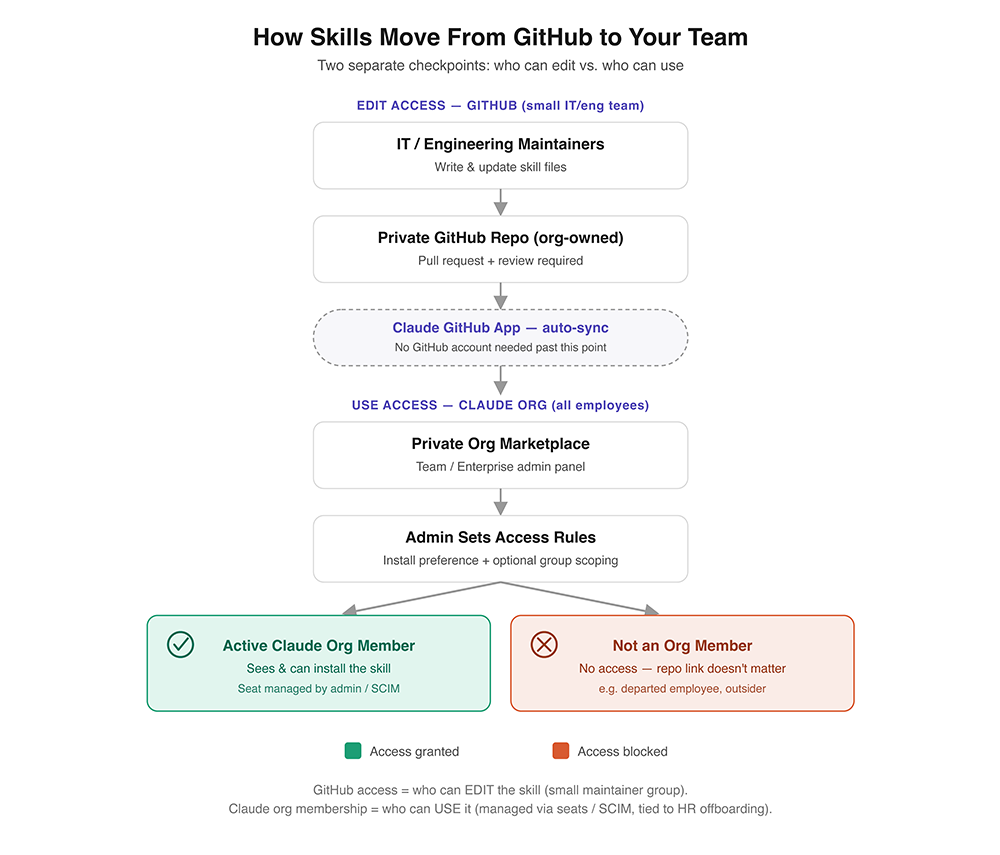
Before touching any settings, it's worth separating two things that people (including me, initially) tend to conflate:
- Who can edit a Skill — controlled entirely by GitHub repo permissions. This should be a small group: whoever maintains your Skills.
- Who can use a Skill — controlled entirely by Claude organization membership (seats). This can be your whole company.
GitHub is just the source of truth that syncs into Claude's admin panel. Nobody outside your Claude org ever touches the repo, and having the repo URL grants zero access on its own. Those are two independent gates, and keeping them separate is exactly what makes this setup safe to hand off to a whole company.
Prerequisites
- A Claude Team or Enterprise plan, and you're an Owner or Primary Owner (or an Admin, for some steps)
- Cowork and Skills both enabled for your organization (Organization settings → each has its own toggle — both are required before plugin marketplaces work at all)
- A GitHub Organization (not a personal account) — GitHub Free for organizations gives you unlimited collaborators on private repos at no cost, so you don't need to buy anyone a GitHub seat just for this
- Someone with admin access to the repo you'll connect, if you want automatic syncing later
Step 1: Create the GitHub repo
Create a new repo under your GitHub organization. It must be private or internal — public repos are explicitly not allowed for org marketplaces (for obvious reasons).
bash
gh repo create your-org/claude-skills --private
git clone git@github.com:your-org/claude-skills.git
cd claude-skills
Step 2: Scaffold the marketplace structure
A marketplace repo has a specific shape: a top-level .claude-plugin/marketplace.json, and one folder per plugin under plugins/, each with its own manifest and skill files.
bash
mkdir -p .claude-plugin
mkdir -p plugins/quality-review-plugin/.claude-plugin
mkdir -p plugins/quality-review-plugin/skills/quality-review
Write the skill itself as a SKILL.md:
markdown
# plugins/quality-review-plugin/skills/quality-review/SKILL.md
---
description: Review code for bugs, security, and performance
---

Review the code I've selected or the recent changes for:
- Potential bugs or edge cases
- Security concerns
- Performance issues
- Readability improvements

Be concise and actionable.
Then the plugin manifest:
json
// plugins/quality-review-plugin/.claude-plugin/plugin.json
{
  "name": "quality-review-plugin",
  "description": "Adds a quality-review skill for quick code reviews",
  "version": "1.0.0",
  "author": {
    "name": "Your Team"
  }
}
And finally the marketplace catalog that ties it all together:
json
// .claude-plugin/marketplace.json
{
  "name": "company-tools",
  "owner": {
    "name": "IT / DevTools Team",
    "email": "it@yourcompany.com"
  },
  "plugins": [
    {
      "name": "quality-review-plugin",
      "source": "./plugins/quality-review-plugin",
      "description": "Adds a quality-review skill for quick code reviews"
    }
  ]
}
version matters more than it looks — if you set it (in plugin.json or the marketplace entry), users only pick up updates when that string changes. Bump it every release, or omit it entirely and let Claude derive a version from your commits.
Step 3: Push, and put review in front of your main branch
This is the point where I'd stop and add a branch protection rule requiring at least one approving review before merging to main. It costs nothing and gives you a real audit trail — who changed a skill, why, and who signed off — which matters a lot more once a skill is running against production systems or regulated workflows.
bash
git add .
git commit -m "Initial marketplace: quality-review-plugin v1.0.0"
git push -u origin main
Step 4: Enable Cowork and Skills for your org
In Claude, go to Organization settings → Cowork and Organization settings → Skills, and turn both on if they aren't already. Plugin marketplaces silently don't work until both are enabled — this is the single most common "why isn't my repo showing up" issue.
Step 5: Connect the repo
Go to Organization settings → Plugins → Add plugin → GitHub, and enter your repo as owner/repo (e.g. your-org/claude-skills).
You'll be asked to verify your personal GitHub access first (just to confirm you're allowed to see the repo). After that, Claude uses its own GitHub App installation token to do the actual syncing — not your personal credentials, and not anything your teammates need to authenticate with.
If the repo doesn't show up in the picker, the Claude GitHub App probably isn't installed on it yet — install it from the same screen.
Step 6: Let the initial sync run
The first sync kicks off automatically as soon as you connect the repo. Give it a minute, then check that quality-review-plugin shows up in your new marketplace inside the admin panel.
Step 7: Decide who gets it
For each plugin, set an install preference:
| Preference | Effect |
|---|---|
| Installed by default | Auto-installed for everyone; members can remove it |
| Available for install | Shows in the catalog; members opt in |
| Required | Auto-installed, can't be removed |
| Not available | Hidden entirely — good for staging or deprecating |
On Enterprise plans, you can also override this per group — say, auto-install for Engineering, make it opt-in for everyone else, hide it from Legal. The most permissive setting wins if someone belongs to multiple groups with conflicting rules.
Step 8 (optional): Turn on automatic sync
By default, updates require you to click "Update" on the marketplace after pushing changes. If you'd rather have it happen automatically:
- Go to your marketplace in Organization settings → Plugins, open the menu, and toggle Sync automatically.
- This creates a webhook on the repo — whoever flips the toggle needs admin-level access to that repo (checked through their own GitHub connection, separate from the Claude GitHub App).
- The Claude GitHub App also needs its Webhooks (Read & Write) permission approved on the installation. Older installs may need a repo or org admin to click through an updated-permissions prompt on GitHub.
Once it's on, a sync runs whenever a pull request with a version bump is merged to the default branch. A direct push to main — bypassing your PR flow — will not trigger a sync, which is a nice side effect of enforcing PR review in Step 3.
Step 9: Verify the access boundary actually holds
Before calling this done, check both directions:
- A teammate who's an active member of your Claude org should see the plugin in the catalog (or have it auto-installed, depending on your preference) and be able to run its skill.
- Someone who is not a member of your Claude org — including a former employee, if you're testing offboarding — should see nothing, even if you hand them the GitHub repo URL directly. The repo isn't a distribution channel by itself.
Step 10: Wire offboarding to your identity provider
This is the step people skip and regret. On a Team plan (or Enterprise without SSO/SCIM configured), removing someone's Claude access is a manual step — an admin has to go remove them from Organization settings → Members. If HR processes an exit and nobody remembers to do that, the account (and its plugin access) just sits there active.
If you're on Enterprise, set up SCIM provisioning against your identity provider. Then removing someone from your IdP removes their Claude seat — and their marketplace access — immediately and automatically, the same way it already kills their VPN and email access.
A few things I learned the hard way
- Public repos are a hard no. Org marketplaces require private or internal repos — there's no way around it, and there shouldn't be.
- You don't need to buy GitHub seats for this. GitHub Free for organizations gives unlimited collaborators on private repos. Save your GitHub Team/Enterprise budget for the review and audit features, if you want those.
- A failed sync can pull plugins out from under your whole team. If a sync fails, everyone can temporarily lose access to what was already installed. Fix the underlying issue in the repo, re-sync, and then double-check your install preferences — they can get reset in the process.
- Syncs aren't instant. Budget up to 30 minutes for a sync to complete, especially with a lot of plugins.
- There's a plugin cap. 500 plugins per GitHub-synced marketplace, 100 for a manually-uploaded one. You'll hit "quick prototype" limits (manual upload, 50MB per zip) well before you hit the GitHub-sync ones.
- Some marketplace names are reserved (
claude-code-marketplace,anthropic-plugins,agent-skills, etc.) — pick something obviously yours.
Why bother with all this
The honest answer is that ad hoc skill-sharing works fine for two people on the same team. It stops working the moment you want version history, a review gate before something ships to the whole company, or a guarantee that access dies the day someone's badge stops working. This setup gives you all three, and it does it using infrastructure (a GitHub repo, PR review) most engineering orgs already have muscle memory for. Worth the hour it takes to set up.