GitHub Foundations is GitHub's entry-level certification. It proves you understand Git, repositories, collaboration, project management, security basics, and how modern features like GitHub Actions and Copilot fit together. You don't need to be a developer: the exam is aimed at developers, non-developers, and anyone who works on GitHub.
This guide covers what's on the exam as of the January 2026 update, then gives you 100 original practice questions across all seven domains, weighted like the real exam. Each question hides its answer and an explanation until you open it. These questions are written for practice; they aren't taken from the real exam.
The exam at a glance
- Exam code: GH-900, for the GitHub Foundations certification.
- Time: 100 minutes. If the exam isn't offered in your language, you can request 30 extra minutes.
- Passing score: 700 or higher.
- Delivery: proctored, scheduled through Pearson VUE from the Microsoft Learn certification page. Price depends on the country where you take it.
- Languages: English, Spanish, Portuguese (Brazil), Korean, and Japanese.
- Retakes: you can retake 24 hours after a first failed attempt; later retakes have longer waits.
- Renewal: none needed. GitHub Foundations follows Microsoft's policy for fundamentals-level exams, which don't expire.
- Free extras: an official practice assessment and an exam sandbox that shows the real question interface.
Microsoft doesn't publish a fixed number of questions, and the study guide notes that the exam can include preview features if they're commonly used. Check the official pages linked at the end before you book, since details change.
The seven domains and their weights
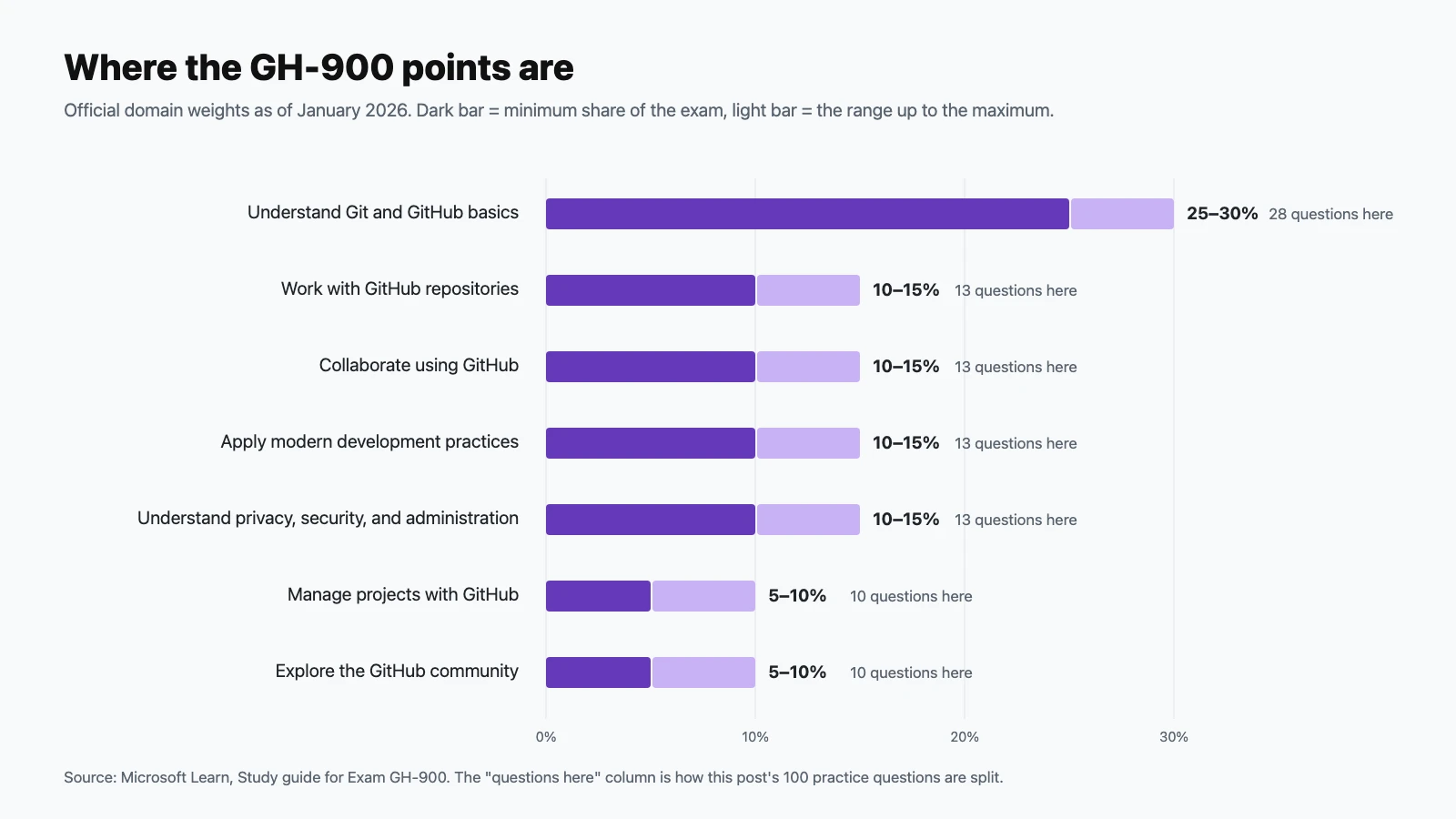
| Domain | Exam weight | Practice questions here |
|---|---|---|
| Understand Git and GitHub basics | 25–30% | 28 |
| Work with GitHub repositories | 10–15% | 13 |
| Collaborate using GitHub | 10–15% | 13 |
| Apply modern development practices | 10–15% | 13 |
| Manage projects with GitHub | 5–10% | 10 |
| Understand privacy, security, and administration | 10–15% | 13 |
| Explore the GitHub community | 5–10% | 10 |
The January 2026 update rewrote every objective and added new topics: Copilot agents, agent mode, and multi-model support; the differences between Copilot plans; passkeys; Enterprise Managed Users; organization-wide Copilot policies; and repository metrics and dependency insights. Older practice tests won't cover these, and the questions below do.
How to use these questions
Answer each question before opening its answer. Tally your misses per domain; that's your study list. Questions marked Choose two or Choose three need every correct option, just like on the exam. If you get more than about 80% right on the first pass, take the official practice assessment next.
Understand Git and GitHub basics (25–30%)
Questions 1–28.
-
What is the main benefit of using version control?
Show answer
Answer: C. Version control records every change: who made it, when, and why. You can compare versions, undo mistakes, and let several people work on the same files without overwriting each other.
-
Which statement best describes the difference between Git and GitHub?
Show answer
Answer: B. Git works entirely offline on your machine. GitHub hosts Git repositories and layers on issues, pull requests, Actions, Projects, and more. Git doesn't need GitHub at all.
-
What does it mean that Git is a distributed version control system?
Show answer
Answer: D. Each clone is a complete repository with all history, so you can commit, branch, and view history offline, then sync later.
-
What is a commit?
Show answer
Answer: C. A commit records the state of the staged files at a point in time. Its ID (a SHA hash) lets you refer back to it forever.
-
Which Git command stages changes so they're included in the next commit?
Show answer
Answer: A.
git addmoves changes into the staging area.git committhen records whatever is staged. -
What does
git clonedo?Show answer
Answer: D.
git clonecopies the repository and all of its history to your machine, and sets up a remote namedoriginpointing back at the source. -
What is a branch in Git?
Show answer
Answer: B. Branches are cheap pointers, so creating one is instant. A permanent label for a release is a tag.
-
Which command downloads new commits from a remote and integrates them into your current branch?
Show answer
Answer: A.
git pullis agit fetchfollowed by a merge (or a rebase, if configured).git pushgoes the other way. -
What is the difference between
git fetchandgit pull?Show answer
Answer: C. Fetch is the safe look-before-you-leap option: you can inspect what changed before merging it in.
-
In Git, what does
HEADrefer to?Show answer
Answer: B.
HEADpoints at where you are right now, usually the tip of the current branch. -
What is the purpose of a
.gitignorefile?Show answer
Answer: D. Typical entries are build output, dependency folders like
node_modules/, OS clutter like.DS_Store, and local secrets like.env. -
When does a merge conflict happen?
Show answer
Answer: C. Git merges most changes automatically. It only stops and asks you to choose when the same part of a file changed in conflicting ways.
-
What is a GitHub organization?
Show answer
Answer: A. Organizations own repositories on behalf of a group, and use teams and roles to manage who can do what.
-
Which account type lets a company centrally manage policies and billing across multiple organizations?
Show answer
Answer: D. An enterprise account sits above organizations, so administrators can set policies, security settings, and billing in one place.
-
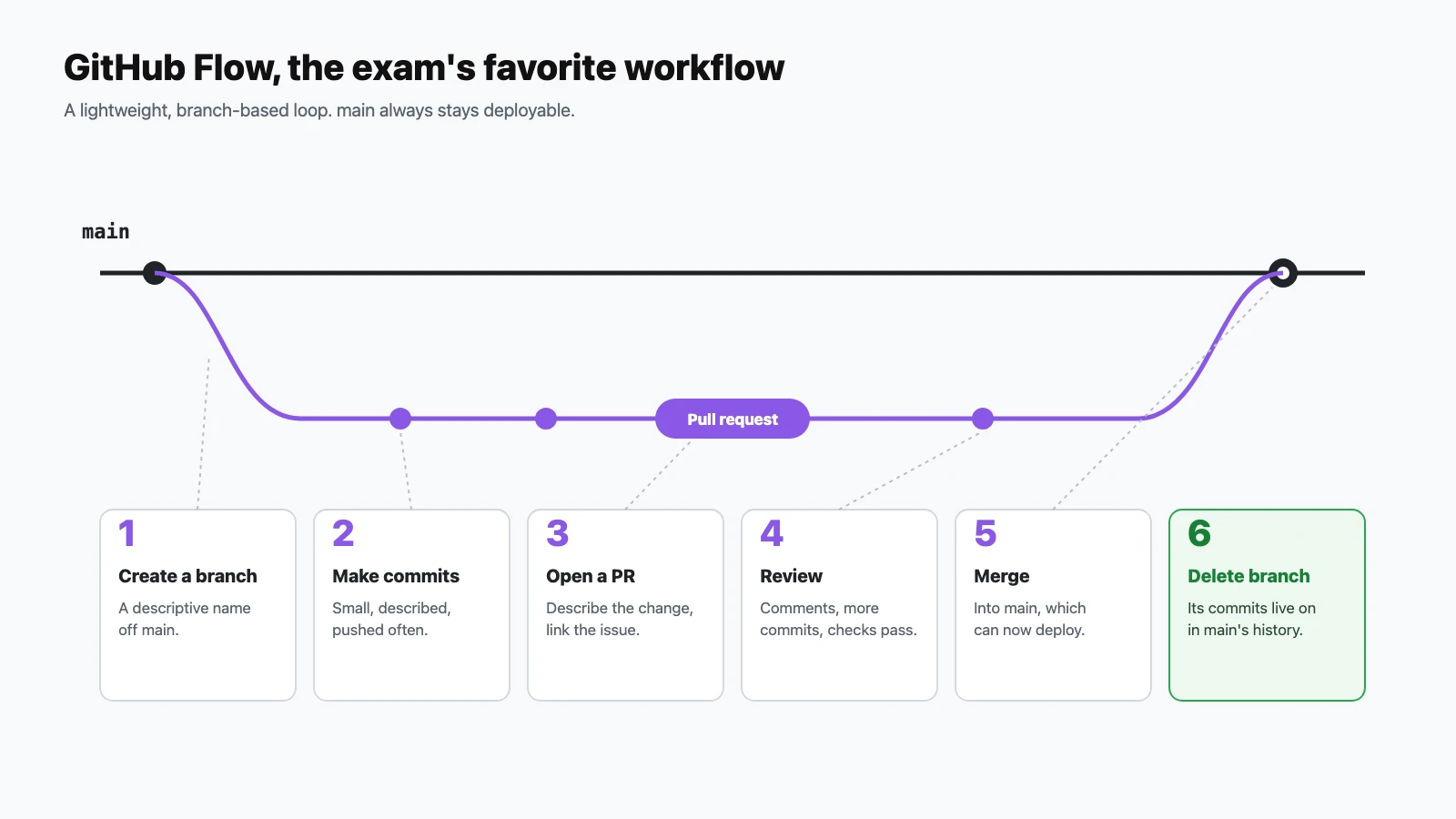
In GitHub Flow, what is the first step when you start new work?
Show answer
Answer: B. Every change starts on its own descriptively named branch, which keeps
mainclean and deployable. -
In GitHub Flow, where do changes get reviewed and discussed before they reach
main?Show answer
Answer: A. The pull request is the center of GitHub Flow: discussion, review comments, follow-up commits, and status checks all happen there.
-
Which of these is not part of GitHub Flow?
Show answer
Answer: C. Long-lived develop and release branches belong to heavier models such as Git Flow. GitHub Flow is deliberately lightweight: short-lived branches off
main. -
In GitHub Flow, what should always be true of the
mainbranch?Show answer
Answer: B. Because every change lands through a reviewed pull request,
mainshould always be safe to deploy. -
Which Markdown creates an unchecked task list item in an issue?
Show answer
Answer: D.
- [ ]renders an unchecked checkbox;- [x]renders a checked one. GitHub shows progress for task lists. -
How do you notify a specific person in an issue comment?
Show answer
Answer: C. An @mention sends them a notification.
#is for referencing issues and pull requests. -
In an issue comment, what does typing
#42do?Show answer
Answer: A. GitHub turns
#42into a link and shows a cross-reference on #42. -
Which Markdown produces a code block with Python syntax highlighting?
Show answer
Answer: D. Fenced code blocks with a language identifier get syntax highlighting.
>starts a blockquote. -
A teammate wants a flowchart that's written as text and rendered as a diagram inside a GitHub issue. What should they use?
Show answer
Answer: B. GitHub renders Mermaid diagrams written in fenced code blocks in issues, pull requests, discussions, wikis, and Markdown files.
-
When is GitHub Desktop the best choice?
Show answer
Answer: A. GitHub Desktop is a free app for macOS and Windows that handles cloning, committing, branching, and pushing visually.
-
Which task is GitHub Mobile designed for?
Show answer
Answer: C. GitHub Mobile, on iOS and Android, keeps you responsive away from your desk. It isn't a development environment.
-
Which command shows a repository's commit history?
Show answer
Answer: B.
git loglists commits;git log --onelinegives a compact version.git statusshows the current working state, not history. -
After cloning a repository, what is
origin?Show answer
Answer: D.
originis just a conventional name for the remote URL. You can rename it or add others, such asupstream. -
A user wants to experiment with a change without affecting anyone else's work. What's the right first move?
Show answer
Answer: C. Branches isolate work. If the experiment fails, delete the branch; if it works, open a pull request.
Work with GitHub repositories (10–15%)
Questions 29–41.
-
Where does GitHub display a repository's
README.md?Show answer
Answer: A. The README is the repository's front door: what it is, how to install it, and how to use it.
-
What is the effect of a public repository having no license file?
Show answer
Answer: D. Without a license, the author keeps all rights. People can view and fork the code on GitHub under GitHub's terms, but they aren't granted rights to reuse it.
-
What is a
CONTRIBUTING.mdfile for?Show answer
Answer: B. GitHub surfaces a link to the contributing guidelines when people open an issue or a pull request.
-
What does a
CODEOWNERSfile do?Show answer
Answer: A. Combined with a branch protection rule that requires code owner review, it makes sure the right people approve changes to their areas.
-
Which file tells people how to report a security vulnerability in your project?
Show answer
Answer: C. A security policy is shown in the repository's Security tab, so reporters know to disclose privately rather than in a public issue.
-
You create a new repository from a template repository. What do you get?
Show answer
Answer: B. Templates are for starting new projects from a known-good layout. Forks keep the history and the upstream link; templates don't.
-
While editing a file in the browser, you want your change reviewed instead of committed straight to
main. Which option should you choose?Show answer
Answer: D. The web editor offers both. Choosing a new branch keeps GitHub Flow intact even for quick fixes.
-
Who can view a repository's Traffic insights (views, clones, referrers)?
Show answer
Answer: C. Traffic data is limited to people with push access, since it reveals usage patterns of the repository.
-
What does starring a repository do?
Show answer
Answer: A. Stars are bookmarks and a popularity signal, and you can organize them into lists. Notifications come from watching, not starring.
-
Where do you opt in to try GitHub features that are still in preview?
Show answer
Answer: D. Feature preview lists features you can switch on or off for your own account while they're being tested.
-
Which feature lists the packages a repository depends on, based on its manifest and lock files?
Show answer
Answer: B. The dependency graph powers dependency insights and Dependabot alerts about vulnerable packages.
-
Which repository insight summarizes recent activity, such as merged pull requests and opened and closed issues, over a period you choose?
Show answer
Answer: A. Pulse gives a quick health check of how active a repository has been over the last day, week, or month.
-
A project is finished but you want to keep it visible and clearly signal that it's no longer maintained. What should you do?
Show answer
Answer: C. Archived repositories stay readable and cloneable, but issues, pull requests, and pushes are closed off. You can unarchive later.
Collaborate using GitHub (10–15%)
Questions 42–54.
-
What are GitHub issues primarily used for?
Show answer
Answer: B. Issues are the to-do list and bug tracker of a repository, with labels, assignees, milestones, and comments.
-
When is GitHub Discussions a better fit than an issue?
Show answer
Answer: D. Discussions keep conversation out of the issue tracker. In a Q&A category, a reply can be marked as the answer.
-
Which pull request description automatically closes issue #12 when the PR is merged into the default branch?
Show answer
Answer: C. Closing keywords only take effect when the pull request merges into the repository's default branch.
-
Which two of these are valid closing keywords? (Choose two.)
Show answer
Answer: C and D. GitHub's closing keywords are close/closes/closed, fix/fixes/fixed, and resolve/resolves/resolved.
-
Where do issue templates live in a repository?
Show answer
Answer: D. Markdown templates and YAML issue forms placed there appear as choices when someone opens a new issue.
-
What does a file named
pull_request_template.mddo?Show answer
Answer: B. It can live in the repository root,
docs/, or.github/, and usually holds a checklist and prompts for context. -
What is a draft pull request?
Show answer
Answer: A. Drafts let you share work early and run checks without signaling that review is needed yet.
-
Which search filter shows open issues assigned to you?
Show answer
Answer: C.
assignee:@meworks anywhere GitHub accepts search qualifiers, including saved views. -
You're watching a busy repository and only want notifications when you participate in a conversation or are @mentioned. Which watch setting do you choose?
Show answer
Answer: B. That's the quiet default for most repositories. Ignore stops notifications entirely, even @mentions.
-
You only care about new versions of a project. Which watch option fits?
Show answer
Answer: D. Custom lets you pick event types such as issues, pull requests, releases, discussions, and security alerts.
-
Which statement about a secret gist is correct?
Show answer
Answer: C. Secret isn't private. Don't put credentials in any gist.
-
Which statement about a repository wiki is correct?
Show answer
Answer: A. Wikis are their own Git repository (
REPO.wiki.git), useful for long-form documentation. -
Which of these can GitHub Pages not host?
Show answer
Answer: D. Pages serves static files only, published from a branch or by a GitHub Actions workflow.
Apply modern development practices (10–15%)
Questions 55–67.
-
What is GitHub Actions?
Show answer
Answer: B. Workflows build, test, and deploy code, or automate repository chores, when events such as pushes, pull requests, or schedules occur.
-
Where must GitHub Actions workflow files be stored?
Show answer
Answer: A. Every YAML file in
.github/workflows/is a workflow. -
Which event runs a workflow when a pull request is opened or updated?
Show answer
Answer: C.
pull_requestis the standard CI trigger for testing proposed changes before they merge. -
What is GitHub Copilot?
Show answer
Answer: B. Copilot works across code completion, chat, and agents, in IDEs, on GitHub.com, and in the CLI.
-
In your IDE, what does Copilot agent mode do that ordinary chat doesn't?
Show answer
Answer: D. Agent mode acts on your local workspace instead of only answering questions.
-
How does Copilot cloud agent differ from agent mode?
Show answer
Answer: C. You hand it a task, for example from an issue, and it researches, implements, and tests in an ephemeral environment rather than your IDE.
-
What does multi-model support in Copilot mean?
Show answer
Answer: A. Paid plans offer a choice of models. Copilot Free and Copilot Student use automatic model selection.
-
Which two Copilot plans give organizations centralized management and policy control for their members? (Choose two.)
Show answer
Answer: C and D. Business adds centralized management and Copilot policy control; Enterprise includes everything in Business plus more. Free, Pro, and the other individual plans are for individuals.
-
Which statement about Copilot Free is correct?
Show answer
Answer: B. Plan limits change over time, so check GitHub's plans page. Copilot isn't available on GitHub Enterprise Server.
-
What is GitHub Codespaces?
Show answer
Answer: A. Codespaces gives everyone the same ready-to-code environment in seconds, with a terminal, debugging, and extensions.
-
Which file customizes a codespace's dev container, setting tools, extensions, and settings?
Show answer
Answer: C. Commit
devcontainer.json(optionally with a Dockerfile) and every codespace for the repository starts with the same setup. -
How do you open the github.dev editor for a repository?
Show answer
Answer: B. You can also change
github.comtogithub.devin the URL. It opens a lightweight VS Code editor in the browser. -
You need to run tests and use a terminal without installing anything locally. Which should you use?
Show answer
Answer: D. github.dev is a browser editor with no terminal or compute, good for quick edits. Codespaces runs on a virtual machine, so you can build, run, and debug.
Manage projects with GitHub (5–10%)
Questions 68–77.
-
What is GitHub Projects?
Show answer
Answer: C. Projects can pull items from multiple repositories in an organization and stay in sync with them.
-
Which three layouts can a GitHub Projects view use? (Choose three.)
Show answer
Answer: A, C, D. Table is spreadsheet-like, board is kanban columns, and roadmap is a timeline driven by date or iteration fields.
-
Which custom field type plans work in repeating time blocks, such as two-week sprints?
Show answer
Answer: D. Iteration fields define a cadence and can include breaks, and they power roadmap and insights views.
-
What are labels used for?
Show answer
Answer: B. Labels make filtering and triage fast, and they're shared across a repository's issues and pull requests.
-
What does a milestone provide?
Show answer
Answer: A. Milestones answer "how close is this release?" at a glance.
-
A team wants every closed issue in their project to move to the Done status automatically. What should they use?
Show answer
Answer: C. Built-in workflows can set a status when items close or merge, and can auto-add or auto-archive items.
-
What are saved replies?
Show answer
Answer: B. They speed up common answers such as "please add reproduction steps". They belong to your personal account, not a repository.
-
What does assigning someone to an issue communicate?
Show answer
Answer: D. Assignees make ownership visible and filterable, for example with
assignee:@me. -
Which Projects feature charts items over time to track progress, for example a burn-up chart?
Show answer
Answer: C. Project insights build current and historical charts from your project's fields.
-
What is a draft issue in GitHub Projects?
Show answer
Answer: A. Drafts are perfect for quick planning notes. Convert them when they're ready for real work.
Understand privacy, security, and administration (10–15%)
Questions 78–90.
-
What does two-factor authentication (2FA) add to your GitHub account?
Show answer
Answer: D. Even if your password leaks, an attacker still needs your second factor.
-
Which sign-in method is the most resistant to phishing?
Show answer
Answer: B. Passkeys are bound to the real site, so a look-alike phishing page can't use them. On GitHub they can be used to sign in and satisfy 2FA.
-
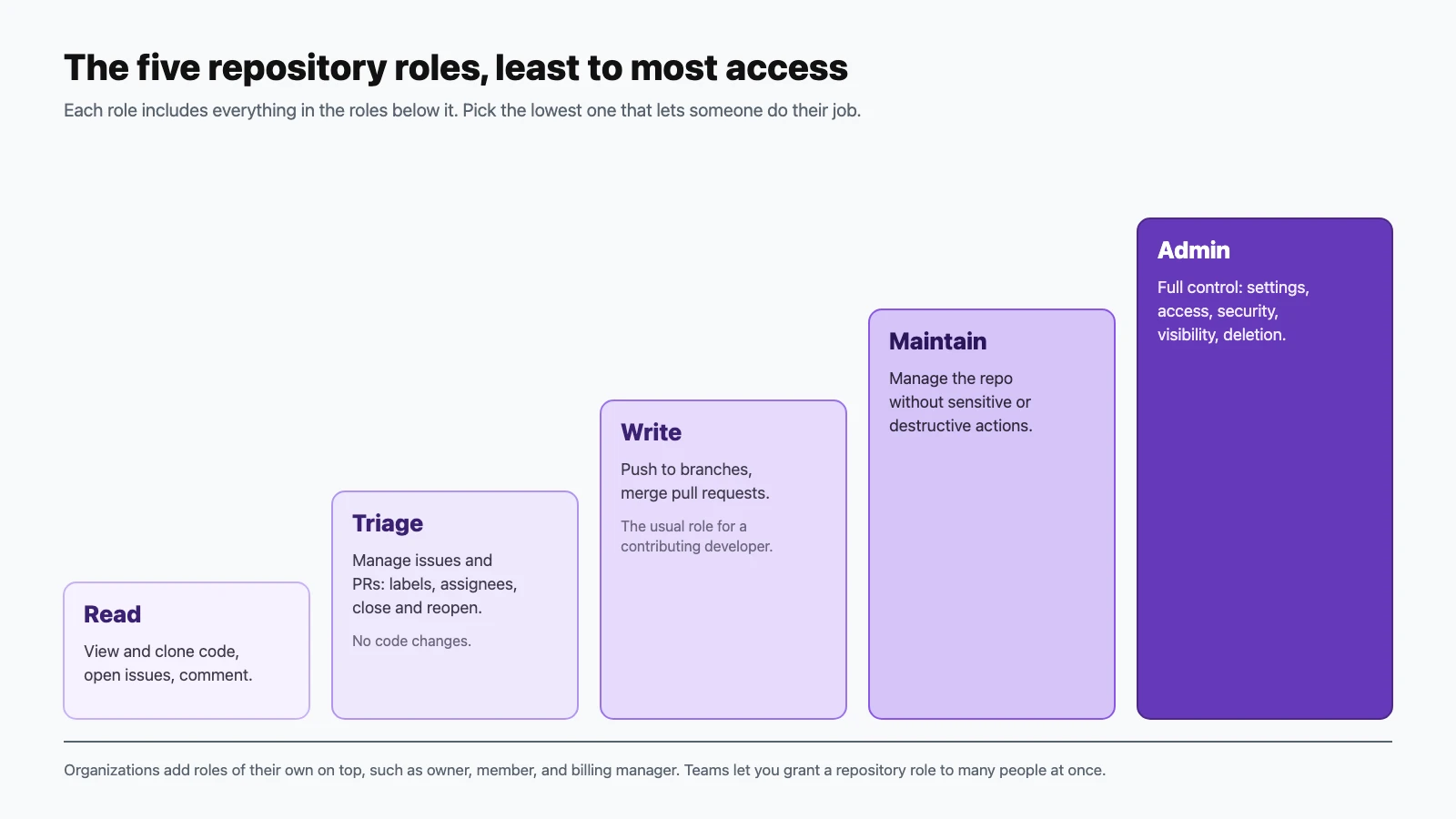
Which is the lowest repository role that can manage issues and pull requests (labels, assignees, closing) without being able to push code?
Show answer
Answer: A. Triage is designed for people who organize work but don't change code.
-
A developer needs to push branches and merge pull requests, but shouldn't change repository settings. Which role fits best?
Show answer
Answer: C. Write is the usual role for contributing developers. Settings changes need Maintain or Admin.
-
What distinguishes the Maintain role from Admin?
Show answer
Answer: B. Admin is full control. Maintain covers day-to-day repository management for project managers.
-
What can an organization owner do?
Show answer
Answer: D. Keep the number of owners small. Other organization roles, such as billing manager, are deliberately narrower.
-
Why use teams in an organization?
Show answer
Answer: C. Teams can be nested, so access changes for a group happen in one place.
-
What is an outside collaborator?
Show answer
Answer: A. Contractors are the typical example. They get specific repository access without full membership.
-
Which repository visibility makes a repository visible to all members of an enterprise, but not to the public?
Show answer
Answer: D. Internal repositories are only available to organizations owned by an enterprise account, and they're the foundation of InnerSource.
-
What is the main purpose of a branch protection rule on
main?Show answer
Answer: B. Branch protection rules and rulesets stop unreviewed or failing changes from reaching important branches.
-
Which statement about Enterprise Managed Users (EMU) is correct?
Show answer
Answer: A. EMU gives an enterprise central control over how accounts are created, how they sign in, and what they can access.
-
An organization on Copilot Business wants to control which Copilot features its members may use. Who sets these policies?
Show answer
Answer: C. Centralized Copilot policy management is one of the main reasons organizations choose Business or Enterprise.
-
You need to make sure everyone in your organization uses 2FA. What's the most effective approach?
Show answer
Answer: B. Once 2FA is required, members and outside collaborators without it lose access until they enable it.
Explore the GitHub community (5–10%)
Questions 91–100.
-
Which is a benefit of open source software?
Show answer
Answer: D. Open source lets anyone inspect, learn from, and improve software, subject to its license.
-
What is GitHub Sponsors?
Show answer
Answer: C. Sponsorship helps maintainers spend sustainable time on the projects many people rely on.
-
What happens when you follow a user on GitHub?
Show answer
Answer: A. Following keeps you informed without subscribing to every notification. You can follow organizations too.
-
What is the GitHub Marketplace for?
Show answer
Answer: D. It's the catalog for reusable GitHub Actions and GitHub Apps, both free and paid.
-
What is InnerSource?
Show answer
Answer: B. Internal visibility, clear contribution guidelines, and code review across teams are typical InnerSource building blocks.
-
You want to propose a change to a project you don't have write access to. What do you typically do?
Show answer
Answer: A. Forks stay connected to the upstream repository, which is what makes cross-repository pull requests possible.
-
When should you use a template repository instead of a fork?
Show answer
Answer: C. Templates are for starting new projects; forks are for contributing back.
-
A maintainer wants to point newcomers to approachable tasks. What's the common convention?
Show answer
Answer: B. GitHub surfaces issues with this label to people looking for a place to start contributing.
-
How can you make a public repository easier to discover?
Show answer
Answer: D. Topics classify a repository by subject, language, or purpose, and power topic pages and search.
-
Where can a maintainer check whether a public repository has the recommended community health files, such as a code of conduct, contributing guide, and license?
Show answer
Answer: C. The community standards checklist shows what's present and links to add anything missing.
Final tips for exam day
- Spend your time where the points are. Git and GitHub basics is up to 30% of the exam: GitHub Flow, Markdown, and core Git terms are near-guaranteed points.
- Learn the role ladder cold. "Lowest role that can…" questions come up a lot, and the answer is almost always Triage, Write, or Maintain.
- Know which tool fits which job: github.dev versus Codespaces, issues versus Discussions, forks versus templates, GitHub Desktop versus GitHub Mobile. Many questions are about choosing between two similar features.
- Click through it yourself. Create a project with an iteration field, add a CODEOWNERS file, open a codespace, try Copilot agent mode. Fifteen minutes of hands-on practice beats an hour of reading.
- Use the exam sandbox before exam day, so the interface doesn't cost you time.
Official resources
- GitHub Foundations certification page (Microsoft Learn): scheduling, the free practice assessment, and exam policies.
- Exam GH-900 study guide: the official skills list and change log.
- GitHub Foundations learning path, part 1 and part 2: free self-paced training.
- GitHub Docs: the source of truth for every feature in these questions.
For hands-on practice on this site, work through Git and GitHub from the Command Line: 100 Quick Lessons and GitHub Actions: 100 Quick Lessons in CI/CD.