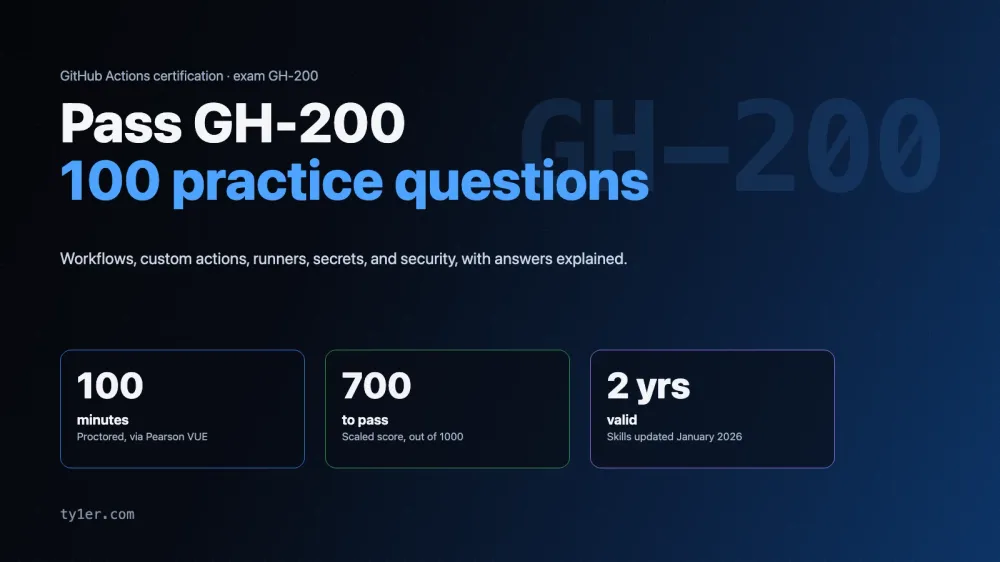
The GitHub Actions certification (exam GH-200) checks that you can build and run CI/CD on GitHub: writing workflows, debugging runs, creating custom actions, running Actions across an organization or enterprise, and keeping automation secure and efficient. It's an intermediate-level exam for DevOps engineers, developers, and administrators.
This guide covers the exam as of its January 2026 skills update, then gives you 100 original practice questions weighted like the real exam. Each one hides its answer and an explanation until you open it. Limits, defaults, and file locations in these questions were checked against GitHub's documentation in October 2026. The questions are written for practice; they aren't taken from the real exam.
The exam at a glance
- Exam code: GH-200, for the GitHub Actions certification. Level: intermediate.
- Time: 100 minutes. If the exam isn't offered in your language, you can request 30 extra minutes.
- Passing score: 700 or higher.
- Delivery: proctored, scheduled through Pearson VUE from the Microsoft Learn certification page. Price depends on the country where you take it.
- Languages: English, Spanish, Portuguese (Brazil), Korean, and Japanese.
- Retakes: you can retake 24 hours after a first failed attempt; later retakes have longer waits.
- Validity: 2 years. GitHub is moving its certifications to Microsoft's recertification process, and certifications that expire before that's in place are being extended by 6 months.
- Free extras: an official practice assessment and an exam sandbox that shows the real question interface.
Microsoft doesn't publish a fixed number of questions. Check the official pages linked at the end before you book, since details change.
The five domains and their weights
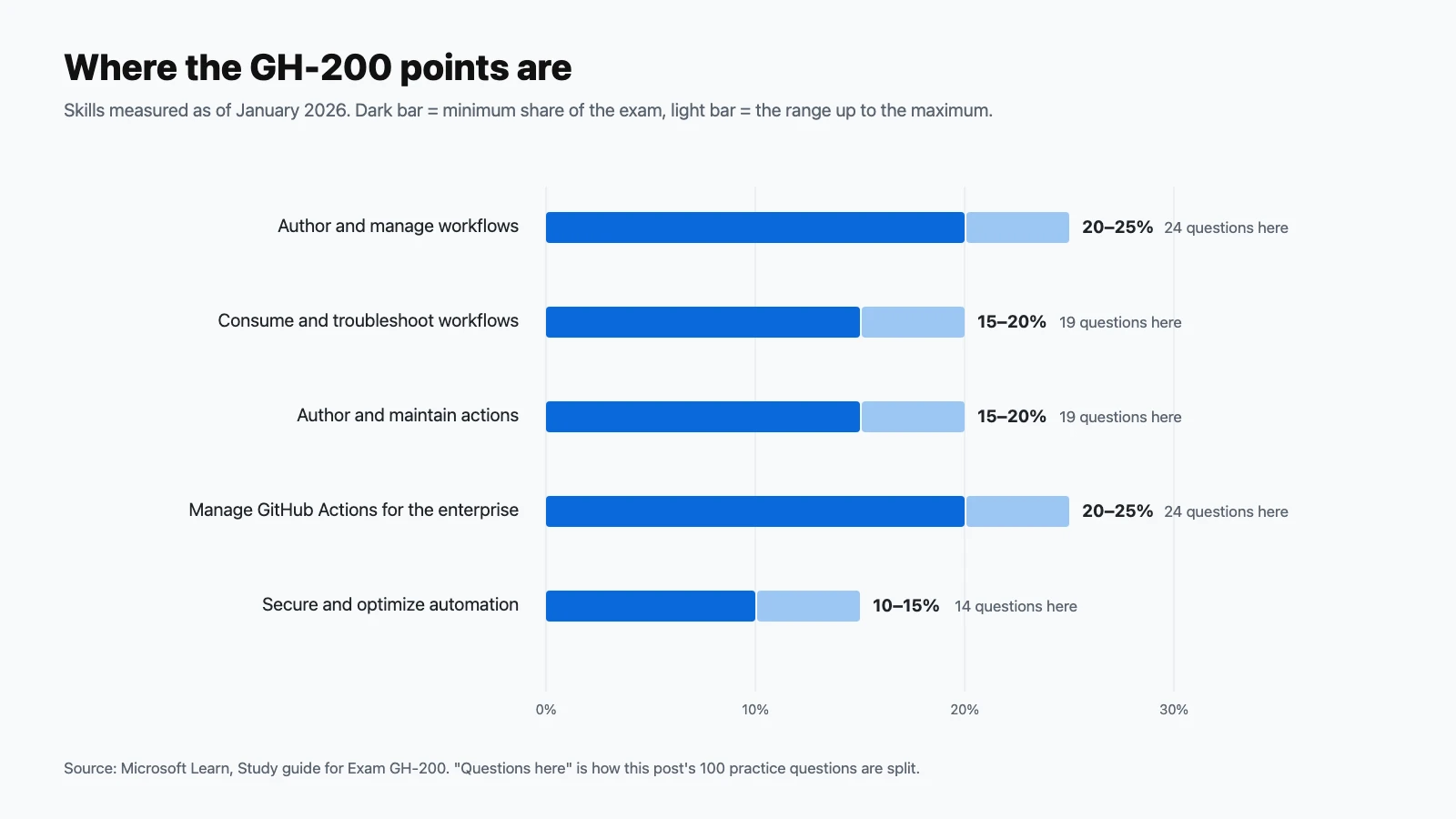
| Domain | Exam weight | Practice questions here |
|---|---|---|
| Author and manage workflows | 20–25% | 24 |
| Consume and troubleshoot workflows | 15–20% | 19 |
| Author and maintain actions | 15–20% | 19 |
| Manage GitHub Actions for the enterprise | 20–25% | 24 |
| Secure and optimize automation | 10–15% | 14 |
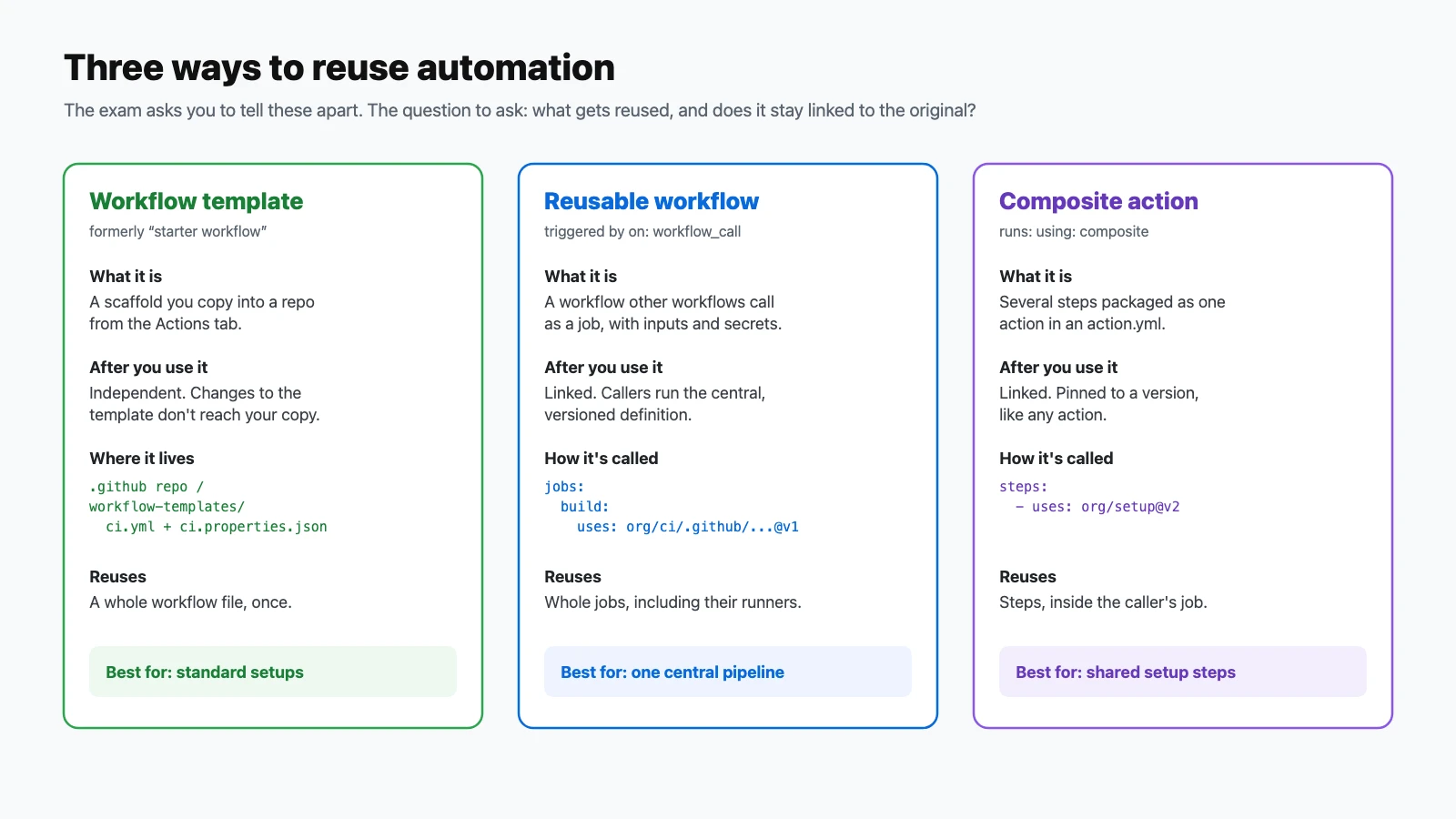
The January 2026 update rewrote every objective. New or expanded topics include YAML anchors and aliases in workflow files; runner image changes (Ubuntu 20.04 retired, windows-latest moving to Windows Server 2025); the differences between workflow templates, reusable workflows, and composite actions; immutable actions and version pinning; retention policies through the REST API; and artifact attestations.
How to use these questions
Answer each question before opening its answer, and tally your misses per domain. Questions marked Choose two need both correct options. Many questions are scenarios that ask for the best approach; think least privilege and the simplest built-in feature first, because that's usually the intended answer. If you get more than about 80% right, take the official practice assessment next.
Author and manage workflows (20–25%)
Questions 1–24.
-
A workflow should run every weekday at 06:00 in New York. What must you remember when writing its
schedulecron expression?Show answer
Answer: C. Scheduled workflows run in UTC by default. The shortest allowed interval is every 5 minutes.
-
Which trigger adds a manual Run workflow button and lets you start the workflow from the API or
gh workflow run?Show answer
Answer: B.
workflow_dispatchsupports typed inputs and manual runs. -
An external CI system needs to start a workflow by calling GitHub's REST API with a custom event type. Which trigger fits?
Show answer
Answer: D.
repository_dispatchis the webhook-style trigger for events from outside GitHub, and it can carry a custom payload. -
Which is not a valid
workflow_dispatchinput type?Show answer
Answer: C. Valid types are
boolean,choice,number,environment, andstring. -
Which trigger makes a workflow callable from other workflows?
Show answer
Answer: A. Declare the inputs, secrets, and outputs it accepts under
on: workflow_call. -
A caller workflow sets
env: REGION: us-west-2at the workflow level and calls a reusable workflow. Can the reusable workflow readREGION?Show answer
Answer: D. Pass values explicitly with
with:inputs, and secrets withsecrets:. -
A caller wants to pass all of its secrets to a reusable workflow in the same organization without listing each one. What does it use?
Show answer
Answer: B.
secrets: inheritpasses every secret the caller can access. Otherwise, map secrets one by one. -
Job
deploymust start only after jobstestandlintboth succeed. What do you add todeploy?Show answer
Answer: A. If any job in
needsfails, dependent jobs are skipped unless theirifsays otherwise. -
A step should run only when an earlier step in the job has failed, for example to send an alert. Which condition does it need?
Show answer
Answer: C.
failure()is true when any previous step failed.always()runs regardless of outcome. -
How does a step set an output that later steps can read as
steps.<id>.outputs.version?Show answer
Answer: B. The old
::set-outputcommand is deprecated. Writename=valuelines to the$GITHUB_OUTPUTfile, and give the step anid. -
A step needs to set an environment variable for every later step in the same job. How?
Show answer
Answer: D.
exportonly lasts for the current step's shell.$GITHUB_ENVcarries it to later steps. -
A test job needs a Postgres database. What's the recommended approach?
Show answer
Answer: C. Service containers start alongside the job, and health-check options make Actions wait until the service is ready.
-
A matrix tests three operating systems and two Node versions. You want to skip only Windows with Node 22. Which key do you use?
Show answer
Answer: A.
excluderemoves combinations;includeadds combinations or extra values. -
What's the default behavior when one job in a matrix fails?
Show answer
Answer: D. Set
fail-fast: falsewhen you want every combination's result. -
What does
strategy.max-parallelcontrol?Show answer
Answer: B. It's useful for capping load on shared resources or limited runners. A matrix can generate up to 256 jobs per run.
-
A workflow pinned to
runs-on: ubuntu-20.04stopped running. What's the most likely cause?Show answer
Answer: A. Hosted images get retired over time, and
-latestlabels move too.windows-latestnow points to Windows Server 2025. -
In a workflow file, what do YAML anchors (
&) and aliases (*) let you do?Show answer
Answer: C. Workflows support YAML anchors and aliases, for example reusing an
envblock or a whole job configuration. -
A step should only run if a secret named
DEPLOY_KEYis set. Why doesn'tif: secrets.DEPLOY_KEY != ''work, and what's the usual fix?Show answer
Answer: B. This is a documented limitation. Set the secret as an environment variable, then check the variable in the condition.
-
Inside a matrix job, which context holds the current combination's values, such as
osandnode?Show answer
Answer: D. Use
${{ matrix.os }}. Thestrategycontext holds things likefail-fastand the job index. -
Why can
run: echo "${{ github.event.issue.title }}"be dangerous?Show answer
Answer: C. Expressions are evaluated first and the result becomes part of the script. Pass untrusted values through
env:instead. -
How do you add a Markdown report, such as test results, to a run's summary page?
Show answer
Answer: A. Each step's summary content is collected and shown on the run's summary page.
-
Which URL pattern shows a workflow status badge in a README?
Show answer
Answer: D. You can add
?branch=mainto show a specific branch's status. -
A deployment job must wait for a person to approve it. Where do you configure that?
Show answer
Answer: B. The job pauses at the environment gate until an allowed reviewer approves.
-
Which editor tooling helps catch workflow mistakes as you type, such as unknown keys or wrong input names?
Show answer
Answer: A. Validating in the editor catches errors before you push and wait for a failed run.
Consume and troubleshoot workflows (15–20%)
Questions 25–43.
-
Where can you quickly see what event triggered each recent run of a workflow?
Show answer
Answer: C. Each run records its triggering event, such as
push,pull_request, orschedule. -
A run failed in one step out of forty. What's the fastest way to see only the relevant logs from the terminal?
Show answer
Answer: B.
--log-failedprints just the failed steps' logs. -
You need much more detail from the runner and steps to debug a failure. What do you do?
Show answer
Answer: D. Debug logging can be enabled for a single re-run, or for every run while the setting is present.
-
One job in a 12-job matrix failed because of a flaky network call. How do you retry just that job?
Show answer
Answer: C. Re-running a single job also re-runs any jobs that depend on it.
-
In the run view, a matrix job is shown as
test (macos-latest, 22). What do the values in parentheses tell you?Show answer
Answer: A. Matrix job names include their axis values, which makes failures easy to locate.
-
A workflow defines
defaults: &defaultscontainingLOG: infoandREGION: us, and a job'senvuses<<: *defaultsplusLOG: debug. What values does the job get?Show answer
Answer: D. The merge key brings in the anchored mapping, and keys written locally override the merged ones.
-
How do you download a run's artifact named
distfrom the terminal?Show answer
Answer: B.
-n(--name) picks artifacts by name;-pmatches a glob pattern. -
Which REST API endpoint lists a repository's workflow artifacts?
Show answer
Answer: A. Artifacts can also be downloaded and deleted through the Actions API.
-
You delete a workflow artifact by mistake. Can it be restored?
Show answer
Answer: C. Re-running the job that produced the artifact is the only way to get it back.
-
By default, how long does GitHub keep build logs and artifacts?
Show answer
Answer: B. The default is 90 days, and it can be changed at the repository, organization, and enterprise level.
-
Where does an organization store its own workflow templates?
Show answer
Answer: D. They then appear when members create a new workflow from the Actions tab.
-
What file must accompany each organization workflow template?
Show answer
Answer: C. It holds the required
nameanddescription, plus optionaliconName,categories, andfilePatterns. -
In a workflow template, what does the
$default-branchplaceholder do?Show answer
Answer: A. It lets one template work across repositories that use different default branch names.
-
A team creates a workflow from an organization template, and later the template is updated. What happens to the team's workflow?
Show answer
Answer: D. Use a reusable workflow instead when you want changes to reach every caller.
-
What's the key difference between a reusable workflow and a composite action?
Show answer
Answer: B. Use a reusable workflow to share a pipeline, and a composite action to share setup steps.
-
What's the difference between disabling a workflow and deleting its file?
Show answer
Answer: A. Disable from the Actions tab, or with
gh workflow disable. -
A public repository's scheduled workflow stopped running after a long quiet period. Why?
Show answer
Answer: C. Re-enable it from the Actions tab. Scheduled workflows in a fork of a public repository are also disabled by default.
-
How does a job call a reusable workflow that lives in another repository?
Show answer
Answer: B. Pin the reference to a tag, branch, or commit SHA. The workflow is called as a job, not a step.
-
A reusable workflow in a private repository can't be called from other repositories in the organization. What's the likely fix?
Show answer
Answer: D. Private and internal repositories must explicitly share their workflows and actions.
Author and maintain actions (15–20%)
Questions 44–62.
-
Which three types of custom actions can you build?
Show answer
Answer: C. Each type is declared in
action.ymlunderruns.using. -
Which custom action type can only run on Linux runners?
Show answer
Answer: A. Docker container actions only execute on runners with a Linux operating system. JavaScript and composite actions run on Linux, macOS, and Windows.
-
What must an action's metadata file be named?
Show answer
Answer: D.
action.ymlis preferred. -
Which three top-level keys are required in an action's metadata file?
Show answer
Answer: B.
inputs,outputs, andbrandingare optional. -
Which
runs.usingvalues are valid for a JavaScript action?Show answer
Answer: A. Docker container actions use
docker, and composite actions usecomposite. -
A
runstep inside a composite action fails validation. What's a likely cause?Show answer
Answer: C. Unlike workflow steps, composite action
runsteps must declare their shell explicitly. -
A JavaScript action must remove a temporary credential file after the main code finishes. Which metadata key handles this?
Show answer
Answer: B.
postruns at the end of the job aftermain;preruns at the start. -
How does a JavaScript action typically read an input named
api-url?Show answer
Answer: D. Inputs are passed as
INPUT_environment variables; the toolkit handles the details. -
How does an action make an output available to the workflow that uses it?
Show answer
Answer: C. The workflow then reads it as
steps.<id>.outputs.<name>. -
Which workflow command, used inside an action, hides a dynamically generated value from all later logs?
Show answer
Answer: A. Secrets from the
secretscontext are masked automatically; values you generate at runtime needadd-mask. -
What does the
@actions/corenpm package provide?Show answer
Answer: D. Companion packages such as
@actions/githubadd an authenticated API client. -
Why must a JavaScript action commit its dependencies (such as
node_modules), or bundle them into a single file?Show answer
Answer: B. Bundling with a tool like
@vercel/ncckeeps the repository small. -
What is the
brandingsection ofaction.ymlfor?Show answer
Answer: A. It's optional, but it makes the action recognizable in listings.
-
Which is a requirement for publishing an action to GitHub Marketplace?
Show answer
Answer: C. The action's
namemust also be unique, and the owner must accept the Marketplace Developer Agreement. -
What security requirement applies to the account publishing an action to GitHub Marketplace?
Show answer
Answer: B. Publishing to Marketplace requires 2FA.
-
Which versioning practice do GitHub's guidelines recommend for actions?
Show answer
Answer: D. Users can pin
@v1for compatible updates, a full release tag, or a commit SHA for maximum safety. -
You want an action to be usable only inside your enterprise, not publicly. Which option fits?
Show answer
Answer: C. Actions can be public (optionally on Marketplace), shared privately within an organization or enterprise, or local to one repository.
-
A workflow fails with an error saying it can't find or resolve an action. Which is a likely cause?
Show answer
Answer: A. Check the
OWNER/REPO@refspelling, that the ref exists, and repository access settings. -
What does making action releases immutable protect against?
Show answer
Answer: D. If a version can't change, pinning to it gives you exactly the code you reviewed. The exam ties this to version-pinning practice.
Manage GitHub Actions for the enterprise (20–25%)
Questions 63–86.
-
A platform team wants every repository in the organization to share one CI pipeline whose updates reach all callers. What should they publish?
Show answer
Answer: B. Callers pin a version of the central workflow; updating it updates everyone who follows that version.
-
Which is a valid organization policy for which actions workflows may use?
Show answer
Answer: A. Options range from allowing all actions to tightly limiting them, with patterns for specific approved actions.
-
An enterprise sets an Actions policy, and an organization owner tries to set a less restrictive one. What happens?
Show answer
Answer: C. Policies cascade downward: enterprise, then organization, then repository.
-
What's a key difference between GitHub-hosted and self-hosted runners?
Show answer
Answer: B. With self-hosted runners you're responsible for the operating system, tools, updates, and cleanup between jobs.
-
Which network access does a self-hosted runner need to work?
Show answer
Answer: D. The runner application polls GitHub for jobs over outbound HTTPS.
-
Which labels are applied automatically to a self-hosted runner?
Show answer
Answer: C. Add custom labels for capabilities, and target them with
runs-on: [self-hosted, linux, gpu]. -
What are runner groups for?
Show answer
Answer: A. Runner groups are the access-control layer for shared runners.
-
A new self-hosted runner is registered at the organization level without choosing a group. Where does it go?
Show answer
Answer: D. Restrict the Default group's access, or create dedicated groups, to keep runners from being used too widely.
-
Why is attaching self-hosted runners to a public repository risky?
Show answer
Answer: B. GitHub recommends self-hosted runners only for private repositories, or very careful isolation.
-
What does registering a self-hosted runner as ephemeral do?
Show answer
Answer: A. Ephemeral runners are a common hardening and autoscaling pattern.
-
Which GitHub-maintained project autoscales self-hosted runners on Kubernetes?
Show answer
Answer: C. ARC scales runner pods up and down based on demand.
-
An organization's IP allow list blocks GitHub-hosted runners from reaching its resources. What's a supported way to make that work?
Show answer
Answer: B. Standard hosted runners use shared, changing IP ranges; larger runners can have static IPs.
-
A self-hosted runner shows as offline. What should you check?
Show answer
Answer: D. Most offline runners come down to a stopped service, the network, or expired registration.
-
Where can you find which tools and versions come preinstalled on GitHub-hosted runners?
Show answer
Answer: C. Check the image's software list before adding install steps; you may not need them.
-
A workflow needs a tool version that isn't on the hosted image. What's the recommended approach?
Show answer
Answer: A.
setup-*actions use the runner's tool cache when the version is already there. -
Which repository access options does an organization-level secret offer?
Show answer
Answer: D. Selected-repository access is the least-privilege choice for sensitive organization secrets.
-
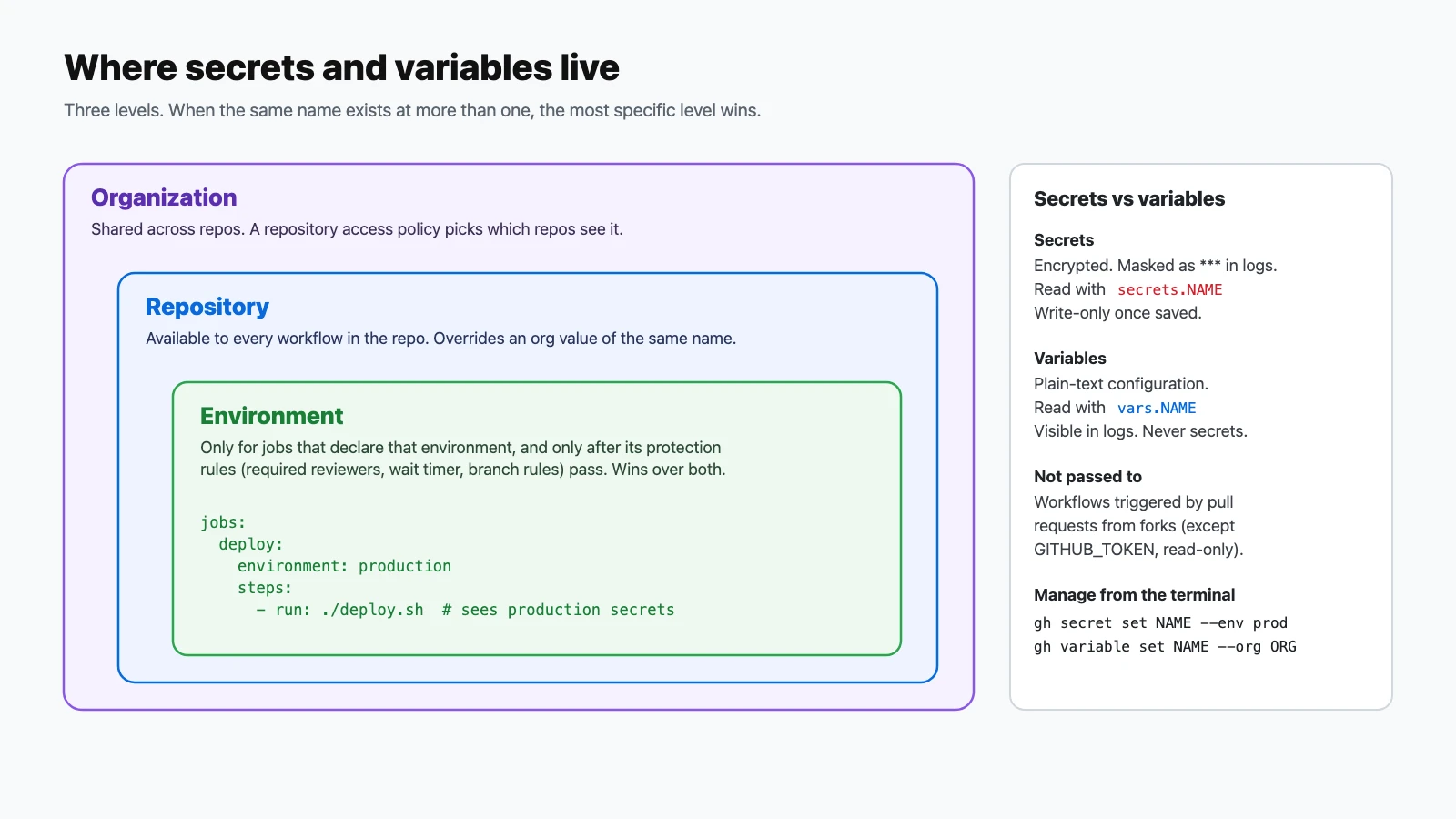
A secret named
API_KEYexists at the organization, repository, and environment levels. A job using that environment readssecrets.API_KEY. Which value does it get?Show answer
Answer: B. The most specific level wins: environment, then repository, then organization.
-
When are environment secrets available to a job?
Show answer
Answer: A. This keeps production credentials out of jobs that don't deploy.
-
What does setting a secret through the REST API require that
gh secret sethandles for you?Show answer
Answer: C. The API only accepts sealed values;
ghfetches the public key and encrypts for you. -
When should you use a configuration variable instead of a secret?
Show answer
Answer: B. Variables are plain text and appear in logs; secrets are encrypted and masked.
-
Which command sets an organization secret that only two named repositories can use?
Show answer
Answer: D.
--orgtargets the organization and--reposlimits access to specific repositories. -
A workflow triggered by a pull request from a fork tries to read a repository secret. What happens?
Show answer
Answer: C. This stops untrusted code from exfiltrating secrets.
-
Which two kinds of runs don't consume billed GitHub Actions minutes? (Choose two.)
Show answer
Answer: C and D. Standard hosted runners are free in public repositories, and self-hosted runners aren't billed for minutes. Larger runners are always billed.
-
An organization wants to reuse one runner pool across many repositories but keep production deploy jobs on separate machines. What's the cleanest setup?
Show answer
Answer: D. Runner groups control access; labels let jobs target specific machines.
Secure and optimize automation (10–15%)
Questions 87–100.
-
Which feature adds a human approval step before a job can use production credentials?
Show answer
Answer: B. Environment protection rules, such as required reviewers, wait timers, and branch restrictions, gate the job.
-
Which signals help you judge whether a Marketplace action is trustworthy? (Choose two.)
Show answer
Answer: A and C. Read the source, check maintenance, and still pin to a full commit SHA.
-
What's the safest way to use a pull request title in a
runstep?Show answer
Answer: C. Values in environment variables are treated as data by the shell, not as code.
-
Which of these values can an attacker control in a workflow triggered by a pull request?
Show answer
Answer: B. Titles, bodies, branch names, and commit messages are all user-supplied input.
-
When is
GITHUB_TOKENcreated, and when does it expire?Show answer
Answer: D. It's ephemeral and scoped to the repository that contains the workflow.
-
How does
GITHUB_TOKENdiffer from a personal access token?Show answer
Answer: C. Prefer
GITHUB_TOKENwith minimalpermissions, and reach for a PAT or GitHub App token only when you need more. -
How do you restrict
GITHUB_TOKENto read-only repository contents for a whole workflow?Show answer
Answer: A. Widen permissions only on the specific jobs that need write access.
-
A workflow pushes a commit using
GITHUB_TOKEN. Will that push trigger the repository'son: pushworkflows?Show answer
Answer: D. This prevents accidental infinite loops of workflows triggering each other.
-
Which permission must a job have to request an OIDC token for cloud federation?
Show answer
Answer: B. With OIDC, the cloud provider trusts a short-lived token instead of a stored long-lived secret.
-
What's the most secure way to reference a third-party action?
Show answer
Answer: A. A SHA can't be moved to different code, unlike branches and tags.
-
What do artifact attestations give you?
Show answer
Answer: C. Generate them with
actions/attest-build-provenance, which needsid-token: writeandattestations: write. -
Which statement about the dependency cache is correct?
Show answer
Answer: B. Design keys with
hashFilesand userestore-keysfor prefix fallbacks. -
Build artifacts are filling storage, but they're only needed for a day. What's the best fix?
Show answer
Answer: D. Retention can be tuned per artifact and at the repository, organization, and enterprise level.
-
Which two changes reduce wasted runner time on busy pull requests? (Choose two.)
Show answer
Answer: A and D. Cancel superseded runs and skip runs that can't be affected by the change.
Final tips for exam day
- Workflow authoring and enterprise management are nearly half the exam. Know triggers, contexts,
GITHUB_OUTPUTandGITHUB_ENV, runner groups, policies, and secret scopes cold. - Learn the limits and defaults: a 360-minute job timeout, up to 256 matrix jobs, a 5-minute minimum schedule in UTC, a 10 GB cache with 7-day eviction, 90-day log and artifact retention, 10 levels of reusable-workflow nesting, and up to 50 unique reusable workflows per workflow file.
- Know the exceptions: secrets can't be used directly in
if:, the caller's workflow-levelenvdoesn't reach a reusable workflow, Docker actions only run on Linux, and events created withGITHUB_TOKENdon't start new runs (exceptworkflow_dispatchandrepository_dispatch). - On security questions, pick least privilege: pin by SHA, minimal
permissions, OIDC instead of stored cloud keys, environments with reviewers, and untrusted input passed throughenv. - Build one of each: a reusable workflow, a composite action, a JavaScript action, and an organization workflow template. An afternoon of hands-on practice covers a lot of the exam.
Official resources
- GitHub Actions certification page (Microsoft Learn): scheduling, the free practice assessment, and exam policies.
- Exam GH-200 study guide: the official skills list and change log.
- Automate your workflow with GitHub Actions: the free self-paced learning path.
- GitHub Actions documentation: the source of truth for every feature in these questions.
For hands-on practice, work through GitHub Actions: 100 Quick Lessons in CI/CD. Preparing for more GitHub certifications? See the GitHub Foundations (GH-900) and GitHub Copilot (GH-300) practice guides.