The GitHub Copilot certification (exam GH-300) checks that you can use Copilot well and safely: responsible AI, agent mode, Copilot CLI, code review, prompt engineering, how Copilot handles data, and the settings that keep sensitive code out of it. It's an intermediate-level exam for developers, DevOps engineers, and technology managers who already know GitHub basics.
This guide covers the exam as of its August 7, 2026 skills update, then gives you 100 original practice questions weighted like the real exam. Each one hides its answer and an explanation until you open it. Copilot changes quickly, so every product detail here was checked against GitHub's documentation in October 2026. These questions are written for practice; they aren't taken from the real exam.
The exam at a glance
- Exam code: GH-300, for the GitHub Copilot certification. Level: intermediate.
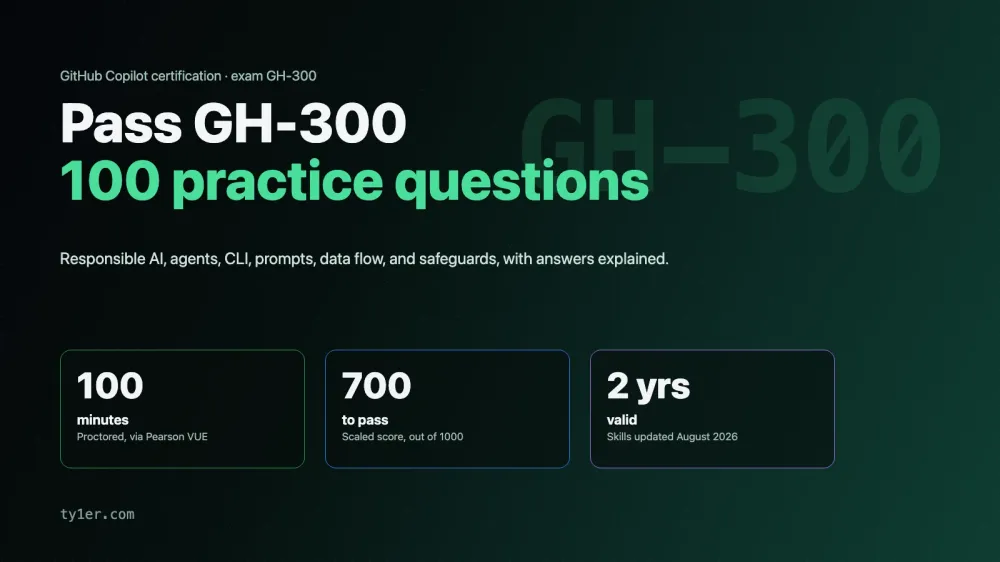
- Time: 100 minutes. If the exam isn't offered in your language, you can request 30 extra minutes.
- Passing score: 700 or higher.
- Delivery: proctored, scheduled through Pearson VUE from the Microsoft Learn certification page. Price depends on the country where you take it.
- Languages: English, Spanish, Portuguese (Brazil), Korean, and Japanese.
- Retakes: you can retake 24 hours after a first failed attempt; later retakes have longer waits.
- Validity: 2 years. GitHub is moving its certifications to Microsoft's recertification process, and certifications that expire before that's in place are being extended by 6 months.
- Free extras: an official practice assessment and an exam sandbox that shows the real question interface.
Unlike GitHub Foundations, which doesn't expire, GH-300 needs renewing. Check the official pages linked at the end before you book, since details change.
The domains and their weights
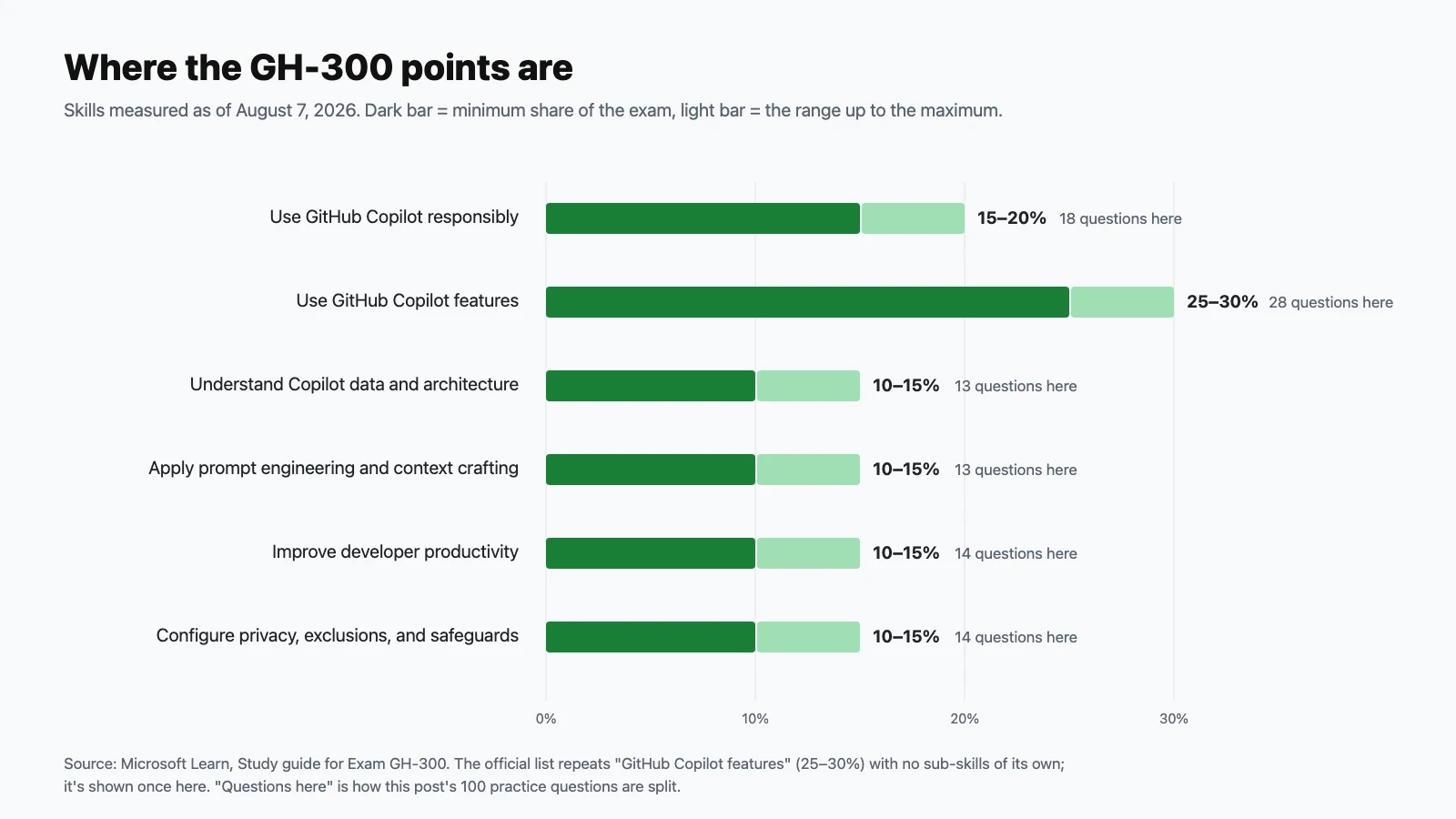
| Domain | Exam weight | Practice questions here |
|---|---|---|
| Use GitHub Copilot responsibly | 15–20% | 18 |
| Use GitHub Copilot features | 25–30% | 28 |
| Understand GitHub Copilot data and architecture | 10–15% | 13 |
| Apply prompt engineering and context crafting | 10–15% | 13 |
| Improve developer productivity with GitHub Copilot | 10–15% | 14 |
| Configure privacy, content exclusions, and safeguards | 10–15% | 14 |
One oddity: Microsoft's "skills at a glance" list shows the features domain twice, as "Use GitHub Copilot features" and "GitHub Copilot features", both at 25–30%. Only one of them has any skills listed, so it reads as a duplicate, and this guide treats the exam as six domains. The August 2026 update made minor changes to the IDE, features, and safeguards objectives. Newer topics include Copilot CLI, agent sessions and sub-agents, Copilot Spaces, Spark, instructions files, and managing seats through the REST API.
How to use these questions
Answer each question before opening its answer, and tally your misses per domain. If you get more than about 80% right, take the official practice assessment next. Several questions describe features that change often; when one surprises you, check GitHub's docs instead of relying on memory, because that's what the exam rewards.
Use GitHub Copilot responsibly (15–20%)
Questions 1–18.
-
Why do you need to review code that Copilot generates before using it?
Show answer
Answer: C. Copilot predicts likely code; it doesn't verify it. GitHub's own docs warn that suggestions may look valid but be semantically or syntactically wrong.
-
What does it mean when an AI tool "hallucinates"?
Show answer
Answer: B. Hallucinations are why you check unfamiliar APIs against real documentation before trusting them.
-
Copilot suggests a database query built by concatenating user input into a SQL string. What's the best response?
Show answer
Answer: D. Content filters reduce insecure suggestions but don't guarantee secure code. You're responsible for spotting injection risks.
-
Copilot's training data comes from many sources. What risk does that create?
Show answer
Answer: C. GitHub's responsible-use documentation lists bias carried over from training data as a known limitation.
-
A developer commits code that Copilot wrote and it causes a production outage. Who is accountable?
Show answer
Answer: A. Accountability stays with people. Copilot is a tool; the person who accepts, reviews, and merges the code owns it.
-
Which of these is not one of Microsoft's six responsible AI principles?
Show answer
Answer: D. The six principles are fairness, reliability and safety, privacy and security, inclusiveness, transparency, and accountability.
-
In responsible AI, what does the transparency principle ask for?
Show answer
Answer: B. Users should know when they're working with AI output and what it can and can't do.
-
A new team member accepts Copilot suggestions they don't understand. What's the main risk?
Show answer
Answer: A. Over-reliance is a recognized harm. Ask Copilot Chat to explain the code, and read it before accepting.
-
What should you avoid pasting into a Copilot Chat prompt?
Show answer
Answer: C. Treat prompts like any data you'd send to a service: never include credentials. Use placeholders instead.
-
Copilot suggests an API call that was deprecated in the latest version of a library. Why might this happen?
Show answer
Answer: B. Check suggestions against current documentation, especially for fast-moving libraries.
-
Copilot cloud agent has opened a pull request with a feature you asked for. What's the responsible next step?
Show answer
Answer: D. Human review stays in the loop. Agent pull requests go through the same review and checks as a teammate's.
-
In agent mode, Copilot proposes running a terminal command that deletes a directory. What should you do?
Show answer
Answer: C. Agent mode can run commands, so treat each one as if you were typing it yourself.
-
Copilot generates unit tests that all pass on the first run. What should you check?
Show answer
Answer: A. Generated tests can be shallow or assert whatever the current code does, bugs included.
-
Which mitigation best reduces the risk of unknowingly using code that matches licensed public code?
Show answer
Answer: D. Depending on your policy, matches are blocked or shown with information about the matching code and its license.
-
Copilot writes a form validation function that rejects names containing apostrophes or accents. Which responsible AI principle is most at stake?
Show answer
Answer: B. Assumptions baked into generated code can exclude real users. Reviewing for them is part of using AI responsibly.
-
Which statement about Copilot's limitations is correct?
Show answer
Answer: A. Copilot only knows what's in its context. Instructions files, open files, and specific prompts close the gap.
-
A teammate argues that because Copilot passed a security review once, its suggestions no longer need review. What's wrong with this?
Show answer
Answer: C. Model output varies from request to request. Review is per change, not per tool.
-
What's the best description of how to operate Copilot responsibly day to day?
Show answer
Answer: B. Copilot speeds you up, but you still make the decisions.
Use GitHub Copilot features (25–30%)
Questions 19–46.
-
What do you need to start using Copilot in VS Code?
Show answer
Answer: D. Sign in with a GitHub account that has a Copilot plan. Copilot isn't available for GitHub Enterprise Server.
-
Copilot shows a grey inline suggestion as you type. Which key accepts it?
Show answer
Answer: C. Tab accepts, Esc dismisses. You can also accept word by word.
-
In VS Code, how do you open Copilot chat directly inside the editor, at your cursor?
Show answer
Answer: A. Inline chat edits code in place. The Chat view is better for longer conversations.
-
What can Copilot agent mode do that ask mode can't?
Show answer
Answer: D. Agent mode works autonomously on a task, with you approving commands and reviewing edits.
-
What is the Model Context Protocol (MCP) used for with Copilot?
Show answer
Answer: B. MCP is an open protocol. MCP servers give agent mode new tools it can call.
-
In VS Code, which file configures MCP servers for a specific workspace?
Show answer
Answer: A. Committing
.vscode/mcp.jsonshares the same MCP setup with everyone who opens the workspace. -
Why delegate part of a task to a sub-agent?
Show answer
Answer: C. The study guide pairs sub-agents with "optimized context usage": a side task doesn't fill the main conversation with detail.
-
How do you install GitHub Copilot CLI with npm?
Show answer
Answer: B. It needs Node.js 22 or later. Homebrew, WinGet, and an install script are alternatives.
-
After installing Copilot CLI, which command starts its interactive interface?
Show answer
Answer: D. On first launch, if you aren't signed in, it asks you to use
/login. -
In Copilot CLI, what does the
/delegatecommand do?Show answer
Answer: C. Use it when a task can finish in the background as a pull request instead of in your terminal.
-
Which Copilot CLI slash command lets you choose which AI model to use?
Show answer
Answer: A.
/clearstarts a new conversation,/mcpmanages MCP servers, and/resumepicks up a previous session. -
Which Copilot CLI slash command manages MCP server configuration?
Show answer
Answer: D.
/mcpcan list, add, edit, enable, or disable MCP servers. -
You want to return to a Copilot CLI conversation you had yesterday. What do you use?
Show answer
Answer: B. Sessions are saved, so you can pick work back up with its context intact.
-
Copilot CLI won't start for a developer whose colleagues use it fine. What's a likely cause?
Show answer
Answer: A. Organization owners and enterprise administrators control CLI availability with policies.
-
How do you ask Copilot to review a pull request on GitHub.com?
Show answer
Answer: C. By default, Copilot only reviews a pull request when you request it. Automatic reviews can be turned on in settings or rulesets.
-
Does an approving review from Copilot count toward a branch's required approvals?
Show answer
Answer: B. By default, Copilot's reviews don't count toward required approvals.
-
How can an organization run Copilot code review automatically on every new pull request?
Show answer
Answer: D. Options include reviewing when a PR opens, on each new push, and on drafts.
-
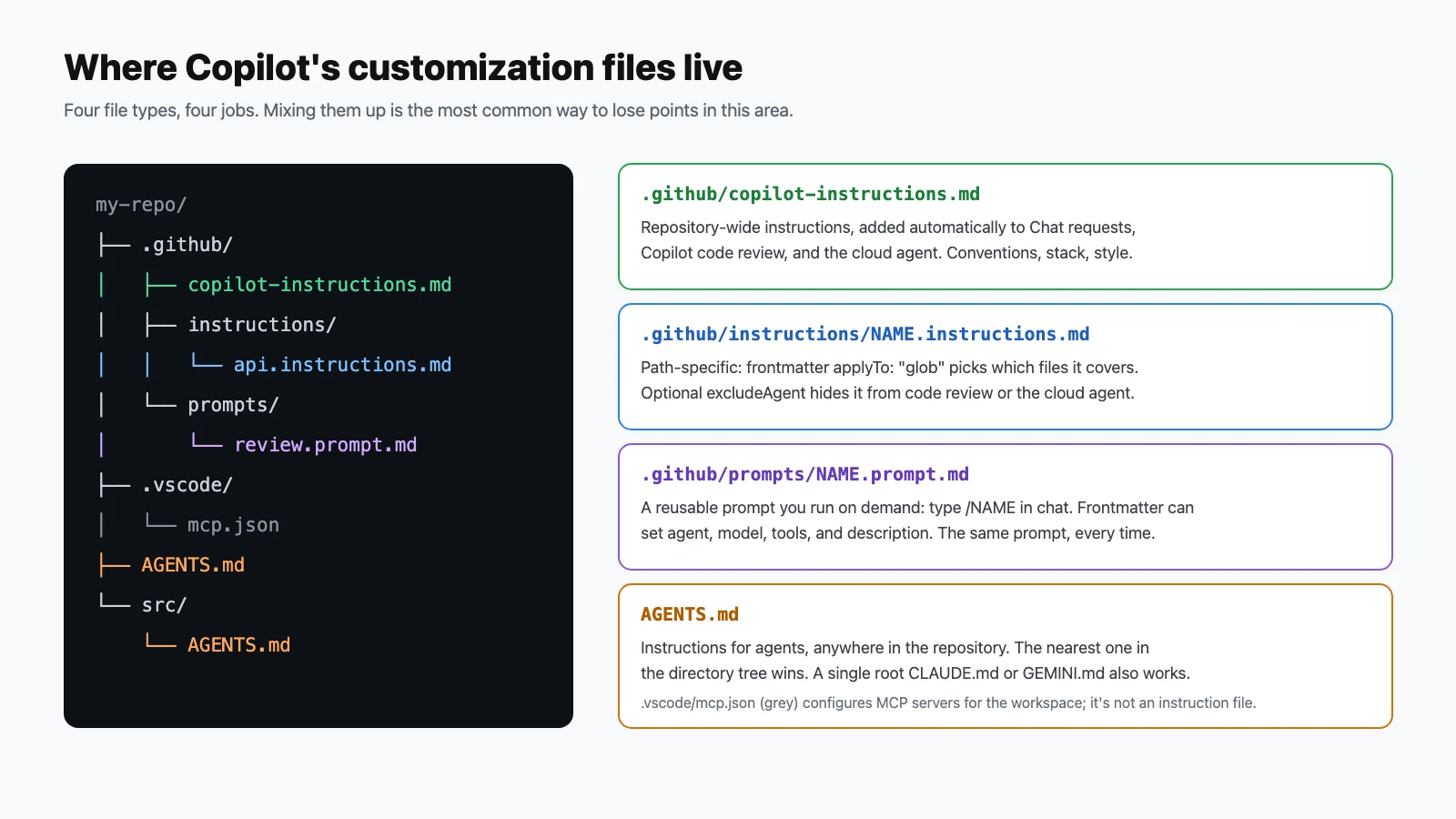
Where do repository-wide custom instructions for Copilot live?
Show answer
Answer: C. They're added to Copilot Chat requests and used by Copilot code review and the cloud agent.
-
You want one set of instructions to apply only to files under
api/. What do you create?Show answer
Answer: A. Path-specific instruction files use the
applyTofrontmatter key to target files. -
A repository has an
AGENTS.mdat the root and another insrc/. An agent edits a file insrc/. Which file's instructions take precedence?Show answer
Answer: D. The nearest
AGENTS.mdwins, so subprojects can carry their own guidance. -
What are prompt files for?
Show answer
Answer: B. Prompt files give a team consistent, reusable prompts. Frontmatter can set the agent, model, and tools.
-
What are Copilot Spaces?
Show answer
Answer: A. Spaces let teams curate the knowledge Copilot should draw on for a topic or project.
-
What is GitHub Spark?
Show answer
Answer: C. You describe an app; Spark builds it, and you refine it with more prompts or code.
-
What can Copilot generate for you when you open a pull request on GitHub.com?
Show answer
Answer: B. Pull request summaries save writing time, but check them for accuracy before posting.
-
In Copilot Chat in VS Code, which slash command generates tests for the selected code?
Show answer
Answer: D.
/explainexplains code,/fixproposes fixes, and/testswrites tests. -
A Copilot Chat answer was unhelpful. What's the built-in way to tell GitHub?
Show answer
Answer: C. Feedback controls on chat responses are the intended channel.
-
An organization owner wants to stop members from using Copilot in the CLI while still allowing it in IDEs. Where is that controlled?
Show answer
Answer: A. Organization policies control feature availability across IDEs, the CLI, and GitHub.com.
-
Which REST API endpoint lists every Copilot seat assigned in an organization?
Show answer
Answer: D.
POSTandDELETEon/orgs/{org}/copilot/billing/selected_usersadd and remove users.
Understand GitHub Copilot data and architecture (10–15%)
Questions 47–59.
-
For an inline suggestion, which context does Copilot use?
Show answer
Answer: B. That's why opening related files and closing unrelated ones improves suggestions.
-
What is the "prompt" in Copilot's architecture?
Show answer
Answer: A. Even inline suggestions have a prompt, built automatically from your editor's context.
-
Which statement about how Copilot filters generated output is correct?
Show answer
Answer: C. GitHub's responsible-use documentation describes these filters on generated suggestions.
-
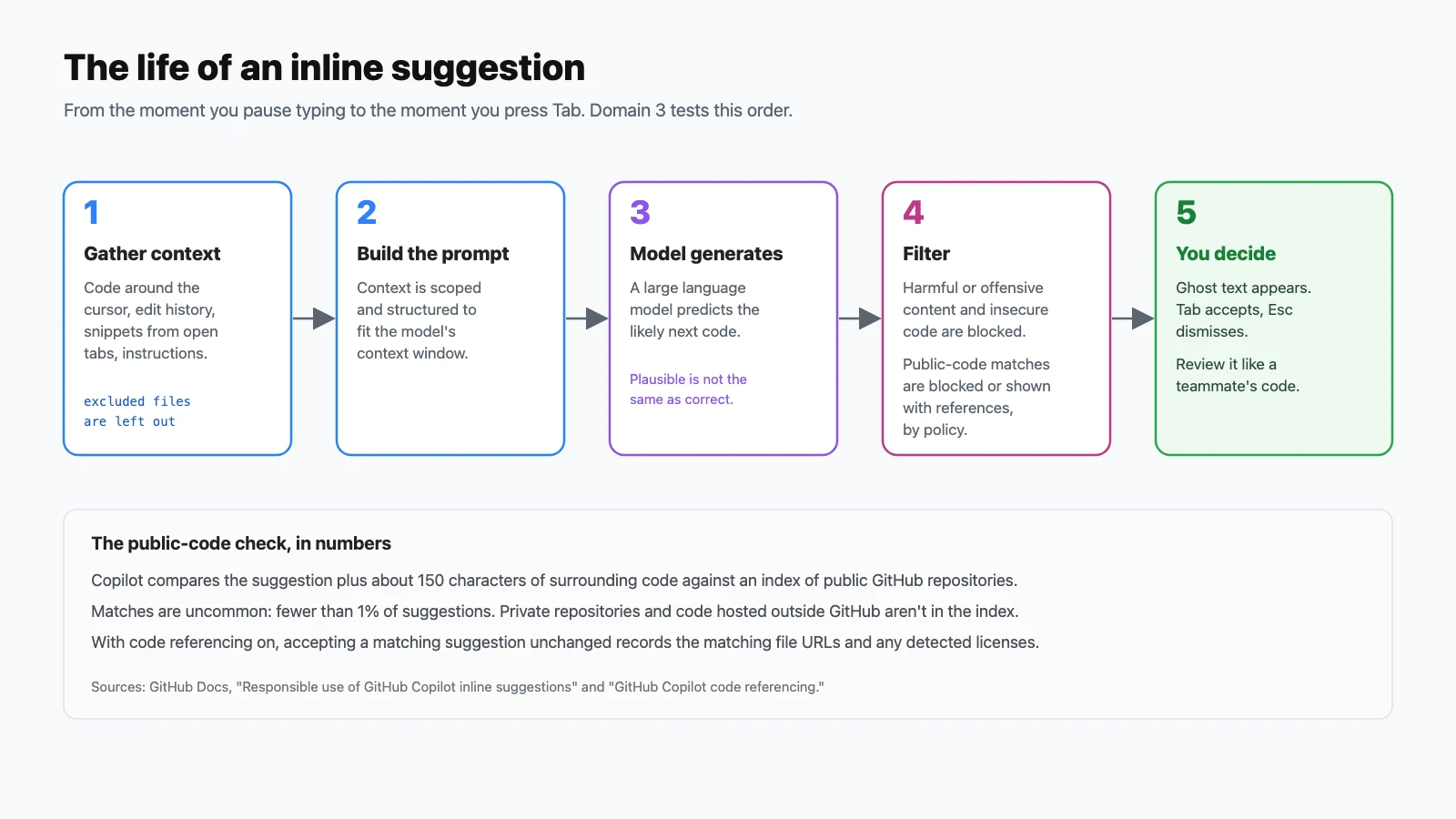
When checking for matches with public code, how much surrounding code does Copilot compare along with the suggestion?
Show answer
Answer: B. Copilot compares the suggestion plus roughly 150 characters of surrounding code against an index of public repositories on GitHub.
-
Roughly how often do Copilot suggestions match public code?
Show answer
Answer: D. Matches are uncommon, which is why a filter or reference is enough to manage them.
-
With code referencing enabled, what does Copilot record when you accept a matching inline suggestion unchanged?
Show answer
Answer: C. Only accepted, unchanged suggestions are checked this way. Edited suggestions aren't.
-
Which code is not part of the index Copilot checks for public-code matches?
Show answer
Answer: A. The index covers public repositories on GitHub.com only.
-
Which order correctly describes the life of an inline suggestion?
Show answer
Answer: D. Context first, then generation, then filtering, then your decision.
-
Why can't Copilot simply read your entire large codebase for every suggestion?
Show answer
Answer: B. Context limits are why instructions files, Spaces, and specific prompts matter.
-
You send the same prompt to Copilot twice and get two different answers. Why?
Show answer
Answer: A. Variation is normal. It's one more reason every result needs review.
-
Inline suggestions are designed to produce what kind of output?
Show answer
Answer: C. Inline suggestions target code. Use Copilot Chat for explanations in natural language.
-
In a Copilot Chat conversation, how do earlier messages affect a new question?
Show answer
Answer: B. Start a new conversation when you change topics, so old context doesn't steer the new answer.
-
A suggestion appears in a language you rarely use and looks lower quality. What explains this?
Show answer
Answer: D. GitHub notes that the composition of training data affects quality by language.
Apply prompt engineering and context crafting (10–15%)
Questions 60–72.
-
What is zero-shot prompting?
Show answer
Answer: C. Zero-shot relies entirely on the instruction and context.
-
What is few-shot prompting?
Show answer
Answer: A. Examples are the fastest way to get output in a specific format or style.
-
Which prompt is most likely to get useful code from Copilot Chat?
Show answer
Answer: D. Specific language, inputs, outputs, and constraints leave less for the model to guess.
-
A large feature request gives poor results in one prompt. What's the best technique?
Show answer
Answer: B. Smaller tasks keep each request focused and easier to verify.
-
How can you steer inline suggestions without opening chat?
Show answer
Answer: A. Comments and names are part of the context Copilot reads.
-
Which action is most likely to improve inline suggestions for a module you're writing?
Show answer
Answer: C. Snippets from open tabs are part of the context Copilot uses.
-
Why close unrelated files when working with Copilot?
Show answer
Answer: B. Relevant context helps; irrelevant context dilutes it.
-
Which elements make up a well-structured prompt?
Show answer
Answer: D. Goal, context, constraints, and examples cover most of what the model needs.
-
In VS Code chat, how do you make sure a specific file is included as context?
Show answer
Answer: C. Explicit references beat hoping Copilot finds the right file on its own.
-
Copilot's first answer is close but uses the wrong library. What should you do?
Show answer
Answer: A. Iterating with follow-ups uses the conversation's history to refine the result.
-
You've finished one task in Copilot Chat and are starting an unrelated one. What's best practice?
Show answer
Answer: D. Chat history is context. Old topics can steer new answers in the wrong direction.
-
You want Copilot to always use your team's naming conventions without repeating them in every prompt. What should you use?
Show answer
Answer: B. Instructions files add the same context to every request automatically.
-
Which is a prompt engineering principle?
Show answer
Answer: A. The clearer the request, the less the model has to infer.
Improve developer productivity with GitHub Copilot (10–15%)
Questions 73–86.
-
How can Copilot help most when you join a project with an unfamiliar codebase?
Show answer
Answer: C. Explanations in the editor cut down on context switching to docs and search.
-
Which task is a good use of Copilot for documentation?
Show answer
Answer: B. Copilot drafts quickly; you make sure it describes what the code actually does.
-
How can Copilot help when refactoring a long function?
Show answer
Answer: D. Pair refactoring with tests so you know behavior didn't change.
-
You need 50 realistic but fake customer records for a demo. How can Copilot help?
Show answer
Answer: C. Synthetic sample data is a classic productivity win, and it keeps real personal data out of demos.
-
Your team must move an old application to a modern language and framework. How can Copilot help?
Show answer
Answer: A. Modernization goes faster with Copilot, but each translated piece still needs verification.
-
How does Copilot help you learn a new programming language?
Show answer
Answer: D. Asking in the editor keeps you in flow instead of searching elsewhere.
-
Which request is best for getting unit tests from Copilot?
Show answer
Answer: B. Scope and explicit coverage goals produce focused, useful tests.
-
What's the difference between the unit and integration tests Copilot can generate?
Show answer
Answer: A. You can ask Copilot for either. Be explicit about which one you want.
-
Which of these is an edge case Copilot might suggest testing for a function that divides two numbers?
Show answer
Answer: C. Ask Copilot "what edge cases should this handle?" and then write assertions for them.
-
What is an assertion in a test?
Show answer
Answer: B. Tests without meaningful assertions pass without proving anything.
-
How can Copilot help improve the security of existing code?
Show answer
Answer: D. Combine Copilot's suggestions with code scanning and human review.
-
A function runs slowly on large input. How can Copilot help?
Show answer
Answer: C. Always measure; a suggested optimization isn't proven until benchmarks agree.
-
How does Copilot reduce context switching for developers?
Show answer
Answer: A. Staying in the editor keeps you in flow.
-
Which statement best describes Copilot's effect on productivity?
Show answer
Answer: D. The productivity gain is real; the responsibility doesn't move.
Configure privacy, content exclusions, and safeguards (10–15%)
Questions 87–100.
-
Who can configure content exclusions for Copilot?
Show answer
Answer: B. Repository admins exclude content in their repositories; organization owners set exclusions that apply to members with a Copilot seat.
-
What happens to a file that's excluded from Copilot?
Show answer
Answer: A. Exclusions keep sensitive files, such as secrets and configuration, out of Copilot's context.
-
Where is content exclusion not supported?
Show answer
Answer: C. This is an important limitation. Exclusions don't stop agent-mode edits, so sensitive files need other protections.
-
Which statement about content exclusion limitations is correct?
Show answer
Answer: B. Exclusions also don't apply to symbolic links or to repositories on remote filesystems.
-
Your organization wants to prevent Copilot from suggesting code that matches public code. What should you configure?
Show answer
Answer: D. Policies can block matching suggestions, or allow them with references.
-
What's the difference between blocking and allowing suggestions that match public code?
Show answer
Answer: C. Allowing with references lets you decide, with license information to hand.
-
Who owns the code you write with Copilot's suggestions?
Show answer
Answer: A. Check licenses, review, and test as you would for any code you're responsible for.
-
A developer stops getting any Copilot suggestions in one specific file. What's a likely cause?
Show answer
Answer: D. Check content exclusions before deeper troubleshooting.
-
Copilot works in Python files but not in Markdown files for one user. What's a likely cause?
Show answer
Answer: B. Editor settings can enable or disable Copilot per language.
-
Copilot suggestions stopped completely for a whole team after a network change. What should they check first?
Show answer
Answer: A. Copilot needs network access to GitHub's services. Corporate proxies are a common cause.
-
A repository admin adds a content exclusion. Whom does it affect?
Show answer
Answer: C. Repository-level exclusions apply to people using Copilot in that repository.
-
Does content exclusion also apply to Copilot code review on GitHub.com?
Show answer
Answer: B. Excluded files are left out of Copilot's review.
-
Which editor setting can a developer change to reduce Copilot's influence while writing sensitive code?
Show answer
Answer: D. Individual settings complement organization policies and exclusions.
-
Which approach best protects a file of production secrets in a repository where developers use Copilot?
Show answer
Answer: C. Exclusions limit what Copilot reads; keeping secrets out of the repository protects them everywhere.
Final tips for exam day
- Features is a quarter of the exam or more. Know agent mode versus ask mode, what MCP is for, the Copilot CLI basics, and where each customization file lives.
- Learn the exceptions. Content exclusion doesn't apply in Edit and agent modes. Copilot's code reviews don't count toward required approvals by default. These are exactly the details exam questions are built on.
- Know the numbers: about 150 characters for the public-code check, fewer than 1% of suggestions matching, 700 to pass.
- When responsible-AI questions offer "trust the tool" against "review and verify", choose review. The exam consistently keeps humans accountable.
- Use it hands-on. Add a
.github/copilot-instructions.mdfile, write a prompt file, try agent mode on a small task, and install Copilot CLI. An afternoon of practice covers a lot of the features domain.
Official resources
- GitHub Copilot certification page (Microsoft Learn): scheduling, the free practice assessment, and exam policies.
- Exam GH-300 study guide: the official skills list and change log.
- GitHub Copilot Fundamentals, part 1 and part 2: free self-paced training.
- GitHub Copilot documentation: the source of truth for every feature in these questions.
Preparing for more GitHub certifications? See GitHub Foundations (GH-900): Exam Guide and 100 Practice Questions, plus the hands-on Git and GitHub and GitHub Actions lesson posts.