
The GitHub Administration certification (exam GH-100) is for the people who run GitHub for a company: identity and access, enterprise deployment and licensing, security policy and compliance, GitHub Actions at scale, and keeping usage and costs under control. It's an intermediate-level exam covering both GitHub Enterprise Cloud and GitHub Enterprise Server.
This guide covers the exam as of its July 2026 skills update, then gives you 100 original practice questions weighted like the real exam. Each one hides its answer and an explanation until you open it. Rate limits, retention periods, token policies, and deployment details were checked against GitHub's documentation in October 2026. The questions are written for practice; they aren't taken from the real exam.
The exam at a glance
- Exam code: GH-100, for the GitHub Administration certification. Level: intermediate.
- Time: 100 minutes. The exam is English only; if English isn't your first language, you can request 30 extra minutes.
- Passing score: 700 or higher.
- Delivery: proctored, scheduled through Pearson VUE from the Microsoft Learn certification page. Price depends on the country where you take it.
- Language: English only, unlike the other GitHub exams, which are also offered in Spanish, Portuguese (Brazil), Korean, and Japanese.
- Retakes: you can retake 24 hours after a first failed attempt; later retakes have longer waits.
- Validity: 2 years. GitHub is moving its certifications to Microsoft's recertification process, and certifications that expire before that's in place are being extended by 6 months.
- Free extras: an official practice assessment and an exam sandbox that shows the real question interface.
Microsoft doesn't publish a fixed number of questions. Check the official pages linked at the end before you book, since details change.
The five domains and their weights
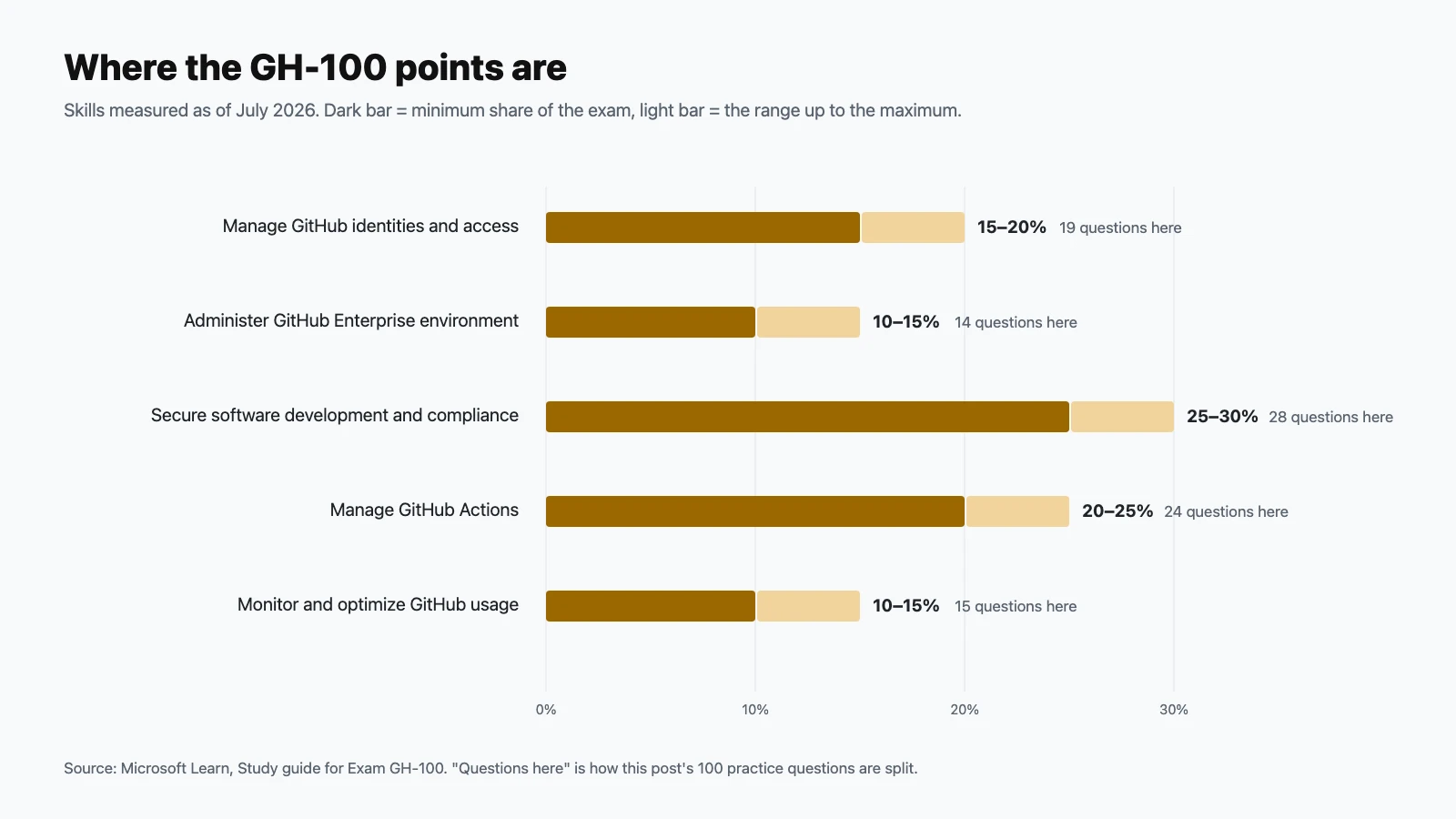
| Domain | Exam weight | Practice questions here |
|---|---|---|
| Manage GitHub identities and access | 15–20% | 19 |
| Administer GitHub Enterprise environment | 10–15% | 14 |
| Implement secure software development and compliance | 25–30% | 28 |
| Manage GitHub Actions | 20–25% | 24 |
| Monitor and optimize GitHub usage | 10–15% | 15 |
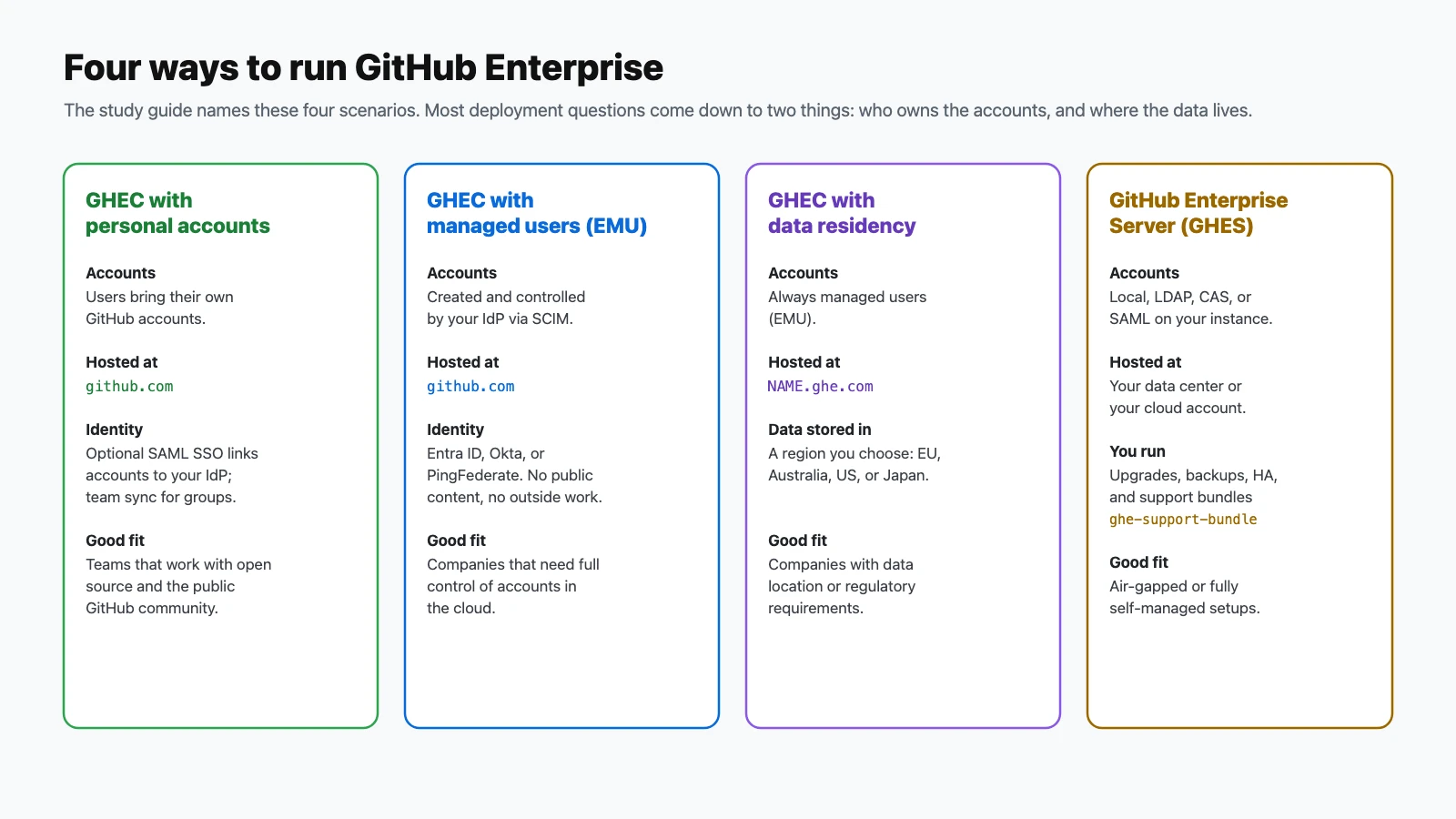
The July 2026 update rewrote every objective. Topics to make sure you cover include the four named deployment scenarios (Enterprise Cloud with managed users, with data residency plus managed users, with personal accounts, and Enterprise Server); SCIM versus team synchronization; enterprise teams; rate limits for personal access tokens and GitHub Apps; Azure private networking for hosted runners; integrating third-party secret vaults; and interpreting usage reports for metered products.
How to use these questions
Answer each question before opening its answer, and tally your misses per domain. Questions marked Choose two need both correct options. Many questions are scenarios. Ask who owns the problem (an administrator or GitHub Support), then pick the least-privilege, most centralized option; that's usually the intended answer. If you get more than about 80% right, take the official practice assessment next.
Manage GitHub identities and access (15–20%)
Questions 1–19.
-
What's the main difference between Enterprise Managed Users (EMU) and personal accounts?
Show answer
Answer: C. Personal accounts belong to the individual; managed user accounts belong to the company.
-
Which are the partner identity providers for Enterprise Managed Users?
Show answer
Answer: B. GitHub recommends using one partner IdP for both authentication and provisioning.
-
An EMU enterprise wants to use OIDC instead of SAML for authentication. Which identity provider supports that?
Show answer
Answer: D. Entra ID supports SAML or OIDC. Okta and PingFederate support SAML.
-
A company wants to use Okta for SSO and Microsoft Entra ID for SCIM provisioning with EMU. Is that supported?
Show answer
Answer: C. Use a single partner IdP for both.
-
What does SAML single sign-on do for an organization or enterprise?
Show answer
Answer: A. SSO handles sign-in. Account lifecycle is SCIM's job.
-
Why configure SAML SSO at the enterprise level rather than separately on each organization?
Show answer
Answer: D. Centralizing identity at the enterprise avoids inconsistent per-organization setups.
-
An organization starts requiring two-factor authentication. What happens to members who don't have 2FA enabled?
Show answer
Answer: B. Members and outside collaborators without 2FA lose access. Warn people before turning the requirement on.
-
What is SCIM used for?
Show answer
Answer: A. Deactivating someone in the IdP then removes their access on GitHub.
-
What does team synchronization require?
Show answer
Answer: C. Creating a group in the IdP doesn't create a team on GitHub.
-
How many identity provider groups can be connected to one team with team synchronization?
Show answer
Answer: B. Group membership is refreshed at least once every hour.
-
An enterprise uses Enterprise Managed Users. How is team membership synchronized with the identity provider?
Show answer
Answer: D. Managed-user enterprises manage team membership through SCIM.
-
Which statement about team synchronization is correct?
Show answer
Answer: C. That's the key difference from SCIM.
-
An organization enforces SAML SSO. A developer's personal access token suddenly can't reach the organization's repositories. What's the likely fix?
Show answer
Answer: A. Under SSO enforcement, personal access tokens and SSH keys must be authorized for the organization.
-
Which organization role can manage billing without access to repositories or other settings?
Show answer
Answer: D. Other organization roles include owner, member, moderator, and security manager.
-
What do an organization's base permissions control?
Show answer
Answer: B. Options are no permission, read, write, or admin. Least privilege usually means no permission or read.
-
On GitHub Enterprise Cloud, what is a custom repository role?
Show answer
Answer: A. Custom roles fill gaps between the five built-in repository roles.
-
What are enterprise teams for?
Show answer
Answer: C. They let administrators manage a group once at the enterprise level instead of in every organization.
-
You need to find out who changed a repository's access settings last week. Where do you look?
Show answer
Answer: B. The audit log records who did what, and when.
-
What advantage do rulesets have over classic branch protection rules?
Show answer
Answer: D. Rulesets make consistent governance possible at scale.
Administer GitHub Enterprise environment (10–15%)
Questions 20–33.
-
Which issue should an administrator resolve, rather than escalate to GitHub Support?
Show answer
Answer: C. Access, settings, and policies are the administrator's job. Platform bugs and outages go to GitHub Support.
-
What's the difference between a GHES diagnostic file and a support bundle?
Show answer
Answer: A. Generate them with
ghe-diagnosticsandghe-support-bundle. -
GitHub Support asks for an extended support bundle from your GHES instance. Which command creates one?
Show answer
Answer: D. A standard bundle covers the past two days of logs; an extended bundle covers eight days and requires SSH.
-
How can you send a support bundle from a GHES instance straight to GitHub Support?
Show answer
Answer: B. Direct upload needs outbound HTTPS access to GitHub's upload endpoints.
-
Where is an Enterprise Managed Users enterprise hosted when it uses GitHub Enterprise Cloud with data residency?
Show answer
Answer: A. Data residency enterprises always use Enterprise Managed Users.
-
Which regions are available for GitHub Enterprise Cloud with data residency?
Show answer
Answer: C. GitHub plans to add more regions.
-
Which deployment requires your team to handle upgrades, backups, and high availability?
Show answer
Answer: B. GHES runs in your data center or your cloud account, so you operate it.
-
A company wants employees to keep contributing to public open source projects with the same account they use at work. Which deployment fits?
Show answer
Answer: D. Managed users can't create public content or collaborate outside the enterprise.
-
Which is a sensible organization-wide standard for branching?
Show answer
Answer: C. Pair it with rulesets that require reviews and passing checks.
-
Which practice best standardizes code review across many repositories?
Show answer
Answer: A. Code owners route reviews to the right people; rulesets enforce them.
-
How is GitHub Enterprise primarily licensed?
Show answer
Answer: D. Seats cover people; metered products are billed for what you use beyond what's included.
-
A company runs both GitHub Enterprise Cloud and GitHub Enterprise Server. How should one person who uses both be counted?
Show answer
Answer: B. Syncing license usage deduplicates people who have accounts in both.
-
Where should an enterprise administrator check how many seats are consumed?
Show answer
Answer: A. Review it regularly to spot unused seats.
-
Which is a good standard for releases across an organization?
Show answer
Answer: C. Consistent tagging makes rollbacks and audits easier.
Implement secure software development and compliance (25–30%)
Questions 34–61.
-
An enterprise owner sets a policy restricting repository creation. Can an organization owner set a looser policy for their organization?
Show answer
Answer: B. Policies cascade from enterprise to organization to repository.
-
Which organization rule applies the same branch requirements to many repositories at once?
Show answer
Answer: D. Rulesets scale governance in a way per-repository branch protection can't.
-
An organization wants to stop members from creating public repositories. Where is that controlled?
Show answer
Answer: C. Enterprises can enforce this policy for all their organizations.
-
Which organization setting best supports least privilege for new members?
Show answer
Answer: A. Grant extra access through teams and roles, not defaults.
-
What does an IP allow list do?
Show answer
Answer: D. Remember to include addresses for runners and apps that need access.
-
How far back does the enterprise audit log keep events?
Show answer
Answer: B. Stream the audit log to keep events for longer.
-
Which destinations does GitHub audit log streaming support? (Choose two.)
Show answer
Answer: B and C. Supported destinations include Amazon S3, Azure Blob Storage, Azure Event Hubs, Datadog, Google Cloud Storage, and Splunk.
-
How can you query the enterprise audit log programmatically?
Show answer
Answer: C. You can also search and export it in the web interface.
-
Which feature notifies you when a dependency in a repository has a known vulnerability?
Show answer
Answer: B. Dependabot alerts rely on the dependency graph and the GitHub Advisory Database.
-
What's the difference between Dependabot security updates and version updates?
Show answer
Answer: D. Many teams turn on both.
-
What does secret scanning push protection do?
Show answer
Answer: C. Users can bypass it with a reason, which creates an alert and an audit log entry.
-
Which reasons can a user give when bypassing push protection?
Show answer
Answer: A. "I'll fix it later" leaves an open alert; the other two create closed alerts.
-
What's the quickest way to start CodeQL code scanning on a supported repository?
Show answer
Answer: D. Use advanced setup when you need custom queries or build steps.
-
What does a repository security advisory let maintainers do?
Show answer
Answer: B. Private collaboration keeps details out of public view until a fix is ready.
-
How can outside researchers report a vulnerability to you privately on GitHub?
Show answer
Answer: A. It routes reports to maintainers without public disclosure.
-
Which file tells people how to report security problems in a repository?
Show answer
Answer: C. It's shown as the security policy in the repository's Security tab.
-
A valid production API key was committed to a repository. What's the first step?
Show answer
Answer: B. Removing the commit doesn't help if the key was already copied. Rotation does.
-
Which step belongs in a security response plan?
Show answer
Answer: D. A written plan makes response consistent and fast.
-
What's the main advantage of fine-grained personal access tokens over classic ones?
Show answer
Answer: C. Classic tokens use broad scopes that apply to everything the user can access.
-
By default, what happens when a fine-grained personal access token tries to access an organization's resources?
Show answer
Answer: A. Owners can change this requirement in the organization's settings.
-
What is the default maximum lifetime organizations allow for fine-grained personal access tokens?
Show answer
Answer: D. Owners can set a shorter maximum lifetime.
-
How can an organization stop classic personal access tokens from accessing its resources?
Show answer
Answer: B. Both token types are allowed by default.
-
A member's token violates a new maximum-lifetime policy. What happens to it?
Show answer
Answer: A. Users find out when their API calls are rejected.
-
What's the primary REST API rate limit for requests authenticated with a personal access token?
Show answer
Answer: C. Unauthenticated requests get 60 per hour.
-
How does the rate limit for a GitHub App installation on an Enterprise Cloud organization compare to the standard one?
Show answer
Answer: B. Standard installation limits grow with the number of repositories and organization users.
-
Why does GitHub recommend GitHub Apps over OAuth apps for most integrations?
Show answer
Answer: D. OAuth apps use broad scopes and, by default, long-lived tokens. They're still needed for some enterprise-level resources.
-
How can an organization control which OAuth apps can access its data?
Show answer
Answer: C. Approvals keep unvetted apps from reaching organization resources.
-
An organization wants an integration that keeps working after the employee who installed it leaves. What should they use?
Show answer
Answer: A. GitHub Apps act independently of a user; tokens tied to a person stop working when the person leaves.
Manage GitHub Actions (20–25%)
Questions 62–85.
-
Which is a valid organization policy for GitHub Actions?
Show answer
Answer: D. Selected actions can include GitHub-created actions, verified creators, and specific patterns.
-
An enterprise restricts actions to enterprise-created ones. Can an organization allow all actions?
Show answer
Answer: B. Enterprise policies set the outer boundary.
-
How do other repositories in the organization get to use an action stored in a private repository?
Show answer
Answer: A. Internal and private repositories must opt in to sharing actions and workflows.
-
Where does an organization keep its workflow templates?
Show answer
Answer: C. Each template needs a matching
.properties.jsonmetadata file. -
What's the best way to make one CI pipeline the standard across the enterprise?
Show answer
Answer: B. Updating the central workflow updates every caller that follows that version.
-
What are runner groups used for?
Show answer
Answer: D. They're the access-control layer for shared runners.
-
Where do new self-hosted runners go if you don't choose a group?
Show answer
Answer: C. Restrict the Default group or create dedicated groups.
-
What's a key operational difference between GitHub-hosted and self-hosted runners?
Show answer
Answer: A. Self-hosted runners mean you own patching, tooling, and cleanup.
-
Which hosted runners can you place in your own Azure Virtual Network with Azure private networking?
Show answer
Answer: D. Azure private networking works with larger Ubuntu and Windows runners, not standard runners.
-
What does Azure private networking for hosted runners make possible?
Show answer
Answer: B. GitHub still manages the runners; you control the networking.
-
Your organization's IP allow list blocks GitHub-hosted runners. What's a supported approach?
Show answer
Answer: A. Standard hosted runners use shared, changing IP ranges.
-
What network access does a self-hosted runner need?
Show answer
Answer: C. The runner polls GitHub for jobs.
-
Which labels does a self-hosted runner get automatically?
Show answer
Answer: B. Add custom labels for special hardware.
-
What do ephemeral self-hosted runners do?
Show answer
Answer: D. They're a common hardening pattern, often combined with autoscaling.
-
Which GitHub-maintained project autoscales self-hosted runners on Kubernetes?
Show answer
Answer: C. ARC scales runner pods with demand.
-
A self-hosted runner shows as offline. What should you check?
Show answer
Answer: A. Most problems are a stopped service, the network, or an expired registration.
-
Jobs wait a long time in the queue for self-hosted runners. What's the most direct fix?
Show answer
Answer: D. Queue time is a capacity or label-matching problem.
-
Why shouldn't you attach self-hosted runners to public repositories?
Show answer
Answer: B. Keep self-hosted runners on private repositories, or isolate them carefully.
-
A secret named
TOKENexists at the organization, repository, and environment levels. Which value does a job using that environment get?Show answer
Answer: A. The most specific level wins.
-
Which repository access options does an organization secret offer?
Show answer
Answer: C. Selected repositories is the least-privilege option.
-
How can workflows use secrets stored in a third-party vault such as HashiCorp Vault without storing long-lived credentials in GitHub?
Show answer
Answer: B. OIDC lets the vault trust a short-lived token issued for the job.
-
Are repository secrets available to workflows triggered by pull requests from forks?
Show answer
Answer: D. This stops untrusted code from exfiltrating secrets.
-
Which command sets an organization secret that only two repositories can use?
Show answer
Answer: C.
--orgtargets the organization;--reposlimits which repositories can use it. -
What's the
GITHUB_TOKENAPI rate limit in GitHub Actions?Show answer
Answer: A. Heavy API automation may need a GitHub App instead.
Monitor and optimize GitHub usage (10–15%)
Questions 86–100.
-
A repository was deleted yesterday and leadership wants to know who did it. Where's the fastest place to look?
Show answer
Answer: D. Filter the audit log by action and repository.
-
Your compliance team needs audit events kept for longer than 180 days. What should you do?
Show answer
Answer: B. Streaming sends events to destinations such as Splunk, Datadog, Azure Event Hubs, or Amazon S3.
-
An integration keeps getting rate-limited. How can it check its remaining API budget?
Show answer
Answer: A. Well-behaved integrations back off before they hit the limit.
-
GitHub.com is down for everyone. Who resolves it?
Show answer
Answer: C. Platform incidents are GitHub's responsibility.
-
Before opening a GHES support ticket about slow performance, what should you gather?
Show answer
Answer: B. Bundles let Support investigate without back-and-forth.
-
How can a GHES administrator find users who haven't been active recently?
Show answer
Answer: D. Suspending or removing dormant users frees licenses.
-
Which metric best shows whether a newly rolled-out feature, such as Codespaces, is being adopted?
Show answer
Answer: C. Compare actual usage with what you pay for.
-
Where do you find detailed usage for metered products such as Actions minutes and storage?
Show answer
Answer: A. Usage reports break costs down by organization and repository.
-
Which change reduces GitHub Actions spend without slowing teams down?
Show answer
Answer: D. Most waste comes from repeated work and runs nobody needs.
-
Artifact storage costs keep growing. What helps most?
Show answer
Answer: B. Retention can be set at the repository, organization, and enterprise level.
-
How can you cut wasted Copilot spending in a large organization?
Show answer
Answer: A.
GET /orgs/{org}/copilot/billing/seatslists seats and their activity. -
Which settings help control Codespaces costs?
Show answer
Answer: C. Idle codespaces and oversized machines are the usual drivers.
-
How can an enterprise avoid surprise bills from metered products?
Show answer
Answer: B. Budgets make overspending visible before the invoice arrives.
-
Package storage keeps growing with old container images. What's the best fix?
Show answer
Answer: D. Cleanup policies keep storage proportional to what's actually used.
-
Several organizations have seats assigned to people who left the company months ago. What would have prevented it?
Show answer
Answer: C. Automated deprovisioning keeps license counts honest.
Final tips for exam day
- Security and compliance is the biggest domain, at 25–30%. Know policy inheritance, rulesets, audit logging, token policies, and GitHub Apps versus OAuth apps.
- Learn the numbers: API rate limits of 60 per hour unauthenticated, 5,000 with a token, and 5,000 to 12,500 for GitHub App installations (15,000 on Enterprise Cloud);
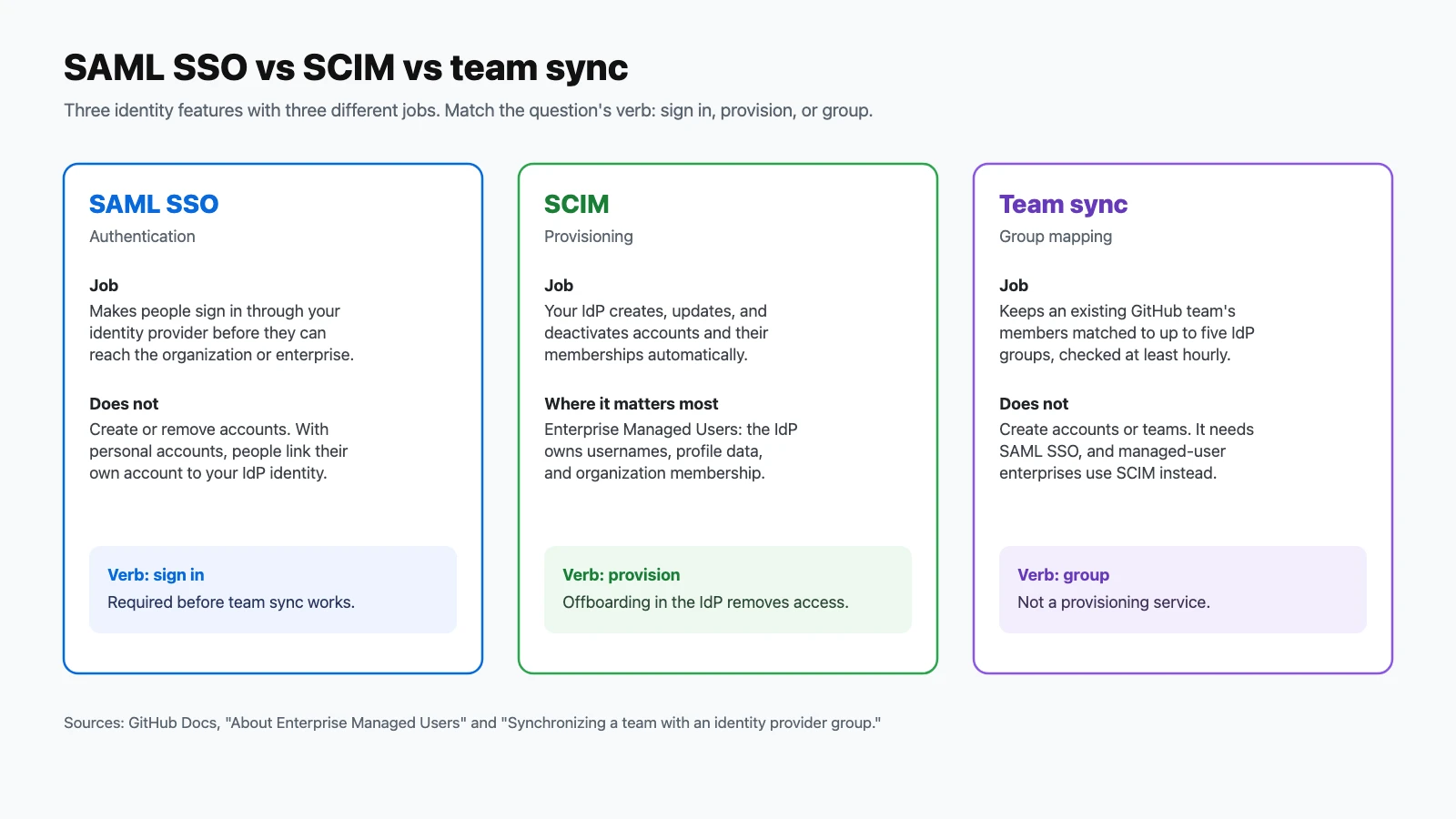
GITHUB_TOKENat 1,000 per hour per repository (15,000 on Enterprise Cloud); 180 days of audit log, but only 7 days of Git events; and a 366-day default maximum lifetime for fine-grained tokens. - Keep the identity trio straight: SAML SSO signs people in, SCIM provisions accounts, and team sync maps groups to teams. Managed-user enterprises use SCIM rather than team sync.
- Know who fixes what. Access, settings, and policies are the administrator's job; platform bugs and outages are GitHub Support's, ideally with a support bundle attached.
- Remember the networking rules: Azure private networking and static IP addresses come with larger runners, not standard ones.
Official resources
- GitHub Administration certification page (Microsoft Learn): scheduling, the free practice assessment, and exam policies.
- Exam GH-100 study guide: the official skills list and change log.
- GitHub Administration learning path, part 1: free self-paced training, with a part 2 linked from the study guide.
- GitHub Enterprise administration documentation: the source of truth for every feature in these questions.
Preparing for more GitHub certifications? See the practice guides for GitHub Foundations (GH-900), GitHub Actions (GH-200), and GitHub Copilot (GH-300).