The GitHub Advanced Security certification (exam GH-500) checks that you can secure code, secrets, and dependencies on GitHub: configuring Secret Protection, supply chain security, and Code Security; triaging and fixing alerts; and rolling all of it out across an organization or enterprise with policies and automation. It's an intermediate-level exam for developers, DevOps engineers, security engineers, and administrators.
This guide covers the exam as of its July 2026 skills update, then gives you 100 original practice questions weighted like the real exam. Each one hides its answer and an explanation until you open it. Product names, defaults, and limits here were checked against GitHub's documentation in October 2026. The questions are written for practice; they aren't taken from the real exam.
The exam at a glance
- Exam code: GH-500, for the GitHub Advanced Security certification. Level: intermediate.
- Time: 100 minutes. If the exam isn't offered in your language, you can request 30 extra minutes.
- Passing score: 700 or higher.
- Delivery: proctored, scheduled through Pearson VUE from the Microsoft Learn certification page. Price depends on the country where you take it.
- Languages: English, Spanish, Portuguese (Brazil), Korean, and Japanese.
- Retakes: you can retake 24 hours after a first failed attempt; later retakes have longer waits.
- Validity: 2 years. GitHub is moving its certifications to Microsoft's recertification process, and certifications that expire before that's in place are being extended by 6 months.
- Free extras: an official practice assessment and an exam sandbox that shows the real question interface.
Microsoft doesn't publish a fixed number of questions. Check the official pages linked at the end before you book, since details change.
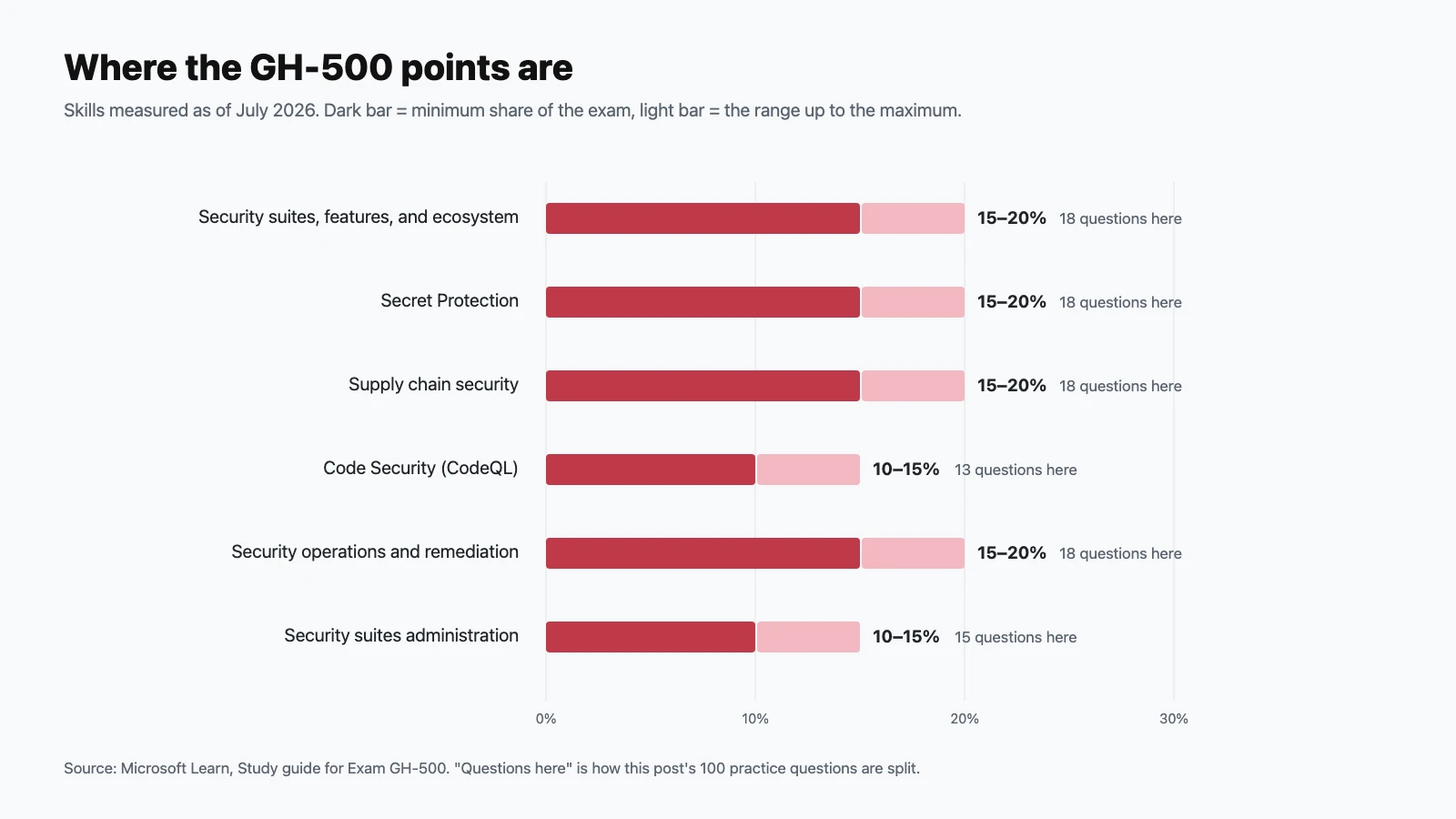
The six domains and their weights
| Domain | Exam weight | Practice questions here |
|---|---|---|
| Describe GitHub security suites, features, and ecosystem | 15–20% | 18 |
| Configure and use Secret Protection | 15–20% | 18 |
| Configure and use supply chain security | 15–20% | 18 |
| Configure and use Code Security | 10–15% | 13 |
| Security operations: best practices, prioritization, and remediation | 15–20% | 18 |
| GitHub security suites administration | 10–15% | 15 |
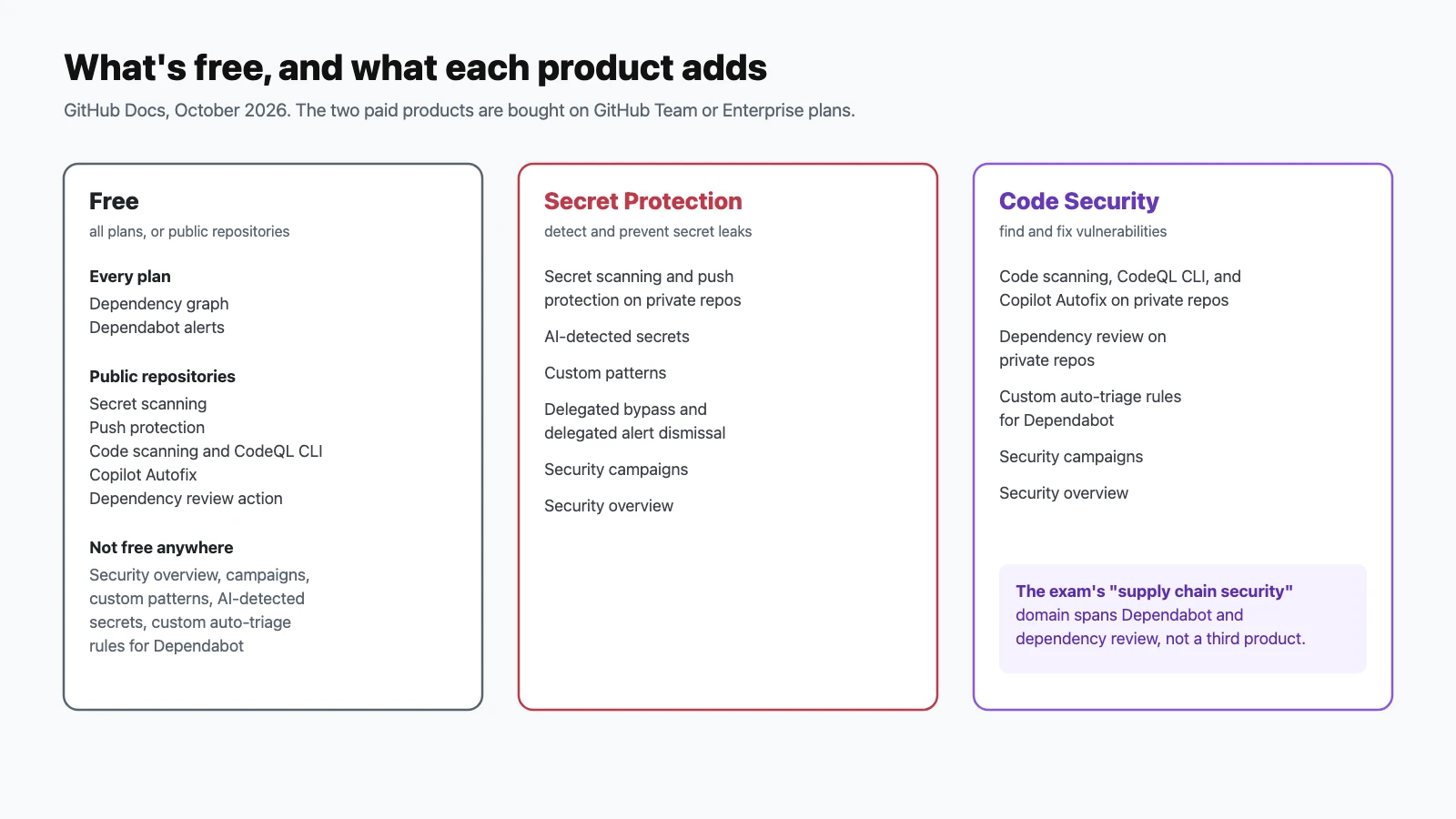
The July 2026 update rewrote every objective and renamed the domains to match GitHub's current products: Secret Protection (formerly secret scanning), supply chain security (formerly Dependabot and dependency review), and Code Security (formerly code scanning with CodeQL). One thing worth knowing: GitHub's documentation lists only two paid products, GitHub Secret Protection and GitHub Code Security. "Supply chain security" is an exam domain covering Dependabot and dependency review, not a third product you buy. New or expanded topics include security campaigns, delegated bypass and delegated dismissal, validity checks, EPSS-based prioritization, SBOM export, auto-triage rules, and security configurations for rollout at scale.
How to use these questions
Answer each question before opening its answer, and tally your misses per domain. Questions marked Choose two need both correct options. When a scenario asks for the best approach, favor the control that prevents the problem earliest and the role with the least privilege; that's usually the intended answer. If you get more than about 80% right, take the official practice assessment next.
Describe GitHub security suites, features, and ecosystem (15–20%)
Questions 1–18.
-
Which two paid products make up GitHub Advanced Security as of 2026?
Show answer
Answer: C. GitHub sells Secret Protection and Code Security as separate products. The exam's "supply chain security" domain covers Dependabot and dependency review rather than a third product.
-
Which GitHub plans can purchase Secret Protection or Code Security?
Show answer
Answer: B. You must be on a Team or Enterprise plan to buy either product.
-
Which features are available free on public repositories? (Choose two.)
Show answer
Answer: A and B. Public repositories also get the CodeQL CLI and Copilot Autofix. Security overview and custom patterns need a paid product.
-
Which two supply chain features are included in every plan?
Show answer
Answer: C. Dependency review on private repositories and custom auto-triage rules need Code Security.
-
What is security overview for?
Show answer
Answer: A. It's the organization-level view for finding where alerts and gaps concentrate. It requires a paid security product.
-
Custom secret patterns and AI-detected secrets belong to which product?
Show answer
Answer: D. Secret Protection also includes delegated bypass, delegated alert dismissal, security campaigns, and security overview.
-
Copilot Autofix, custom Dependabot auto-triage rules, and dependency review on private repositories belong to which product?
Show answer
Answer: B. Code Security covers finding and fixing vulnerabilities in code and dependencies.
-
What's the core idea of a prevention-first security strategy?
Show answer
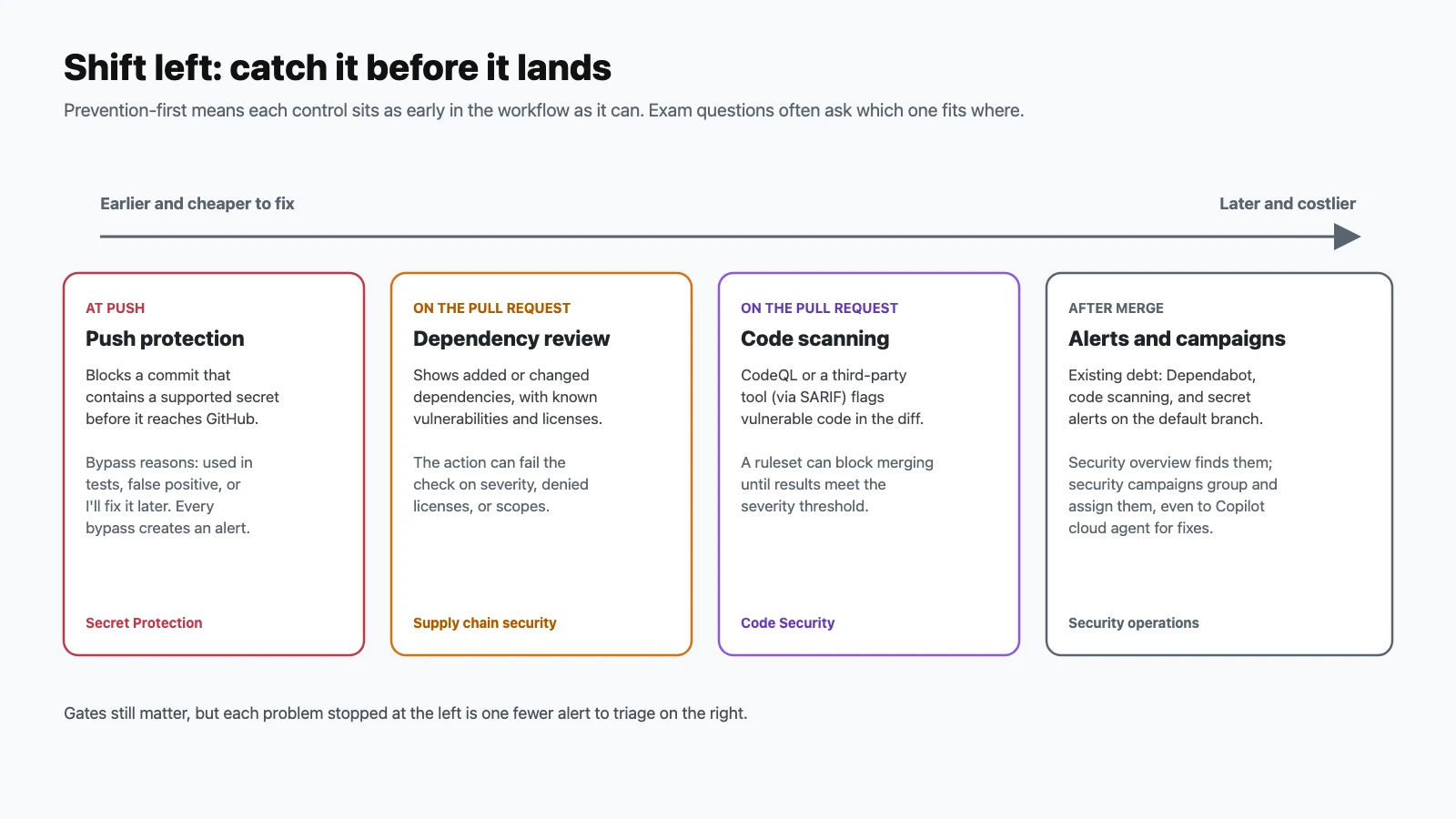
Answer: A. Gates such as merge rules still matter, but each issue prevented early is one fewer alert to triage.
-
What are security campaigns for?
Show answer
Answer: C. Campaigns can cover code scanning alerts and exposed secrets, with assigned owners and remediation targets.
-
In a shift-left SDLC on GitHub, which control acts earliest?
Show answer
Answer: B. Push protection blocks secrets before they reach the repository. Dependency review and code scanning act on pull requests; alerts and campaigns deal with what's already merged.
-
What does Dependabot use to decide that a dependency is vulnerable?
Show answer
Answer: D. Alerts are created when a new advisory is added or when the dependency graph changes. Only advisories reviewed by GitHub trigger alerts.
-
How does secret scanning differ from code scanning?
Show answer
Answer: C. That split is why they're sold as different products: Secret Protection and Code Security.
-
What's a good practice when dismissing a code scanning alert?
Show answer
Answer: A. The reason can affect future analysis, and the comment is kept in the alert's timeline.
-
Who is typically responsible for what in alert remediation?
Show answer
Answer: D. Shared ownership is a core theme of the exam.
-
What does delegated bypass mean for push protection?
Show answer
Answer: B. It turns bypassing into a reviewed request instead of a self-service choice.
-
Why does supply chain security look at lock files, not just manifests?
Show answer
Answer: A. Dependency review shows changes to indirect dependencies from lock files too.
-
When delegated alert dismissal is turned on, who can approve a dismissal request?
Show answer
Answer: C. People with write access must request dismissal instead of dismissing directly.
-
Which statement about repository visibility and security features is correct?
Show answer
Answer: B. That difference is a favorite exam topic, so learn which features are free on public repositories.
Configure and use Secret Protection (15–20%)
Questions 19–36.
-
Where can push protection block a secret? (Choose two.)
Show answer
Answer: A and D. It also covers REST API requests and, on public repositories, GitHub MCP server interactions.
-
A developer's push is blocked by push protection. Which bypass reasons can they choose?
Show answer
Answer: C. If delegated bypass is enabled, they submit a request instead of bypassing directly.
-
A developer bypasses push protection choosing "I'll fix it later". What happens?
Show answer
Answer: A. Bypasses for "used in tests" or "false positive" create closed alerts instead. Every bypass is audited.
-
Is push protection for users on by default?
Show answer
Answer: D. It's separate from repository-level push protection, which admins configure.
-
What does a secret's validity status of "active" mean?
Show answer
Answer: B. Other statuses are "inactive" and "possibly active" (
unknown), used when the token can't be verified or isn't supported. -
Which tokens get validity checks by default?
Show answer
Answer: A. You can also run an on-demand check with the Verify secret button.
-
A secret scanning alert shows an exposed cloud key that's still active. What should you do first?
Show answer
Answer: C. Once exposed, a secret must be treated as compromised. Removing it from code doesn't make it safe.
-
You remove a leaked token from the repository. What happens to its secret scanning alert?
Show answer
Answer: B. Secret scanning doesn't automatically close alerts when the token is removed.
-
Which are valid reasons for closing a secret scanning alert? (Choose two.)
Show answer
Answer: C and D. The other reasons are false positive and won't fix.
-
How do you stop secret scanning from alerting on a
docs/folder full of sample keys?Show answer
Answer: C. Alerts in excluded paths are closed as "ignored by configuration", and those paths are also excluded from push protection.
-
What are the limits of
paths-ignoreinsecret_scanning.yml?Show answer
Answer: A. Keep exclusions tight. Every excluded path is a place leaks can hide.
-
Your company has an internal API key format that GitHub doesn't recognize. What should you use?
Show answer
Answer: D. Custom patterns can be defined at the repository, organization, or enterprise level, with Secret Protection.
-
What do AI-detected secrets add?
Show answer
Answer: B. Provider patterns match known token formats; AI detection catches the more generic secrets they miss.
-
Can a ruleset stop a pull request from merging while it has an open secret scanning alert?
Show answer
Answer: A. After the secret is fixed and the alert closed, merging is unblocked once a scan of the pull request's head commit completes.
-
An alert shows a secret as "inactive". Is the job done?
Show answer
Answer: C. An inactive secret can't be used now, but it may have been used before it was revoked.
-
Who is notified when someone bypasses push protection?
Show answer
Answer: B. Bypasses also appear in the audit log.
-
What does Secret Protection add for private repositories?
Show answer
Answer: D. On public repositories, secret scanning and push protection are already free.
-
At which levels can Secret Protection be enabled?
Show answer
Answer: C. Security configurations make enabling it consistent across many repositories.
Configure and use supply chain security (15–20%)
Questions 37–54.
-
Which two events create new Dependabot alerts?
Show answer
Answer: A. Only advisories reviewed by GitHub trigger alerts.
-
Where does the dependency graph get its data?
Show answer
Answer: D. It's the foundation for Dependabot alerts, dependency review, and SBOM export.
-
In which format does GitHub export a repository's SBOM?
Show answer
Answer: B. Export it from the Dependencies tab with Export SBOM, or through the REST API. SARIF is the format for code scanning results.
-
What does an exported SBOM not include?
Show answer
Answer: A. An SBOM inventories what your project uses, not who uses your project.
-
What's the difference between Dependabot security updates and version updates?
Show answer
Answer: C. Version updates are configured in
.github/dependabot.yml. -
How can you reduce the number of separate Dependabot pull requests?
Show answer
Answer: B. Grouping cuts review noise without stopping updates.
-
What does the GitHub preset rule "Dismiss low impact issues for development-scoped dependencies" do, and where is it on by default?
Show answer
Answer: D. Preset rules are curated by GitHub and available for all repositories.
-
The "Dismiss package malware alerts" preset is turned on. What's the risk?
Show answer
Answer: C. It's meant for internal packages that share a name with a malicious public one, and it's off by default.
-
Why do auto-triage rules reduce notification noise?
Show answer
Answer: A. Custom rules can target severity, package name, CWE, and more, with Code Security.
-
What does dependency review show on a pull request?
Show answer
Answer: D. It lets reviewers catch a risky dependency before it's merged.
-
In the dependency review action, what does
fail-on-severity: highdo?Show answer
Answer: B. Use it with a required check or ruleset so a failing review blocks the merge.
-
You configure the dependency review action with both
allow-licensesanddeny-licenses. What's the problem?Show answer
Answer: A. Pick an allow list or a deny list, not both.
-
What does
fail-on-scopeslet you control in the dependency review action?Show answer
Answer: C. For example, you might fail only on runtime dependencies.
-
Several repositories should share one dependency review policy. What's the cleanest approach?
Show answer
Answer: B. The
config-fileinput can reference a file in another repository. -
Where is the dependency review action available?
Show answer
Answer: D. That makes it one of the free shift-left controls for open source.
-
What does an EPSS score estimate for a vulnerability?
Show answer
Answer: C. EPSS adds exploitation likelihood to severity, which helps you prioritize which alerts to fix first.
-
Which file configures Dependabot version updates?
Show answer
Answer: A. It lists package ecosystems, directories, schedules, and options such as groups.
-
Why can't a reviewer rely on the manifest diff alone when a pull request updates one dependency?
Show answer
Answer: D. Dependency review covers indirect dependency changes in lock files for exactly this reason.
Configure and use Code Security (10–15%)
Questions 55–67.
-
For a team new to code scanning, which setup does GitHub recommend starting with?
Show answer
Answer: B. Advanced setup takes more effort to configure and maintain.
-
Which three query suites are built in to CodeQL?
Show answer
Answer: A.
defaultandsecurity-extendedare available with default setup for every supported language. -
What do you gain and give up with the
security-extendedsuite instead ofdefault?Show answer
Answer: C.
defaultis tuned for the most relevant issues with minimal false positives. -
Your organization uses a third-party static analysis tool. How do its findings appear as code scanning alerts?
Show answer
Answer: B. GitHub parses the SARIF results and shows them alongside CodeQL alerts.
-
Which methods can upload a SARIF file? (Choose two.)
Show answer
Answer: A and C. Pick the method that matches where your SARIF file is generated.
-
Which SARIF version does GitHub code scanning support?
Show answer
Answer: C. GitHub supports a subset of SARIF 2.1.0.
-
Your builds run in Jenkins, not GitHub Actions. How do you run CodeQL?
Show answer
Answer: A. Code scanning works with GitHub Actions or with external CI systems.
-
In an advanced setup workflow, how do you analyze several languages efficiently?
Show answer
Answer: D. Matrix builds are explicitly part of the exam's skills list.
-
What happens when you dismiss a code scanning alert?
Show answer
Answer: B. Add a dismissal comment to keep a record of the reasoning.
-
Which are valid code scanning dismissal reasons? (Choose two.)
Show answer
Answer: B and C. The third reason is won't fix. The reason you choose can affect whether a query keeps being used in future analysis.
-
What does Copilot Autofix do for code scanning?
Show answer
Answer: C. It's free on public repositories and part of Code Security for private ones.
-
A CodeQL alert shows data flow steps. What do they tell you?
Show answer
Answer: B. Following the path shows where to add validation or sanitization.
-
When should code scanning typically run?
Show answer
Answer: D. Scheduled scans catch problems found by updated queries even when the code hasn't changed.
Security operations: best practices, prioritization, and remediation (15–20%)
Questions 68–85.
-
What's the difference between a CVE and a CWE?
Show answer
Answer: C. Alerts often show both: the specific issue (CVE) and the kind of mistake behind it (CWE).
-
What is a GHSA ID?
Show answer
Answer: A. GitHub advisories can also reference CVE IDs.
-
Your public project has a vulnerability. What's the repository security advisory workflow?
Show answer
Answer: D. Private collaboration avoids exposing the vulnerability before a fix exists.
-
What does private vulnerability reporting allow?
Show answer
Answer: B. It replaces ad-hoc emails and public issues with a private channel.
-
A code scanning ruleset blocks a pull request. Which are valid reasons? (Choose two.)
Show answer
Answer: B and D. A third reason: a required tool isn't configured for the repository.
-
Code scanning merge protection with rulesets does not apply to which of these?
Show answer
Answer: C. Also, every line identified by an alert must exist in the pull request diff.
-
At which levels can you configure code scanning merge protection with rulesets?
Show answer
Answer: B. Rulesets on public repositories are available on Free plans too.
-
In a security campaign, who can alerts be assigned to?
Show answer
Answer: D. Assignment makes ownership clear and lets automation draft fixes.
-
You need to triage thousands of alerts across 300 repositories. What's the best starting point?
Show answer
Answer: C. Overview finds the hotspots; campaigns organize the fix-up work.
-
With delegated alert dismissal enabled, what must a developer with write access do to dismiss an alert?
Show answer
Answer: A. Reviewers are notified by email, and requesters are told the outcome.
-
A team lead isn't an owner or security manager but should review dismissal requests. What's the right approach?
Show answer
Answer: D. Custom roles keep this least-privilege instead of granting full ownership.
-
Why record a comment when dismissing an alert?
Show answer
Answer: B. You can also read or set it through the REST API (
dismissed_comment). -
How can you tailor CodeQL detection to your organization's risk profile?
Show answer
Answer: A. Organization owners and security managers can also recommend a query suite for default setup.
-
Who can recommend a CodeQL query suite for default setup across an organization?
Show answer
Answer: C. That keeps scanning depth consistent across repositories.
-
Which alerts should you usually fix first?
Show answer
Answer: B. Combine severity, exploitability (for example EPSS), and exposure, such as a secret's validity status.
-
What's the earliest preventive control for leaked credentials?
Show answer
Answer: D. Prevent the leak, and there's nothing to rotate or remediate later.
-
Which dependency control works before a vulnerable package is merged?
Show answer
Answer: C. Dependabot alerts cover what's already in the default branch.
-
What's the main benefit of applying policies through rulesets instead of relying on people to remember checks?
Show answer
Answer: A. Governance through rulesets and policies scales where reminders don't.
GitHub security suites administration (10–15%)
Questions 86–100.
-
What is a security configuration?
Show answer
Answer: D. Applying one puts each repository into a managed relationship with that configuration.
-
What does GitHub offer to help you secure an organization quickly without designing settings yourself?
Show answer
Answer: B. You can also create custom security configurations.
-
What's the difference between security configurations and global settings?
Show answer
Answer: A. GitHub recommends using both together.
-
What does enforcing a security configuration prevent?
Show answer
Answer: C. On an unenforced configuration, a repository admin can override a setting, which changes the repository's configuration status.
-
Which permissions does the security manager role grant? (Choose two.)
Show answer
Answer: C and D. It's designed to grant only what's needed to manage security features.
-
Who can assign the security manager role?
Show answer
Answer: D. The role can be given to members or to whole teams.
-
On GitHub Enterprise Server, what must an administrator do before users can see their dependencies?
Show answer
Answer: C. Dependabot alerts and updates are enabled separately, and vulnerability data from the GitHub Advisory Database is synced to the server.
-
How do GitHub Enterprise Server instances get vulnerability data for Dependabot alerts?
Show answer
Answer: A. Administrators can view the data and trigger a manual sync.
-
Your security team wants new repositories to get the right security features automatically. What do you use?
Show answer
Answer: D. Defaults close coverage gaps before anyone has to remember to enable features.
-
A security configuration that enables default setup didn't take effect on one repository. What's a likely cause?
Show answer
Answer: B. Repositories using advanced setup keep it, so resolve that before expecting the configuration to apply.
-
Which tool is best for turning on security features across hundreds of repositories through automation?
Show answer
Answer: A. The exam expects you to know that large-scale enablement and governance are API-driven.
-
How do you give a group of people the ability to review push protection bypass requests without making them owners?
Show answer
Answer: C. Delegated bypass decides who can bypass and who approves requests.
-
An enterprise wants the same policies everywhere, with tightly controlled exceptions. What fits best?
Show answer
Answer: B. Define enforcement boundaries centrally, and make every exception explicit and audited.
-
Which role is best for a developer who should fix alerts in their team's repositories but not change security settings?
Show answer
Answer: D. Keep configuration rights with owners and security managers; give developers what they need to remediate.
-
Before rolling security features out across an entire enterprise, what's a recommended step?
Show answer
Answer: C. Piloting finds noisy settings and workflow issues before they hit everyone.
Final tips for exam day
- Know what's free and what each product adds. Public repositories get secret scanning, push protection, code scanning, Copilot Autofix, and the dependency review action; every plan gets the dependency graph and Dependabot alerts. Security overview, campaigns, custom patterns, and custom auto-triage rules need a paid product.
- Memorize the lists: push protection's three bypass reasons, secret alert close reasons (revoked, false positive, used in tests, won't fix), code scanning dismissal reasons (false positive, used in tests, won't fix), validity statuses, and the three built-in CodeQL query suites.
- Know the exact files and limits:
.github/secret_scanning.ymlwithpaths-ignore(first 1,000 entries, 1 MB limit),.github/dependabot.ymlwithgroups, SARIF 2.1.0, and SBOMs in SPDX. - Know who does what: security managers read all repositories and manage all alerts; owners and security managers approve delegated dismissals; delegated bypass reviewers approve push protection exceptions.
- Prefer prevention: push protection, dependency review, and code scanning on pull requests come before alerts and campaigns. Exam scenarios reward the earliest effective control.
Official resources
- GitHub Advanced Security certification page (Microsoft Learn): scheduling, the free practice assessment, and exam policies.
- Exam GH-500 study guide: the official skills list and change log.
- GitHub Advanced Security, part 1 and part 2: free self-paced training.
- GitHub security documentation: the source of truth for every feature in these questions.
Preparing for more GitHub certifications? See the GitHub Foundations (GH-900), GitHub Actions (GH-200), and GitHub Copilot (GH-300) practice guides.